
Mac Pro, Apple has finally completed the transition to Apple silicon across the entire Mac lineup. Over the past decade, Apple has only released three new Mac Pros and the latest version starts at $6,999 – the highest starting price of any ‌Mac Pro‌ model to date – making it all the more important to consider if now is a good time to upgrade or even if an older model will suffice for your needs.
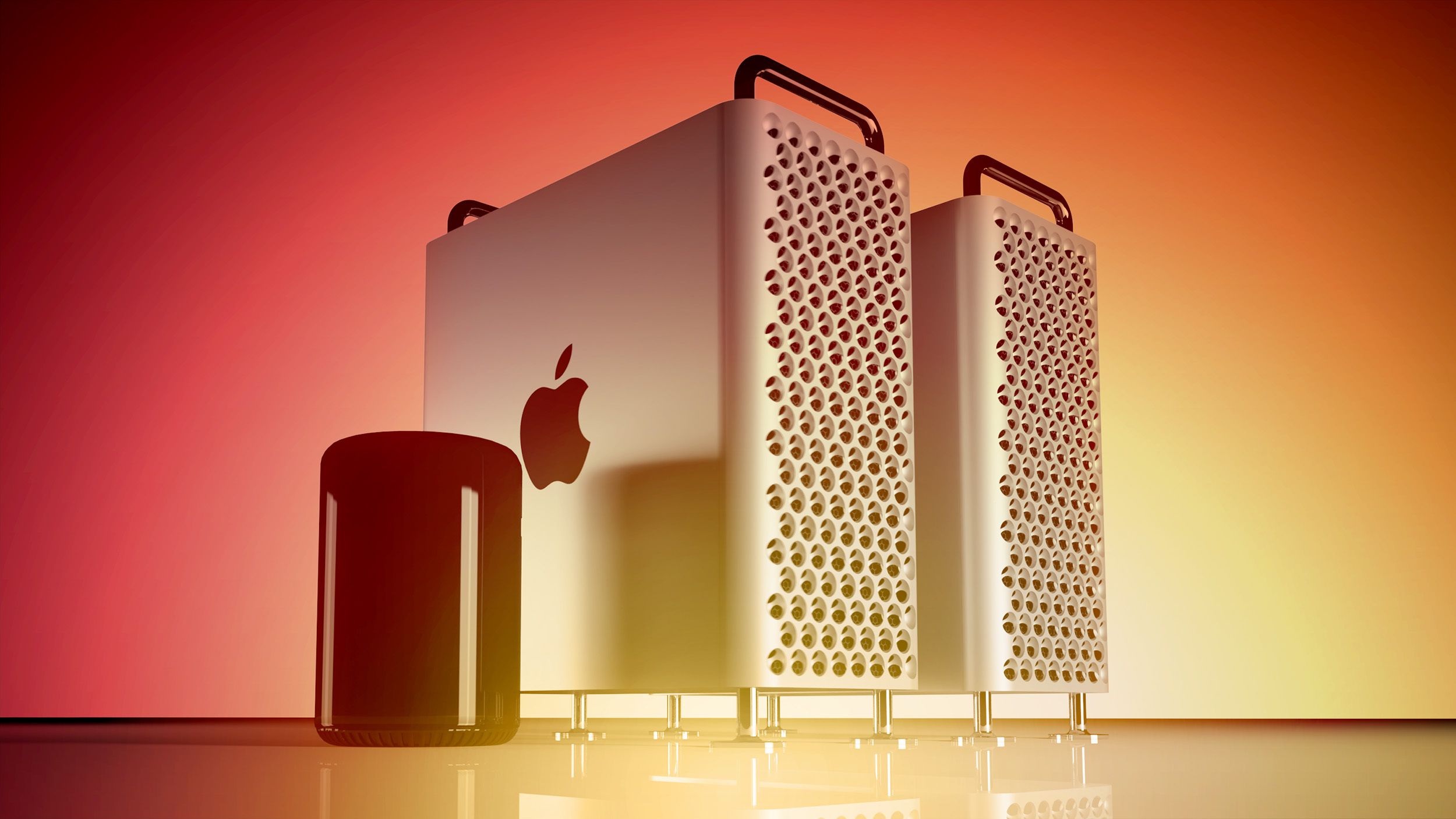

The 2023 Mac Pro is the first of its kind to feature Apple silicon and all previous models had Intel processors. While the machine loses support for eGPUs, it is around twice as powerful as the previous top-tier ‌Mac Pro‌ while maintaining a mostly modular design with seven PCIe slots. Even so, some first-time ‌Mac Pro‌ customers or users of the 2013 model may be able to obtain a 2019 ‌Mac Pro‌ second-hand or from a third-party retailer for a substantially lower price, so it will be important to weigh up exactly what was added with each new version of the machine.

See the breakdown below for each new feature, change, and improvement that was added with each ‌Mac Pro‌ compared to its direct predecessor:

Mac Pro (Apple silicon Tower, 2023)


Mac Pro (Intel Tower, 2019)


Mac Pro (Intel Cylinder, 2013)


Upgrade to the 2023 Mac Pro?


In most workflows, the ‌M2‌ Ultra chip should offer a massive performance improvement over the Intel Xeon W processors offered in the 2019 ‌Mac Pro‌, especially in CPU-intensive tasks. Early benchmarks indicate that it delivers around two-times faster overall CPU performance than the fastest Intel-based ‌Mac Pro‌ with a 28-core Xeon W processor.

For machine learning processes, the 2023 ‌Mac Pro‌ has a significant advantage with the ‌M2‌ Ultra's 32-core Neural Engine. Likewise, its dedicated media engine offers considerable benefits in video editing workflows.

The new ‌Mac Pro‌ can support 8K external displays for the first time. It also has newer Wi-Fi and Bluetooth specifications, as well as two USB-A ports and support for high-impedance headphones.

If you're looking for a high-end, future-proof machine that harnesses the best available performance with Apple silicon, as well as its more modern specifications, it will be worth opting for the new ‌Mac Pro‌.

...Or Stick With the 2019 Mac Pro?


Not all 2013 or 2019 ‌Mac Pro‌ users should upgrade to the 2023 model. Most notably, the 2019 ‌Mac Pro‌ features an Intel chip. While support for Apple silicon is now much better in professional workflows than it was upon its launch in 2020, some niche applications and legacy software may still work better on an Intel architecture. Likewise, some users may wish to dual-boot Windows via Boot Camp and this is not possible on the new ‌Mac Pro‌.

If you require support for external graphics cards, only Intel-based Macs can support this. This means the new ‌Mac Pro‌'s PCIe slots are only useful for things like digital signal processing (DSP) cards, serial digital interface (SDI) I/O cards, additional networking, and built-in storage, so if you need eGPUs, the 2019 ‌Mac Pro‌ is still your best option.

The new ‌Mac Pro‌ maxes out at 192GB of memory. The previous model supported almost eight times this amount, so if you need vast amounts of memory, the 2019 model is still better for your purposes. Similarly, the 2019 model's memory is user-upgradeable. The 2019 ‌Mac Pro‌ supports four more 4K displays than the 2023 model and it also has four more Thunderbolt ports, which may be important considerations for some users.

Hence, for the right price, the 2019 ‌Mac Pro‌ may still be better for some users. That being said, it is important to bear in mind that Apple has now moved away from Intel-based machines entirely. At some point in the future, Intel-based Macs are likely to lose support for the latest version of macOS, so if you are a user that specifically needs 2019 ‌Mac Pro‌ features like eGPU support or an Intel architecture, the 2019 ‌Mac Pro‌ may only be able to help out for so long and it may be important to look at bigger changes to support your workflow in the long term.


The 2013 ‌Mac Pro‌ only supports updates up to macOS 12 Monterey, meaning it misses out on all of the new features added in macOS Ventura and macOS Sonoma. Those still using the 2013 ‌Mac Pro‌ should definitely consider upgrading, and both the 2019 or 2023 ‌Mac Pro‌ models are viable options. Alternatively, if you have got used to the 2013 ‌Mac Pro‌'s lack of PCIe slots and reliance on wired peripherals, the Mac Studio may be a better option, starting at just $1,999.
Related Roundup: Mac Pro
Buyer's Guide: Mac Pro (Buy Now)
Related Forum: Mac Pro

This article, "Mac Pro Buyer's Guide: Comparing the Generations" first appeared on MacRumors.com

Discuss this article in our forums

Mac Pro, Apple has finally completed the transition to Apple silicon across the entire Mac lineup. Over the past decade, Apple has only released three new Mac Pros and the latest version starts at $6,999 – the highest starting price of any ‌Mac Pro‌ model to date – making it all the more important to consider if now is a good time to upgrade or even if an older model will suffice for your needs.


The 2023 Mac Pro is the first of its kind to feature Apple silicon and all previous models had Intel processors. While the machine loses support for eGPUs, it is around twice as powerful as the previous top-tier ‌Mac Pro‌ while maintaining a mostly modular design with seven PCIe slots. Even so, some first-time ‌Mac Pro‌ customers or users of the 2013 model may be able to obtain a 2019 ‌Mac Pro‌ second-hand or from a third-party retailer for a substantially lower price, so it will be important to weigh up exactly what was added with each new version of the machine.

See the breakdown below for each new feature, change, and improvement that was added with each ‌Mac Pro‌ compared to its direct predecessor:

Mac Pro (Apple silicon Tower, 2023)


Mac Pro (Intel Tower, 2019)


Mac Pro (Intel Cylinder, 2013)


Upgrade to the 2023 Mac Pro?


In most workflows, the ‌M2‌ Ultra chip should offer a massive performance improvement over the Intel Xeon W processors offered in the 2019 ‌Mac Pro‌, especially in CPU-intensive tasks. Early benchmarks indicate that it delivers around two-times faster overall CPU performance than the fastest Intel-based ‌Mac Pro‌ with a 28-core Xeon W processor.

For machine learning processes, the 2023 ‌Mac Pro‌ has a significant advantage with the ‌M2‌ Ultra's 32-core Neural Engine. Likewise, its dedicated media engine offers considerable benefits in video editing workflows.

The new ‌Mac Pro‌ can support 8K external displays for the first time. It also has newer Wi-Fi and Bluetooth specifications, as well as two USB-A ports and support for high-impedance headphones.

If you're looking for a high-end, future-proof machine that harnesses the best available performance with Apple silicon, as well as its more modern specifications, it will be worth opting for the new ‌Mac Pro‌.

...Or Stick With the 2019 Mac Pro?


Not all 2013 or 2019 ‌Mac Pro‌ users should upgrade to the 2023 model. Most notably, the 2019 ‌Mac Pro‌ features an Intel chip. While support for Apple silicon is now much better in professional workflows than it was upon its launch in 2020, some niche applications and legacy software may still work better on an Intel architecture. Likewise, some users may wish to dual-boot Windows via Boot Camp and this is not possible on the new ‌Mac Pro‌.

If you require support for external graphics cards, only Intel-based Macs can support this. This means the new ‌Mac Pro‌'s PCIe slots are only useful for things like digital signal processing (DSP) cards, serial digital interface (SDI) I/O cards, additional networking, and built-in storage, so if you need eGPUs, the 2019 ‌Mac Pro‌ is still your best option.

The new ‌Mac Pro‌ maxes out at 192GB of memory. The previous model supported almost eight times this amount, so if you need vast amounts of memory, the 2019 model is still better for your purposes. Similarly, the 2019 model's memory is user-upgradeable. The 2019 ‌Mac Pro‌ supports four more 4K displays than the 2023 model and it also has four more Thunderbolt ports, which may be important considerations for some users.

Hence, for the right price, the 2019 ‌Mac Pro‌ may still be better for some users. That being said, it is important to bear in mind that Apple has now moved away from Intel-based machines entirely. At some point in the future, Intel-based Macs are likely to lose support for the latest version of macOS, so if you are a user that specifically needs 2019 ‌Mac Pro‌ features like eGPU support or an Intel architecture, the 2019 ‌Mac Pro‌ may only be able to help out for so long and it may be important to look at bigger changes to support your workflow in the long term.


The 2013 ‌Mac Pro‌ only supports updates up to macOS 12 Monterey, meaning it misses out on all of the new features added in macOS Ventura and macOS Sonoma. Those still using the 2013 ‌Mac Pro‌ should definitely consider upgrading, and both the 2019 or 2023 ‌Mac Pro‌ models are viable options. Alternatively, if you have got used to the 2013 ‌Mac Pro‌'s lack of PCIe slots and reliance on wired peripherals, the Mac Studio may be a better option, starting at just $1,999.
Related Roundup: Mac Pro
Buyer's Guide: Mac Pro (Buy Now)
Related Forum: Mac Pro

This article, "Mac Pro Buyer's Guide: Comparing the Generations" first appeared on MacRumors.com

Discuss this article in our forums

Mac Pro, Apple has finally completed the transition to Apple silicon across the entire Mac lineup. Over the past decade, Apple has only released three new Mac Pros and the latest version starts at $6,999 – the highest starting price of any ‌Mac Pro‌ model to date – making it all the more important to consider if now is a good time to upgrade or even if an older model will suffice for your needs.


The 2023 Mac Pro is the first of its kind to feature Apple silicon and all previous models had Intel processors. While the machine loses support for eGPUs, it is around twice as powerful as the previous top-tier ‌Mac Pro‌ while maintaining a mostly modular design with seven PCIe slots. Even so, some first-time ‌Mac Pro‌ customers or users of the 2013 model may be able to obtain a 2019 ‌Mac Pro‌ second-hand or from a third-party retailer for a substantially lower price, so it will be important to weigh up exactly what was added with each new version of the machine.

See the breakdown below for each new feature, change, and improvement that was added with each ‌Mac Pro‌ compared to its direct predecessor:

Mac Pro (Apple silicon Tower, 2023)


Mac Pro (Intel Tower, 2019)


Mac Pro (Intel Cylinder, 2013)


Upgrade to the 2023 Mac Pro?


In most workflows, the ‌M2‌ Ultra chip should offer a massive performance improvement over the Intel Xeon W processors offered in the 2019 ‌Mac Pro‌, especially in CPU-intensive tasks. Early benchmarks indicate that it delivers around two-times faster overall CPU performance than the fastest Intel-based ‌Mac Pro‌ with a 28-core Xeon W processor.

For machine learning processes, the 2023 ‌Mac Pro‌ has a significant advantage with the ‌M2‌ Ultra's 32-core Neural Engine. Likewise, its dedicated media engine offers considerable benefits in video editing workflows.

The new ‌Mac Pro‌ can support 8K external displays for the first time. It also has newer Wi-Fi and Bluetooth specifications, as well as two USB-A ports and support for high-impedance headphones.

If you're looking for a high-end, future-proof machine that harnesses the best available performance with Apple silicon, as well as its more modern specifications, it will be worth opting for the new ‌Mac Pro‌.

...Or Stick With the 2019 Mac Pro?


Not all 2013 or 2019 ‌Mac Pro‌ users should upgrade to the 2023 model. Most notably, the 2019 ‌Mac Pro‌ features an Intel chip. While support for Apple silicon is now much better in professional workflows than it was upon its launch in 2020, some niche applications and legacy software may still work better on an Intel architecture. Likewise, some users may wish to dual-boot Windows via Boot Camp and this is not possible on the new ‌Mac Pro‌.

If you require support for external graphics cards, only Intel-based Macs can support this. This means the new ‌Mac Pro‌'s PCIe slots are only useful for things like digital signal processing (DSP) cards, serial digital interface (SDI) I/O cards, additional networking, and built-in storage, so if you need eGPUs, the 2019 ‌Mac Pro‌ is still your best option.

The new ‌Mac Pro‌ maxes out at 192GB of memory. The previous model supported almost eight times this amount, so if you need vast amounts of memory, the 2019 model is still better for your purposes. Similarly, the 2019 model's memory is user-upgradeable. The 2019 ‌Mac Pro‌ supports four more 4K displays than the 2023 model and it also has four more Thunderbolt ports, which may be important considerations for some users.

Hence, for the right price, the 2019 ‌Mac Pro‌ may still be better for some users. That being said, it is important to bear in mind that Apple has now moved away from Intel-based machines entirely. At some point in the future, Intel-based Macs are likely to lose support for the latest version of macOS, so if you are a user that specifically needs 2019 ‌Mac Pro‌ features like eGPU support or an Intel architecture, the 2019 ‌Mac Pro‌ may only be able to help out for so long and it may be important to look at bigger changes to support your workflow in the long term.


The 2013 ‌Mac Pro‌ only supports updates up to macOS 12 Monterey, meaning it misses out on all of the new features added in macOS Ventura and macOS Sonoma. Those still using the 2013 ‌Mac Pro‌ should definitely consider upgrading, and both the 2019 or 2023 ‌Mac Pro‌ models are viable options. Alternatively, if you have got used to the 2013 ‌Mac Pro‌'s lack of PCIe slots and reliance on wired peripherals, the Mac Studio may be a better option, starting at just $1,999.
Related Roundup: Mac Pro
Buyer's Guide: Mac Pro (Buy Now)
Related Forum: Mac Pro

This article, "Mac Pro Buyer's Guide: Comparing the Generations" first appeared on MacRumors.com

Discuss this article in our forums
Mac Pro, Apple has finally completed the transition to Apple silicon across the entire Mac lineup. Over the past decade, Apple has only released three new Mac Pros and the latest version starts at $6,999 – the highest starting price of any ‌Mac Pro‌ model to date – making it all the more important to consider if now is a good time to upgrade or even if an older model will suffice for your needs.


The 2023 Mac Pro is the first of its kind to feature Apple silicon and all previous models had Intel processors. While the machine loses support for eGPUs, it is around twice as powerful as the previous top-tier ‌Mac Pro‌ while maintaining a mostly modular design with seven PCIe slots. Even so, some first-time ‌Mac Pro‌ customers or users of the 2013 model may be able to obtain a 2019 ‌Mac Pro‌ second-hand or from a third-party retailer for a substantially lower price, so it will be important to weigh up exactly what was added with each new version of the machine.

See the breakdown below for each new feature, change, and improvement that was added with each ‌Mac Pro‌ compared to its direct predecessor:

Mac Pro (Apple silicon Tower, 2023)


  • Apple M2 Ultra chip

  • 24-core CPU

  • Up to 76-core GPU

  • Up to 192GB unified memory

  • Non-upgradeable memory

  • Dedicated media engine for hardware-accelerated H.264, HEVC, ProRes, and ProRes RAW with two video decode engines, four video encode engines, and four ProRes encode and decode engines

  • 32-core Neural Engine

  • Seven PCI Express expansion slots

  • Eight Thunderbolt 4 (USB-C) ports

  • Three USB-A ports

  • 3.5 mm headphone jack with advanced support for high-impedance headphones

  • HDMI 2.1 port with support for multichannel audio output

  • Support for up to eight 4K displays, six 6K displays, or three 8K displays

  • 802.11ax Wi-Fi 6E

  • Bluetooth 5.3

  • Weighs 37.2 pounds (16.86 kg) as tower or 37.9 pounds (17.21 kg) as rack

  • Starts at $6,999


Mac Pro (Intel Tower, 2019)


  • Silver tower design with lattice pattern and three impeller fans

  • Intel Xeon W processor

  • Up to 28-core CPU

  • Up to AMD Radeon Pro W6800X Duo GPU with 120 total compute units

  • Up to 1.5TB memory

  • Up to 8TB storage

  • Eight PCI Express expansion slots

  • Up to 12 Thunderbolt 3 (USB-C) ports

  • Two USB 3 ports

  • Dual 10 Gb Ethernet

  • Up to two HDMI 2.0 ports

  • Support for up to 12 4K displays, six 5K displays, or six Pro Display XDRs

  • Bluetooth 5.0

  • Weighs 39.7 pounds (18.0 kg) as tower or 38.8 pounds (17.6 kg) as rack

  • Started at $5,999


Mac Pro (Intel Cylinder, 2013)


  • Space Black cylindrical design with thermal core, single impeller fan, and illuminated ports

  • Intel Xeon E5 processor

  • Up to 12-core CPU

  • Up to Dual AMD FirePro D700 GPU with 64 total compute units

  • Up to 64GB memory

  • User-upgradeable memory

  • Up to 1TB storage

  • Six Thunderbolt 2 ports

  • Four USB 3 ports

  • Dual Gigabit Ethernet

  • 3.5 mm headphone jack

  • HDMI 1.4 Ultra HD port

  • Support for up to three dual-cable 5K displays or six Thunderbolt displays

  • 802.11ac Wi-Fi 5

  • Bluetooth 4.0

  • Weighs 11 pounds (4.9 kg)

  • Started at $2,999


Upgrade to the 2023 Mac Pro?


In most workflows, the ‌M2‌ Ultra chip should offer a massive performance improvement over the Intel Xeon W processors offered in the 2019 ‌Mac Pro‌, especially in CPU-intensive tasks. Early benchmarks indicate that it delivers around two-times faster overall CPU performance than the fastest Intel-based ‌Mac Pro‌ with a 28-core Xeon W processor.

For machine learning processes, the 2023 ‌Mac Pro‌ has a significant advantage with the ‌M2‌ Ultra's 32-core Neural Engine. Likewise, its dedicated media engine offers considerable benefits in video editing workflows.

The new ‌Mac Pro‌ can support 8K external displays for the first time. It also has newer Wi-Fi and Bluetooth specifications, as well as two USB-A ports and support for high-impedance headphones.

If you're looking for a high-end, future-proof machine that harnesses the best available performance with Apple silicon, as well as its more modern specifications, it will be worth opting for the new ‌Mac Pro‌.

...Or Stick With the 2019 Mac Pro?


Not all 2013 or 2019 ‌Mac Pro‌ users should upgrade to the 2023 model. Most notably, the 2019 ‌Mac Pro‌ features an Intel chip. While support for Apple silicon is now much better in professional workflows than it was upon its launch in 2020, some niche applications and legacy software may still work better on an Intel architecture. Likewise, some users may wish to dual-boot Windows via Boot Camp and this is not possible on the new ‌Mac Pro‌.

If you require support for external graphics cards, only Intel-based Macs can support this. This means the new ‌Mac Pro‌'s PCIe slots are only useful for things like digital signal processing (DSP) cards, serial digital interface (SDI) I/O cards, additional networking, and built-in storage, so if you need eGPUs, the 2019 ‌Mac Pro‌ is still your best option.

The new ‌Mac Pro‌ maxes out at 192GB of memory. The previous model supported almost eight times this amount, so if you need vast amounts of memory, the 2019 model is still better for your purposes. Similarly, the 2019 model's memory is user-upgradeable. The 2019 ‌Mac Pro‌ supports four more 4K displays than the 2023 model and it also has four more Thunderbolt ports, which may be important considerations for some users.

Hence, for the right price, the 2019 ‌Mac Pro‌ may still be better for some users. That being said, it is important to bear in mind that Apple has now moved away from Intel-based machines entirely. At some point in the future, Intel-based Macs are likely to lose support for the latest version of macOS, so if you are a user that specifically needs 2019 ‌Mac Pro‌ features like eGPU support or an Intel architecture, the 2019 ‌Mac Pro‌ may only be able to help out for so long and it may be important to look at bigger changes to support your workflow in the long term.


The 2013 ‌Mac Pro‌ only supports updates up to macOS 12 Monterey, meaning it misses out on all of the new features added in macOS Ventura and macOS Sonoma. Those still using the 2013 ‌Mac Pro‌ should definitely consider upgrading, and both the 2019 or 2023 ‌Mac Pro‌ models are viable options. Alternatively, if you have got used to the 2013 ‌Mac Pro‌'s lack of PCIe slots and reliance on wired peripherals, the Mac Studio may be a better option, starting at just $1,999.
Related Roundup: Mac Pro
Buyer's Guide: Mac Pro (Buy Now)
Related Forum: Mac Pro

This article, "Mac Pro Buyer's Guide: Comparing the Generations" first appeared on MacRumors.com

Discuss this article in our forums
With the launch of the new Mac Pro, Apple has finally completed the transition to Apple silicon across the entire Mac lineup. Over the past decade, Apple has only released

With the launch of the new Mac Pro, Apple has finally completed the transition to Apple silicon across the entire Mac lineup. Over the past decade, Apple has only released three new Mac Pros and the latest version starts at $6,999 – the highest starting price of any ‌Mac Pro‌ model to date – making it all the more important to consider if now is a good time to upgrade or even if an older model will suffice for your needs.


The 2023 Mac Pro is the first of its kind to feature Apple silicon and all previous models had Intel processors. While the machine loses support for eGPUs, it is around twice as powerful as the previous top-tier ‌Mac Pro‌ while maintaining a mostly modular design with seven PCIe slots. Even so, some first-time ‌Mac Pro‌ customers or users of the 2013 model may be able to obtain a 2019 ‌Mac Pro‌ second-hand or from a third-party retailer for a substantially lower price, so it will be important to weigh up exactly what was added with each new version of the machine.

See the breakdown below for each new feature, change, and improvement that was added with each ‌Mac Pro‌ compared to its direct predecessor:

Mac Pro (Apple silicon Tower, 2023)

  • Apple M2 Ultra chip
  • 24-core CPU
  • Up to 76-core GPU
  • Up to 192GB unified memory
  • Non-upgradeable memory
  • Dedicated media engine for hardware-accelerated H.264, HEVC, ProRes, and ProRes RAW with two video decode engines, four video encode engines, and four ProRes encode and decode engines
  • 32-core Neural Engine
  • Seven PCI Express expansion slots
  • Eight Thunderbolt 4 (USB-C) ports
  • Three USB-A ports
  • 3.5 mm headphone jack with advanced support for high-impedance headphones
  • HDMI 2.1 port with support for multichannel audio output
  • Support for up to eight 4K displays, six 6K displays, or three 8K displays
  • 802.11ax Wi-Fi 6E
  • Bluetooth 5.3
  • Weighs 37.2 pounds (16.86 kg) as tower or 37.9 pounds (17.21 kg) as rack
  • Starts at $6,999

Mac Pro (Intel Tower, 2019)

  • Silver tower design with lattice pattern and three impeller fans
  • Intel Xeon W processor
  • Up to 28-core CPU
  • Up to AMD Radeon Pro W6800X Duo GPU with 120 total compute units
  • Up to 1.5TB memory
  • Up to 8TB storage
  • Eight PCI Express expansion slots
  • Up to 12 Thunderbolt 3 (USB-C) ports
  • Two USB 3 ports
  • Dual 10 Gb Ethernet
  • Up to two HDMI 2.0 ports
  • Support for up to 12 4K displays, six 5K displays, or six Pro Display XDRs
  • Bluetooth 5.0
  • Weighs 39.7 pounds (18.0 kg) as tower or 38.8 pounds (17.6 kg) as rack
  • Started at $5,999

Mac Pro (Intel Cylinder, 2013)

  • Space Black cylindrical design with thermal core, single impeller fan, and illuminated ports
  • Intel Xeon E5 processor
  • Up to 12-core CPU
  • Up to Dual AMD FirePro D700 GPU with 64 total compute units
  • Up to 64GB memory
  • User-upgradeable memory
  • Up to 1TB storage
  • Six Thunderbolt 2 ports
  • Four USB 3 ports
  • Dual Gigabit Ethernet
  • 3.5 mm headphone jack
  • HDMI 1.4 Ultra HD port
  • Support for up to three dual-cable 5K displays or six Thunderbolt displays
  • 802.11ac Wi-Fi 5
  • Bluetooth 4.0
  • Weighs 11 pounds (4.9 kg)
  • Started at $2,999

Upgrade to the 2023 Mac Pro?

In most workflows, the ‌M2‌ Ultra chip should offer a massive performance improvement over the Intel Xeon W processors offered in the 2019 ‌Mac Pro‌, especially in CPU-intensive tasks. Early benchmarks indicate that it delivers around two-times faster overall CPU performance than the fastest Intel-based ‌Mac Pro‌ with a 28-core Xeon W processor.

For machine learning processes, the 2023 ‌Mac Pro‌ has a significant advantage with the ‌M2‌ Ultra’s 32-core Neural Engine. Likewise, its dedicated media engine offers considerable benefits in video editing workflows.

The new ‌Mac Pro‌ can support 8K external displays for the first time. It also has newer Wi-Fi and Bluetooth specifications, as well as two USB-A ports and support for high-impedance headphones.

If you’re looking for a high-end, future-proof machine that harnesses the best available performance with Apple silicon, as well as its more modern specifications, it will be worth opting for the new ‌Mac Pro‌.

…Or Stick With the 2019 Mac Pro?

Not all 2013 or 2019 ‌Mac Pro‌ users should upgrade to the 2023 model. Most notably, the 2019 ‌Mac Pro‌ features an Intel chip. While support for Apple silicon is now much better in professional workflows than it was upon its launch in 2020, some niche applications and legacy software may still work better on an Intel architecture. Likewise, some users may wish to dual-boot Windows via Boot Camp and this is not possible on the new ‌Mac Pro‌.

If you require support for external graphics cards, only Intel-based Macs can support this. This means the new ‌Mac Pro‌’s PCIe slots are only useful for things like digital signal processing (DSP) cards, serial digital interface (SDI) I/O cards, additional networking, and built-in storage, so if you need eGPUs, the 2019 ‌Mac Pro‌ is still your best option.

The new ‌Mac Pro‌ maxes out at 192GB of memory. The previous model supported almost eight times this amount, so if you need vast amounts of memory, the 2019 model is still better for your purposes. Similarly, the 2019 model’s memory is user-upgradeable. The 2019 ‌Mac Pro‌ supports four more 4K displays than the 2023 model and it also has four more Thunderbolt ports, which may be important considerations for some users.

Hence, for the right price, the 2019 ‌Mac Pro‌ may still be better for some users. That being said, it is important to bear in mind that Apple has now moved away from Intel-based machines entirely. At some point in the future, Intel-based Macs are likely to lose support for the latest version of macOS, so if you are a user that specifically needs 2019 ‌Mac Pro‌ features like eGPU support or an Intel architecture, the 2019 ‌Mac Pro‌ may only be able to help out for so long and it may be important to look at bigger changes to support your workflow in the long term.

The 2013 ‌Mac Pro‌ only supports updates up to macOS 12 Monterey, meaning it misses out on all of the new features added in macOS Ventura and macOS Sonoma. Those still using the 2013 ‌Mac Pro‌ should definitely consider upgrading, and both the 2019 or 2023 ‌Mac Pro‌ models are viable options. Alternatively, if you have got used to the 2013 ‌Mac Pro‌’s lack of PCIe slots and reliance on wired peripherals, the Mac Studio may be a better option, starting at just $1,999.

Related Roundup: Mac Pro
Buyer’s Guide: Mac Pro (Buy Now)
Related Forum: Mac Pro

This article, "Mac Pro Buyer's Guide: Comparing the Generations" first appeared on MacRumors.com

Discuss this article in our forums


You may also be interested in this

Here’s the fastest US car…

Opensignal has shared its latest in-depth reports on the overall mobile experience and the 5G performance of the major US carriers. For 2023, T-Mobile has held onto its big lead for

Best Apple Deals of the W…

This week's best Apple-related deals include a big sale on Amazon that has discounts on popular charging accessories and more, plus we're tracking the first markdowns on official iPhone 17

PSA: Serious Windows iTun…

A serious Windows iTunes security vulnerability has been revealed, affecting all versions prior to the latest update, released a week ago … The The post PSA: Serious Windows iTunes vulnerability

Daily deals: AirPods $99,…

Today's top bargains include up to 45% off Blink Smart Home doorbells and cameras, $80 off a Bose SoundLink Revolve Plus II, 63% off a Logitech Lightspeed Bluetooth wireless gaming

Apple Shortening ‘H…

Apple today at WWDC announced that it is simplifying the voice command to invoke Siri across the iPhone, iPad, Mac, HomePod, and other devices. Instead of "Hey Siri," users will

Level Lock+ long-term rev…

Half a year after its debut, the continues to stand out amongst the competition for its unique, minimalistic design, and ease of installation. Level Home’s smart lock is also one

Apple’s iPhone has propel…

Apple’s iPhones have propelled smartphones into the top-five most exported commodities from India in the fiscal that ended in March this year. Apple’s iPhone 14 Mimansa Verma for Quartz: India’s

Amazon adds iOS setup, Th…

On Tuesday, Amazon announced that is rolling out a new Matter update for Alexa that includes support for Thread, setup on iOS, and a new version of its Works with
X

A whimsical homage to the days in black and white, celebrating the magic of Mac OS. Dress up your blog with retro, chunky-grade pixellated graphics to evoke some serious computer nostalgia. Supports a custom menu, custom header image, custom background, two footer widget areas, and a full-width page template. I updated Stuart Brown's 2011 masterpiece to meet the needs of the times, made it responsive , got dark mode, custom search widget and more.You can download it from tigaman.com, where you can also find more useful code snippets and plugins to get even more out of wordpress.