
01.28.2026
In an age of digital ubiquity, knowing how to easily keep track of your online transactions is crucial, especially as an Apple user who frequently downloads apps, music, movies, and
Your Apple Account purchase history is a comprehensive log of all the content you've bought using your account, not just on your iPhone, but across all your Apple devices. Knowing how to access this information on your device can give you valuable insights into your digital spending habits, help you manage your subscriptions, or even assist in troubleshooting or disputing unauthorized purchases.
So whether you're trying to keep a budget, ensure that your family's purchases are appropriate, or simply curious about when you bought that app or movie, here's how to view your Apple Account purchase history on an iPhone or iPad logged into your account.
View Purchase History in Settings
- Open the Settings app and tap your Apple Account banner at the top.
- Tap Media & Purchases.
- Tap View Account in the popup and authenticate with Face ID or Touch ID.
- Scroll down and tap Purchase History.
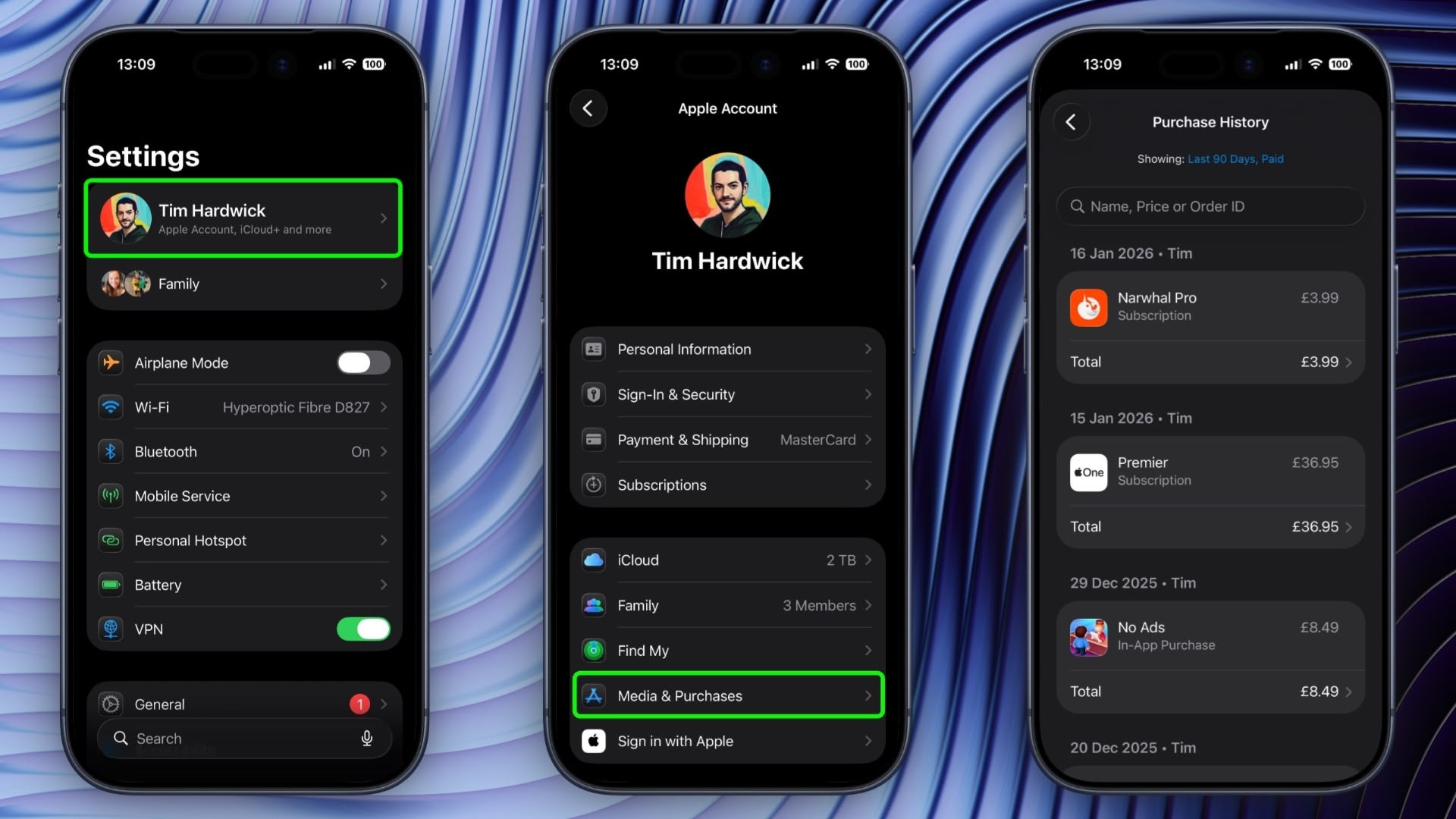
You are now viewing the purchase history for this Apple Account across all the devices tied to the account. If you are looking for a specific purchase, you can use the search field at the top to enter a name, price, or order ID.
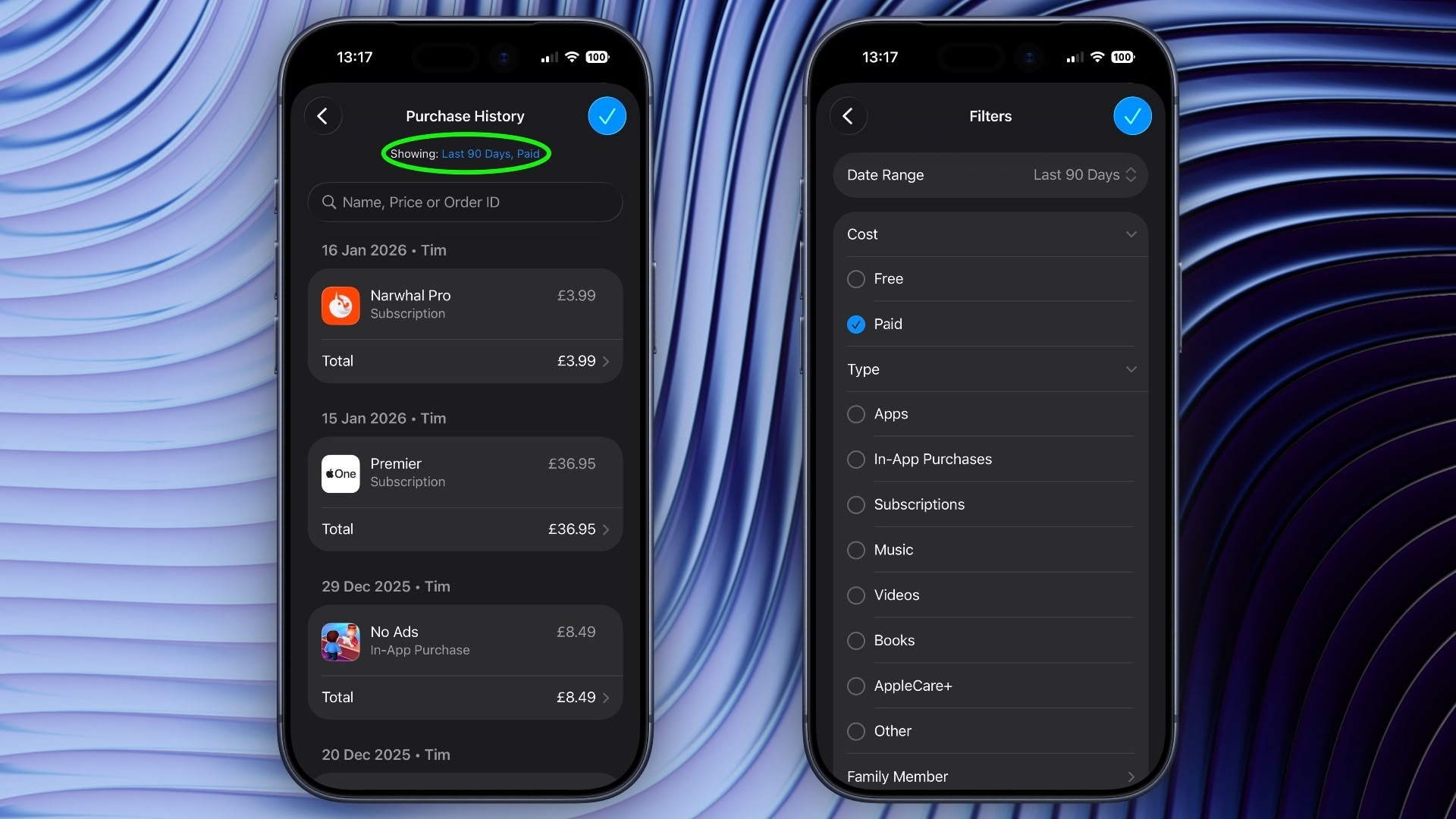
If you tap the blue text next to "Showing:" you can also filter the history by date range, price, and purchase type.
View Purchase History in App Store
In iOS 17.4 and iPadOS 17.4 or later, you can access the same purchase history a little bit faster via the App Store app on iPhone and iPad.
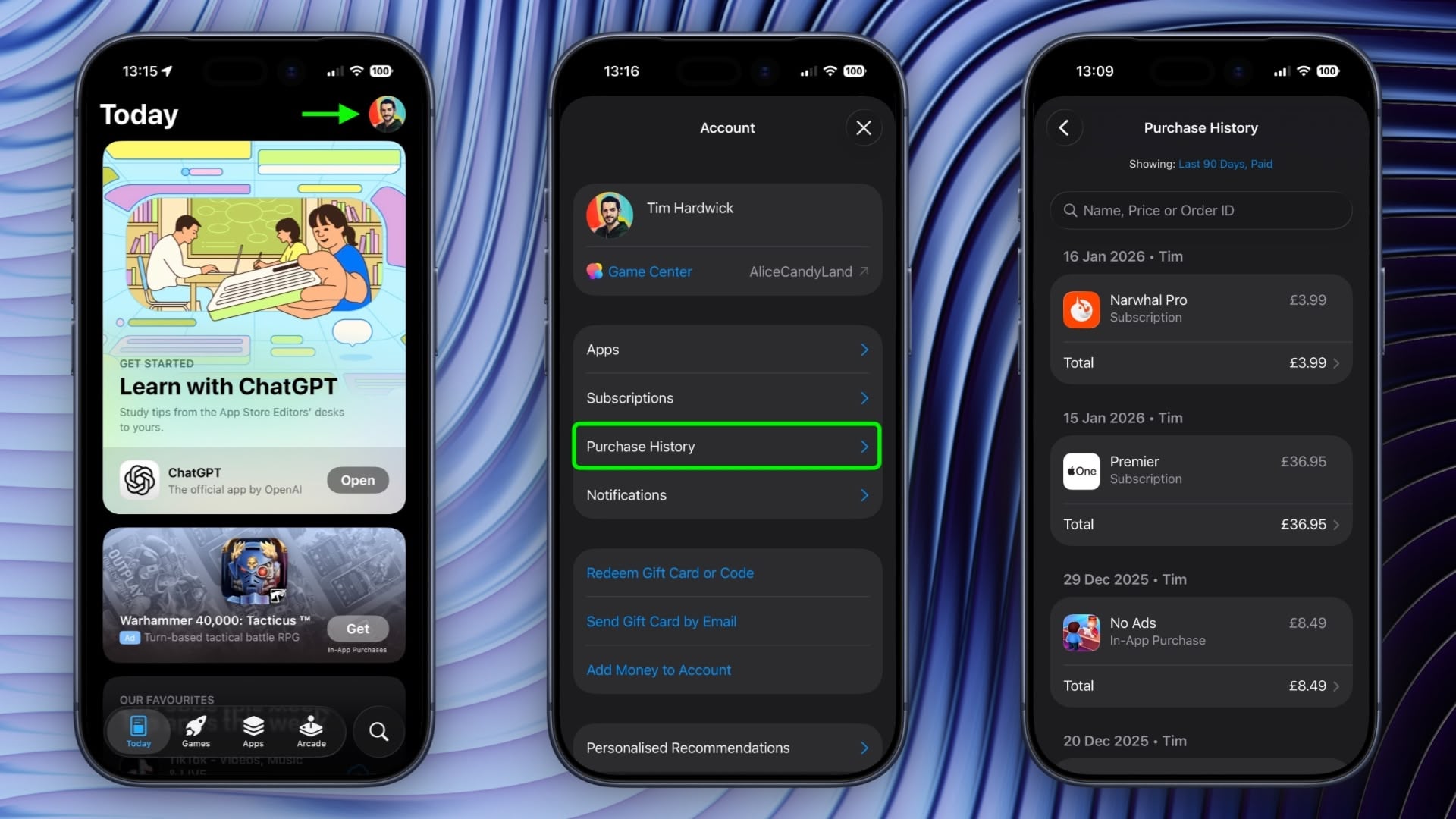
Simply tap your account profile in the top-right corner, then tap Purchase History and authenticate with Face ID or Touch ID when prompted.
This article, "Search Your Apple Account Purchase History on iPhone" first appeared on MacRumors.com
Discuss this article in our forums
You may also be interested in this
Apple’s stock splits: Whe…
12.15.2023
Apple’s stock has split five times since the company went public. The stock split on a 4-for-1 basis on August 28, 2020, a 7-for-1 basis on June 9, 2014, and
‘Ted Lasso’ Season 3: How…
05.10.2023
Macworld Apple put a lot of effort into making its early slate of Apple TV+ original shows a little bit of something for everyone. All the company needed was one
Apple iPhone posts 8% YoY…
07.06.2023
Apple continued to excel in China’s smartphone market, exhibiting an 8% YoY increase without facing any significant competition during the 618 sales period in 2023 (June 1-June 18), even as
AirTag foils $1.1 million…
05.05.2023
Two Chicago men were arrested for a $1.1 million armored truck armed robbery after being tracked down via an AirTag hidden amongst the money.AirTag tracker helps find robbersThe AirTag is
Apple Sainte-Catherine Op…
01.18.2026
This week, Apple officially opened the doors to the all-new Apple Sainte-Catherine, relocating to a stunning, reimagined space… The post Apple Sainte-Catherine Opens its Doors in Montreal appeared first on
Today in Apple history: i…
01.26.2024
On January 26, 2016, iPhone sales flatlined for the first time after nine years of spectacular growth. Some called it "peak iPhone." (via Cult of Mac - Apple news, reviews
Vision Pro prescription l…
06.07.2023
With no apparent supply chain information, Bloomberg's Mark Gurman says that Vision Pro's Zeiss prescription lenses will cost between $300 and $600.Apple has already revealed that it is in partnership
Prime Day starts early wi…
07.07.2025
Macworld Prime Day may start tomorrow, but the AirPods 4 have already dropped to their very best price of $99, so there’s no point in waiting. That’s $30 off and

