
01.28.2026
In an age of digital ubiquity, knowing how to easily keep track of your online transactions is crucial, especially as an Apple user who frequently downloads apps, music, movies, and
Your Apple Account purchase history is a comprehensive log of all the content you've bought using your account, not just on your iPhone, but across all your Apple devices. Knowing how to access this information on your device can give you valuable insights into your digital spending habits, help you manage your subscriptions, or even assist in troubleshooting or disputing unauthorized purchases.
So whether you're trying to keep a budget, ensure that your family's purchases are appropriate, or simply curious about when you bought that app or movie, here's how to view your Apple Account purchase history on an iPhone or iPad logged into your account.
View Purchase History in Settings
- Open the Settings app and tap your Apple Account banner at the top.
- Tap Media & Purchases.
- Tap View Account in the popup and authenticate with Face ID or Touch ID.
- Scroll down and tap Purchase History.
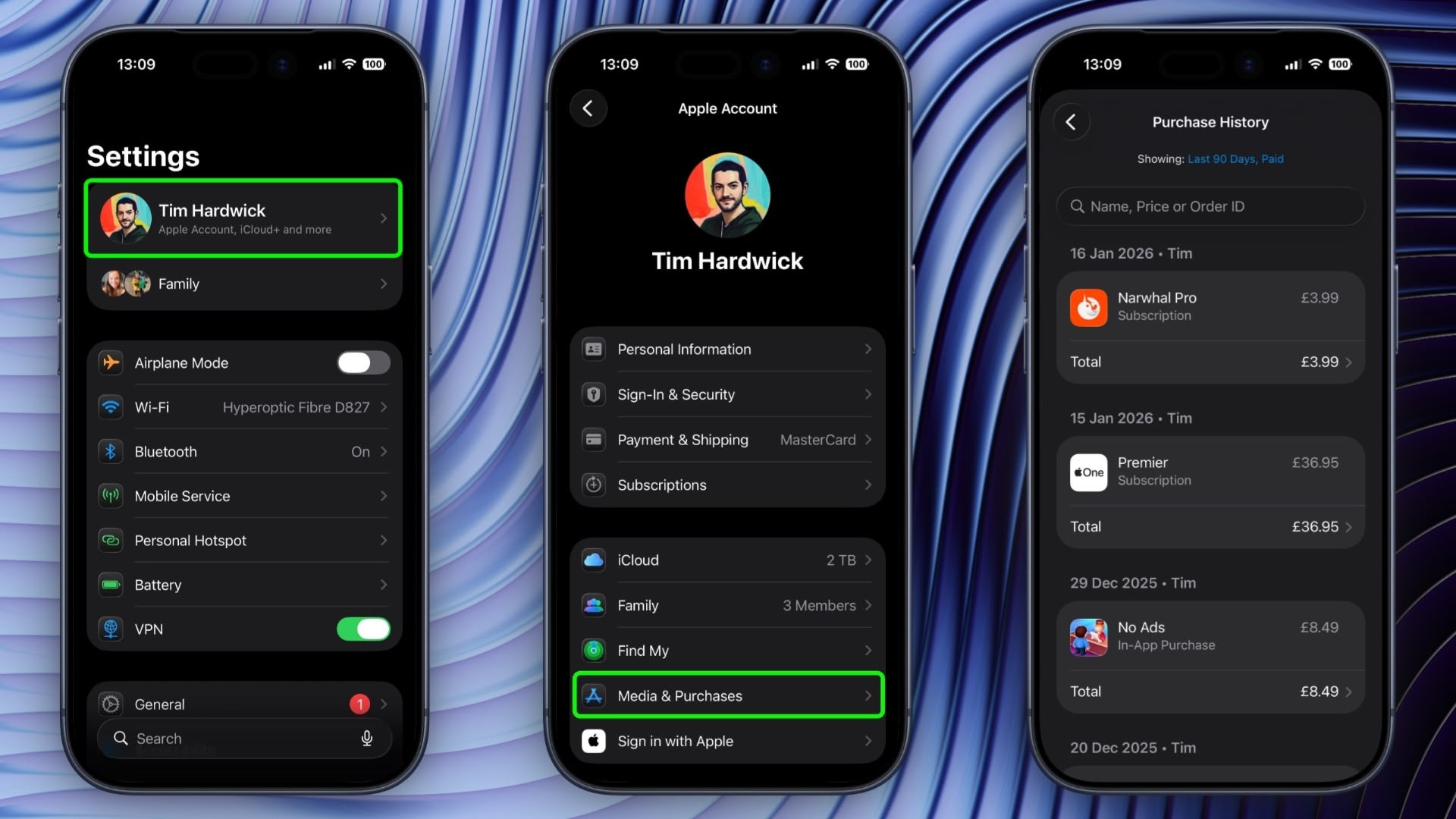
You are now viewing the purchase history for this Apple Account across all the devices tied to the account. If you are looking for a specific purchase, you can use the search field at the top to enter a name, price, or order ID.
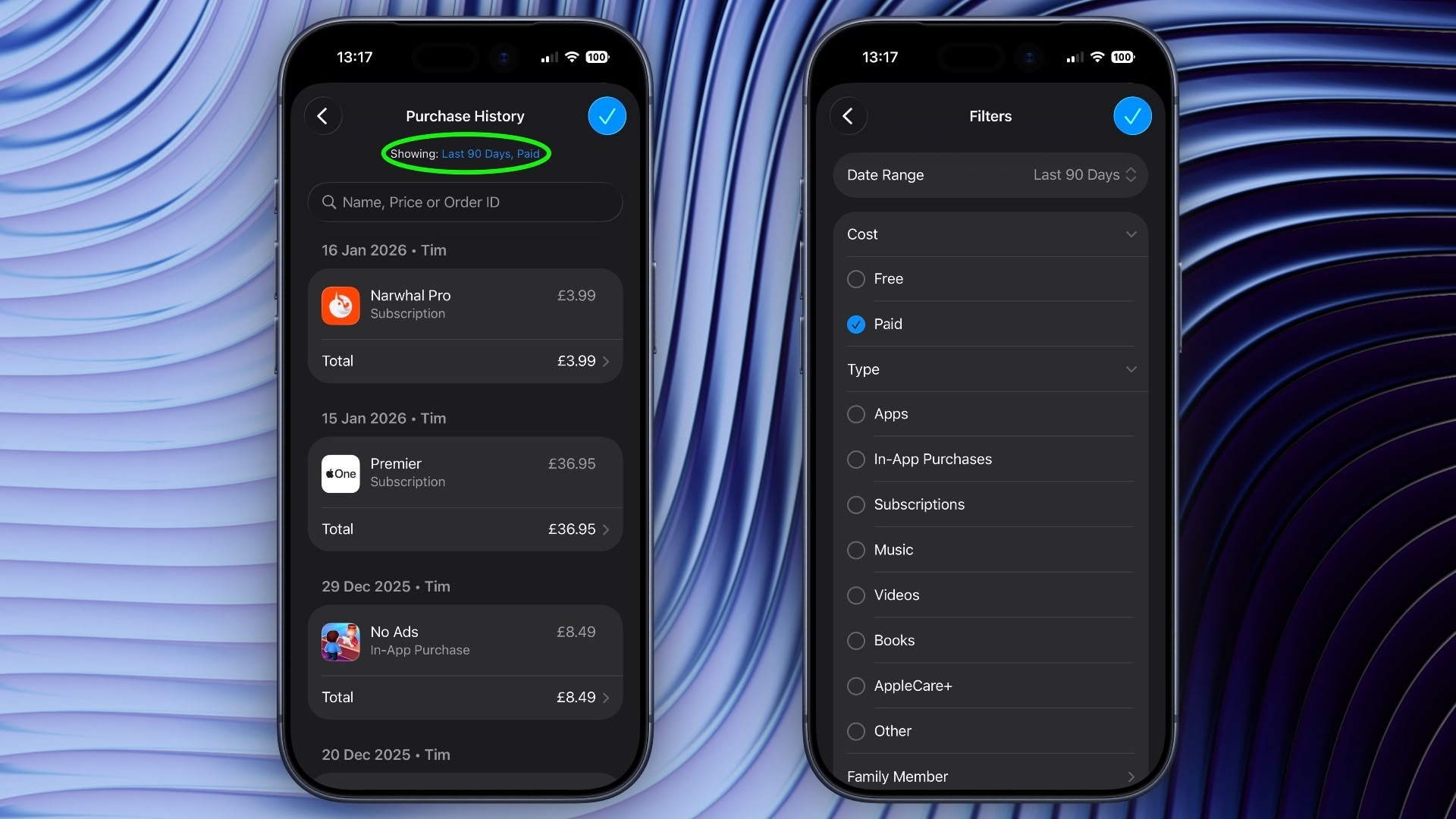
If you tap the blue text next to "Showing:" you can also filter the history by date range, price, and purchase type.
View Purchase History in App Store
In iOS 17.4 and iPadOS 17.4 or later, you can access the same purchase history a little bit faster via the App Store app on iPhone and iPad.
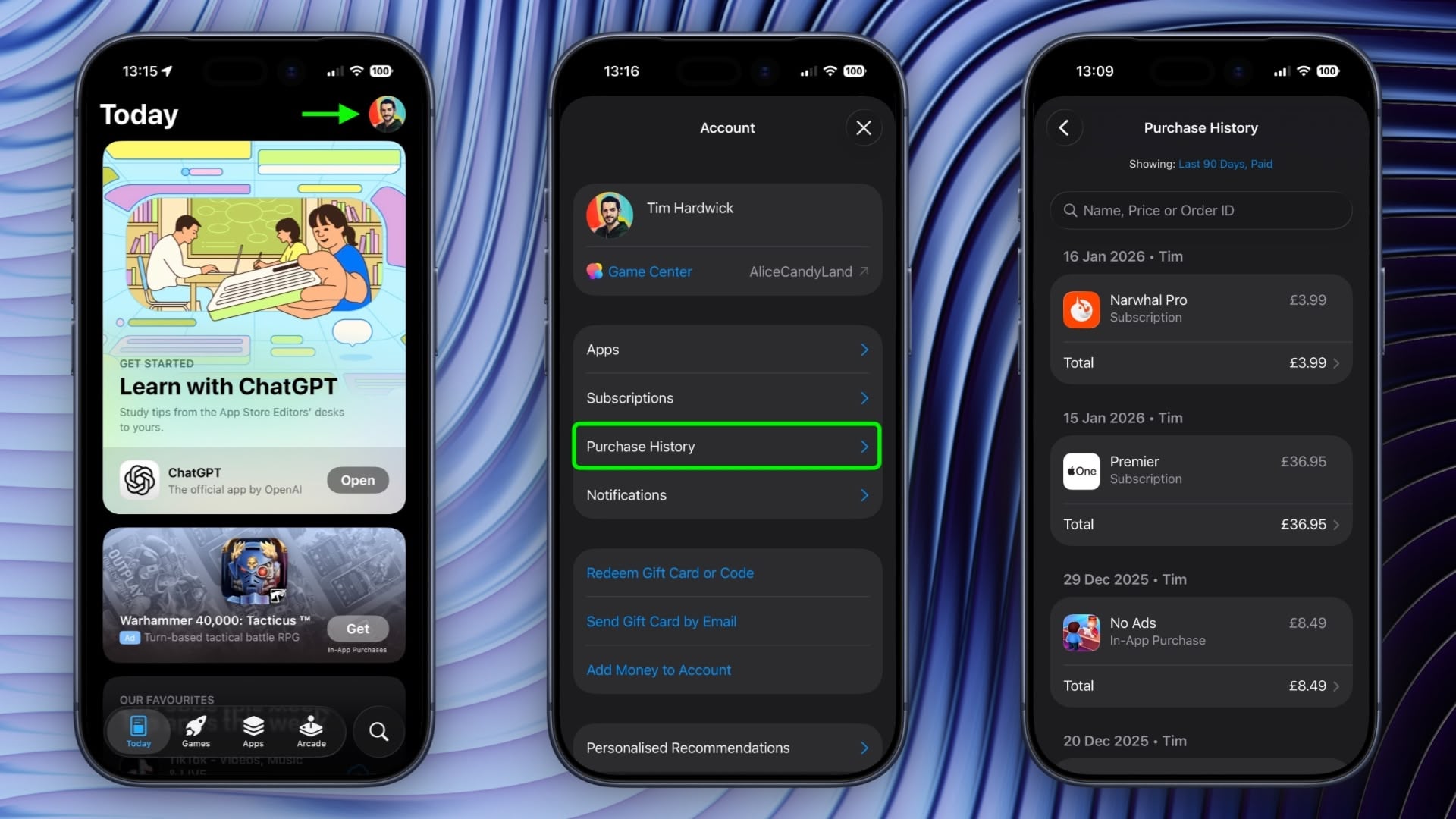
Simply tap your account profile in the top-right corner, then tap Purchase History and authenticate with Face ID or Touch ID when prompted.
This article, "Search Your Apple Account Purchase History on iPhone" first appeared on MacRumors.com
Discuss this article in our forums
You may also be interested in this
US-China trade war threat…
08.28.2023
As U.S.-China relations continue to sour, the way Macs, iPhones, iPads, and other Apple devices are made is changing, and that shift threatens to push up prices for customers. Alyssa
The rumors of a gigantic …
12.17.2024
Macworld After years of sitting on the sidelines of the foldable device market, Apple is reportedly planning to finally launch a folding device of its own, according to multiple new
Apple iPhone’s market sha…
05.22.2023
Colombia’s Q1 2023 smartphone shipments fell 9% YoY, but Apple’s iPhone showed remarkable resiliency with a 60% YoY increase in shipment volume, doubling iPhone’s share of the country’s smartphone market
How to stop macOS Sequoia…
12.27.2024
Macworld When you have an app’s windows sized just as you want them in macOS, it can be a shock when a slight movement in Sequoia suddenly causes the window
Expect Apple’s flagship i…
07.07.2023
Supply chain checks suggest that the production schedule for the iPhone 15 is on track, but the iPhone 15 Pro Max is rumored to be more expensive than ever before.
I took my own advice and …
05.20.2023
The best camera is the one you have with you as you chase your kid across the playground. | Photo by Allison Johnson / The Verge I spent an exciting,
The best phone to buy rig…
05.22.2023
Photo Illustration by William Joel / The Verge Bad news: flagship phones cost a small fortune these days. Good news: we can help you pick the right one and get
iPhone assembly in India …
09.30.2024
A Tata Electronics plant in Chennai, India, that makes components for iPhones reportedly caught fire on Saturday. (via Cult of Mac - Apple news, rumors, reviews and how-tos)

