
Sometimes when you share a webpage link with someone, you just want to bring their attention to a specific passage or sentence to make your point, rather than have them

Sometimes when you share a webpage link with someone, you just want to bring their attention to a specific passage or sentence to make your point, rather than have them read through the entire article.



In 2020, Google added a function to its Chrome browser called Scroll to Text Fragment (STTF) that helps you achieve this. It allows URLs to link directly to any visible text on a page. You may have seen it work in Google Search, where clicking on a link in your returned results takes you to a highlighted passage of text further down the page.

Google later added the feature to the Chromium codebase, so most other popular Chromium browsers like Edge, Opera, Brave, and Vivaldi also support it. Here’s how it works.

Copy Link With Highlight in Safari

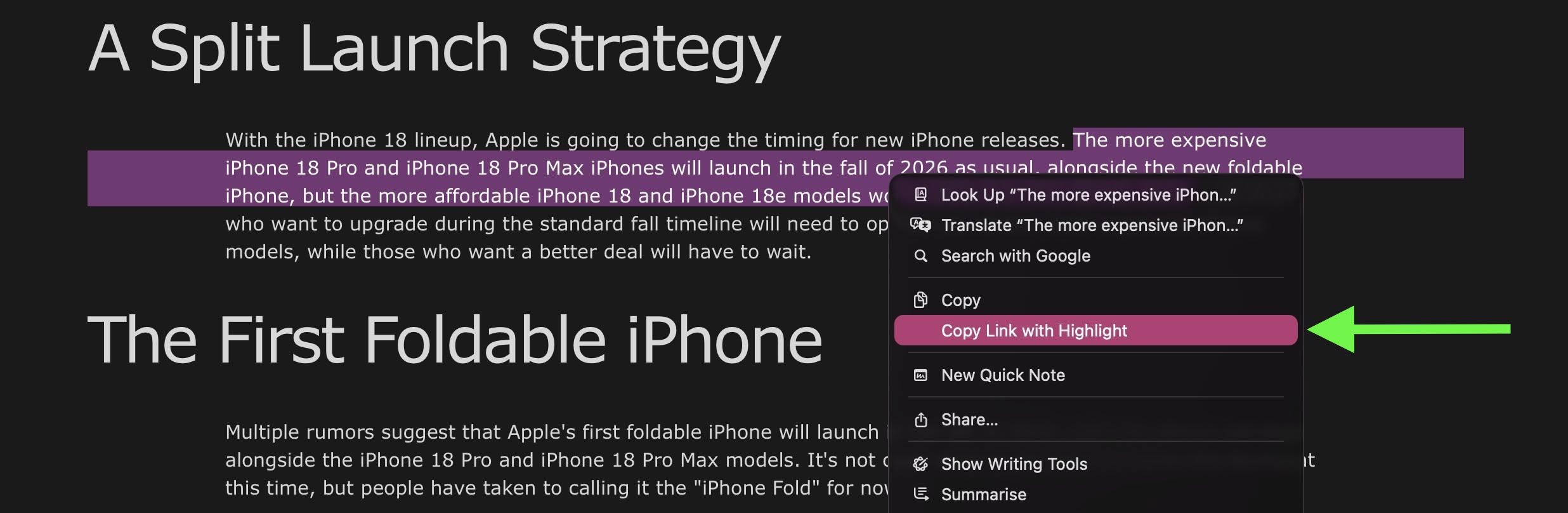
Apple added full support for text fragment links in Safari 18, and the feature is available in Safari on macOS Sequoia and later. To use the feature, visit a web page and simply highlight the text you want to create a link to, then right-click (Ctrl-click) and choose Copy Link with Highlight from the dropdown menu.
safari

The “Copy Link to Highlight” option

This will generate a special URL that includes a hash (#) symbol and “text” element, followed by a few words that bookend the selected text. All you need to do is share the link with someone, and when they click it they will be sent directly to that part of the webpage with the specific passage highlighted, as shown below.
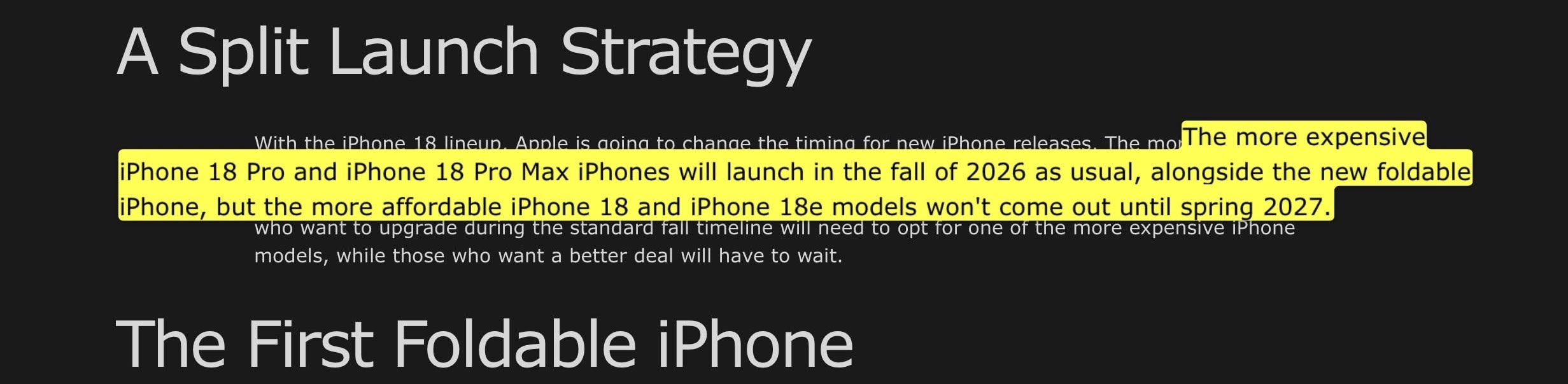
The shared link as the recipient sees it

That’s all there is to it. The Copy Link to Highlight option is also available in Safari on iPhone and iPad, though we have found it to be buggy and inconsistent in iOS 26.3. Hopefully Apple can fix it soon. At least on Mac, it makes it easier for you to direct the recipient of the link to the content you actually want them to focus on.

Bear in mind that the look of highlighted text can differ depending on whether the page author has styled it to look a certain way. Also, text fragment linking does not work in PDFs. Since July 2025, Copy Link to Highlight has also been introduced in Firefox.

Tag: Safari

This article, "macOS: Share a Link That Jumps to a Specific Line on a Webpage" first appeared on MacRumors.com

Discuss this article in our forums


You may also be interested in this

Craig Federighi outlines …

Along with the software and hardware announcements at WWDC, Apple executive Craig Federighi emphasized the company's ongoing commitment to privacy, exemplified by features such as "Check In," and why he

Today in Apple history: S…

June 11, 2007: At WWDC, Apple CEO Steve Jobs unveils Safari 3 for Windows, bringing the company’s web browser to PCs for the first time. Apple pitches Safari as the

Apple unveils new Mac Pro…

Today Apple announced the new Mac Studio and Mac Pro, the two most powerful Macs ever made. Apple today introduced the new Mac Studio and Mac Pro, the two most

iOS 17: Eight Privacy and…

The iOS 17 and iPadOS 17 updates include a number of privacy and security improvements that make your devices safer than ever, with Apple restricting access to photos and calendar

Apple announces powerful …

Apple announced its latest privacy and security innovations, including updates to Safari Private Browsing, Communication Safety, and Lockdown Mode.

iOS 17 Automatically Remo…

Starting with iOS 17 and macOS Sonoma, Safari automatically removes tracking parameters from URLs while in Private Browsing Mode, in order to prevent cross-website tracking. When a tracking parameter is

iOS 17 will autofill veri…

Safari in iOS 17 is getting smarter and will automatically autofill OTP and login codes received in the Mail app. (via Cult of Mac - Tech and culture through an

iPhones will be able to s…

Apple Personal Voice and Live Speech accessibility features. | Image: Apple Today, Apple previewed a bundle of new features designed for cognitive, vision, hearing, and mobility accessibility. That includes a
X

A whimsical homage to the days in black and white, celebrating the magic of Mac OS. Dress up your blog with retro, chunky-grade pixellated graphics to evoke some serious computer nostalgia. Supports a custom menu, custom header image, custom background, two footer widget areas, and a full-width page template. I updated Stuart Brown's 2011 masterpiece to meet the needs of the times, made it responsive , got dark mode, custom search widget and more.You can download it from tigaman.com, where you can also find more useful code snippets and plugins to get even more out of wordpress.
