
In watchOS 26, the Smart Stack for your Apple Watch is pretty clever. The collection of widgets can be pulled up with a scroll of the Digital Crown, and shows

In watchOS 26, the Smart Stack for your Apple Watch is pretty clever. The collection of widgets can be pulled up with a scroll of the Digital Crown, and shows you relevant information throughout your day. But sometimes, its eagerness to help can be a bit much, especially when it comes to Live Activities.
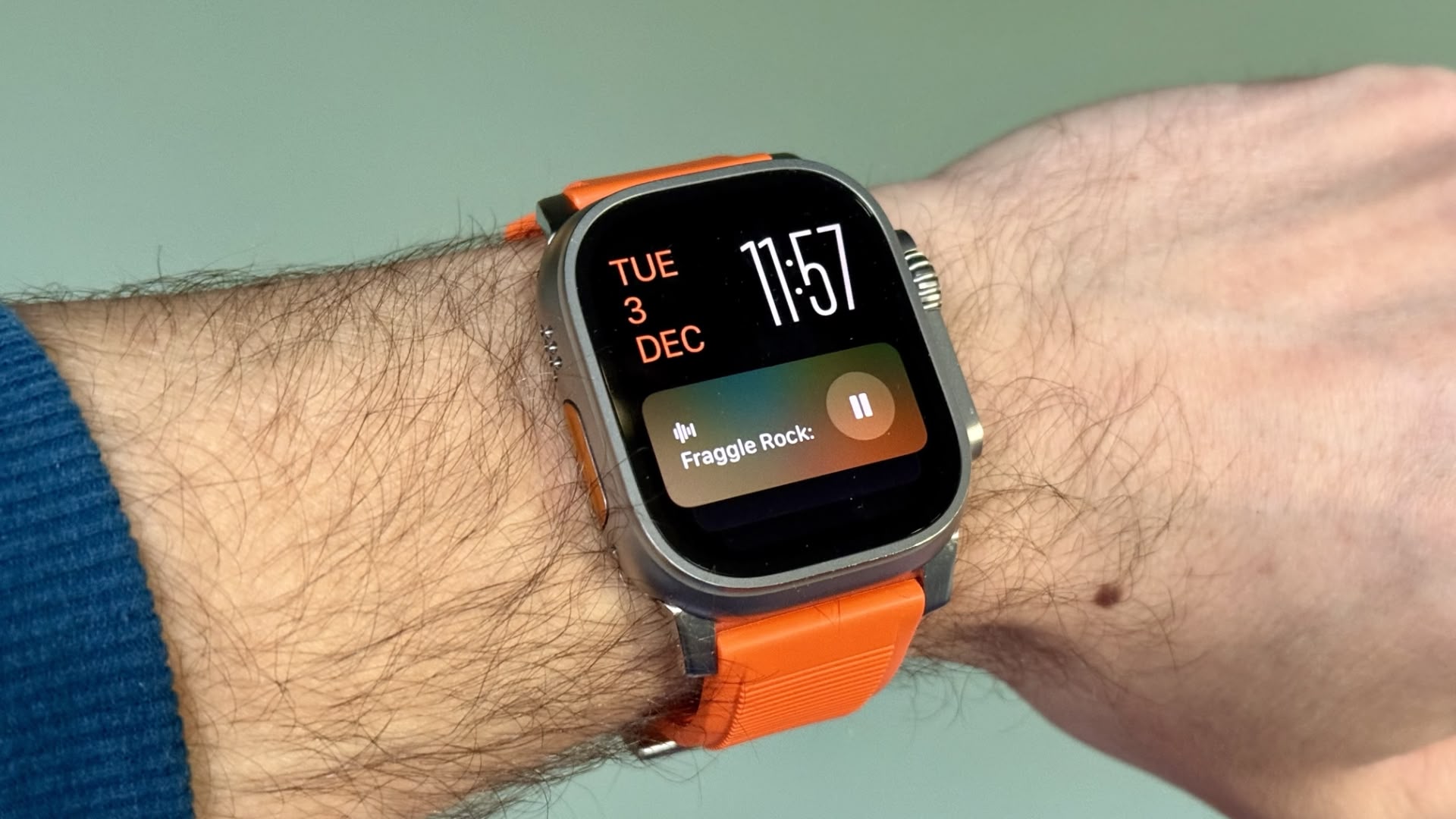


You’re probably familiar with this scenario: You raise your wrist expecting to see your customized watch face, but it’s been replaced by media playback controls because someone’s watching your Apple TV, or a timer you set earlier for cooking that still has ages left to run. Live Activities in the Smart Stack can clearly be useful, but having them automatically take over your display isn’t always ideal. Here’s how to take back control:

  1. Open Settings on your Apple Watch.
  2. Tap Smart Stack.
  3. Select Live Activities.
  4. Toggle off the switch next to Auto-Launch Live Activities.
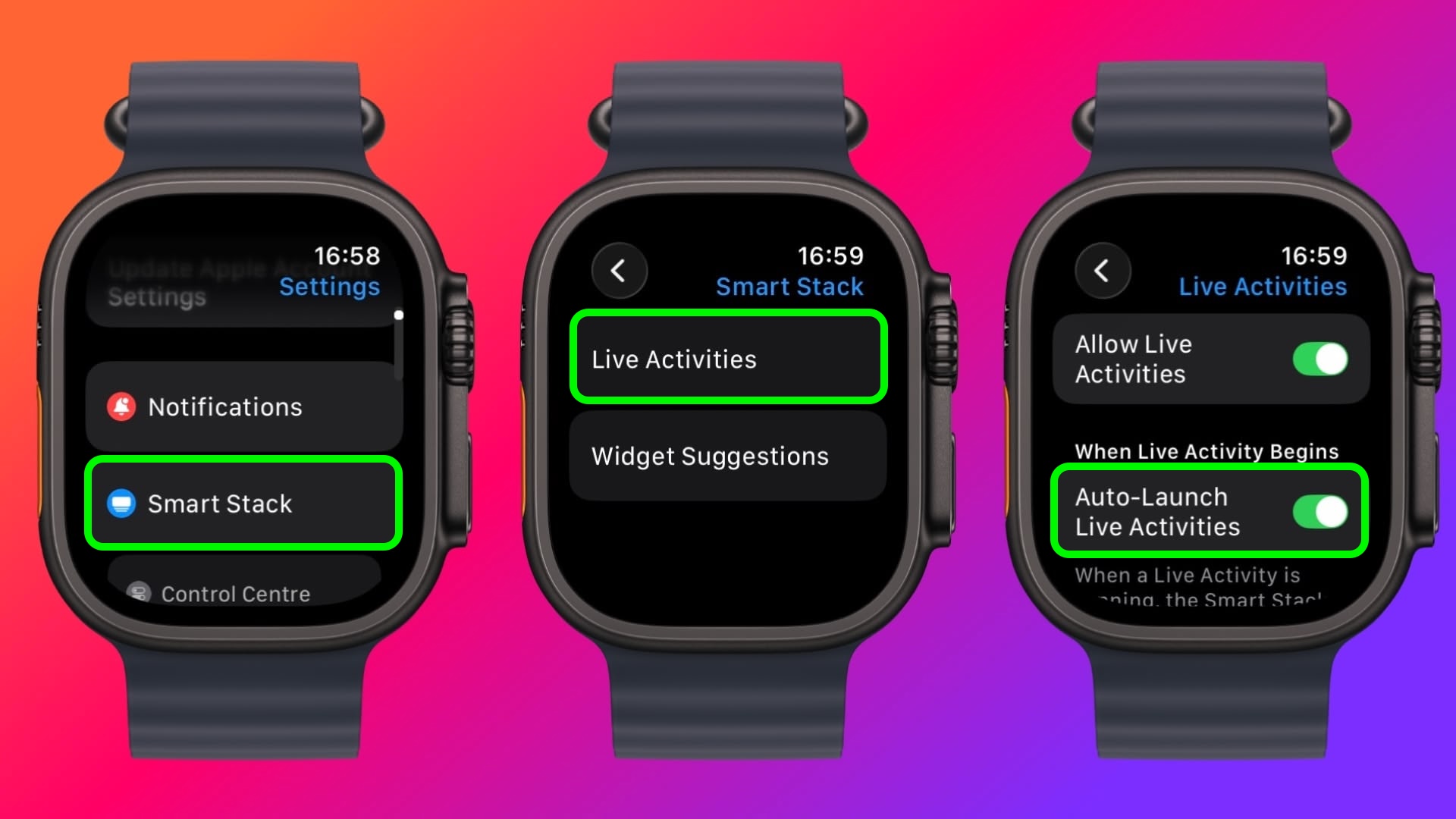
settings

After disabling auto-launch, Live Activities will still be available in your Smart Stack when you want them – you’ll just need to manually scroll to see them instead of having them pop up automatically.

If you want more granular control, you’re in luck. From the same settings screen you can control which Apple apps display Live Activities. Using the Watch app on your iPhone, you can also manage Live Activities settings for third-party apps. This lets you keep the notifications you find useful while preventing the less important ones from interrupting your watch face.

Pro Tip: If it’s just those persistent media controls that bug you, head to Media Apps in the same settings menu and turn off Live Activities completely, or alternatively under “Auto-Launch,” select Off or Smart Stack for a more focused watch face experience.
This article, "Live Activities Taking Over Your Apple Watch? Here's the Fix" first appeared on MacRumors.com

Discuss this article in our forums


You may also be interested in this

Apple Lays Off 600+ Emplo…

Apple this week filed a required notice with the state of California, confirming plans to permanently lay off more than 600 employees. Under California law, employers must give employees and

Apple is placing warnings…

Apple is up to its old tricks again. | Image: The Verge Apple is trying to dissuade Europeans from using iOS apps that support alternative payment options by making them

Here are what the boxes f…

Some of you might be curious what the boxes for iPhone 17 series and iPhone Air would look… The post Here are what the boxes for iPhone 17 series and

Apple reveals iOS 17

iOS 17 upgrades the communications experience with Contact Posters, a new stickers experience, Live Voicemail, and much more. Apple today announced iOS 17, a major release that upgrades the communications

Nvidia set to make histor…

Nvidia is poised to etch its name in history on Wednesday, becoming the first company to hit a $5 trillion market valuation and prolonging a dominant surge fueled by its

Apple may use Intel to fa…

According to a recent research note from analyst Jeff Pu at GF Securities — obtained by MacRumors — Intel is now anticipated to secure a supply agreement with Apple for

Right to Repair: Why is i…

Electronic devices have become ubiquitous in modern life, but increasingly difficult to maintain. A new movement is pushing to change that.

Apple warns India’s USB-C…

Apple’s Lightning port Apple has told India its local production targets will be negatively impacted if New Delhi requires existing iPhones to have USB-C charging ports, a government document shows
X

A whimsical homage to the days in black and white, celebrating the magic of Mac OS. Dress up your blog with retro, chunky-grade pixellated graphics to evoke some serious computer nostalgia. Supports a custom menu, custom header image, custom background, two footer widget areas, and a full-width page template. I updated Stuart Brown's 2011 masterpiece to meet the needs of the times, made it responsive , got dark mode, custom search widget and more.You can download it from tigaman.com, where you can also find more useful code snippets and plugins to get even more out of wordpress.
