In iOS 17, Safari has gained a new feature called Profiles, which is designed to help separate your browsing sessions into things like Work, School, or Personal. Here's how to

In iOS 17, Safari has gained a new feature called Profiles, which is designed to help separate your browsing sessions into things like Work, School, or Personal. Here’s how to use it in the beta and when iOS 17 is released to the general public later this month.


In ‌iOS 17‌, Apple expands on Tab Groups with a Profile feature that is designed to let you separate your browsing for different use cases. You can create a “Work” profile and a “Personal” profile, for example, so all of your work-related browsing is kept separate from your personal browsing.

Each profile gets its own icon and silos your history, Tab Groups, Favorites, Private Browsing tabs, and cookies. You can even assign specific extensions to different profiles to optimize your browsing experience based on the task at hand.

How to Create a Safari Profile

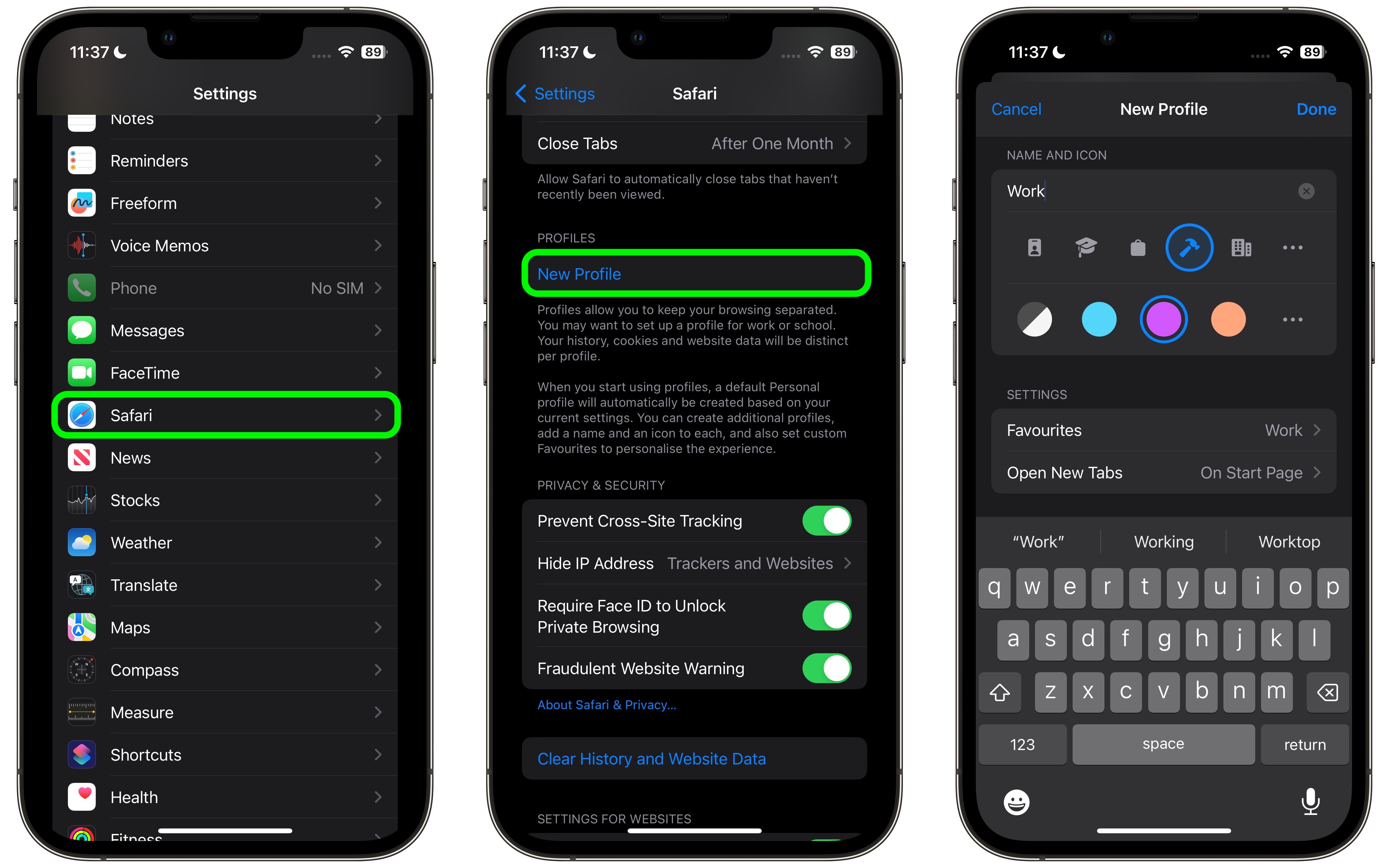
To set up profiles on iPhones running iOS 17, simply follow these steps:

  1. Open the Settings app on you iPhone or iPad.
  2. Scroll down to Safari.
  3. Under the “Profiles” section, tap New Profile.
  4. Select an icon, name, and background color for the profile.

  5. Choose your settings for Favorites and New Tabs.
  6. Tap Done.

safari

When you create a new profile, your device will automatically generate a “Personal” profile to differentiate other browsing sessions conducted outside of the profile you created.

Both profiles and additional ones you create can be edited in the same section of the Settings app. When editing an existing profile, you can also opt to enable any Safari extensions you have installed on your device, as well as delete the profile if desired.

How to Switch Between Profiles in Safari

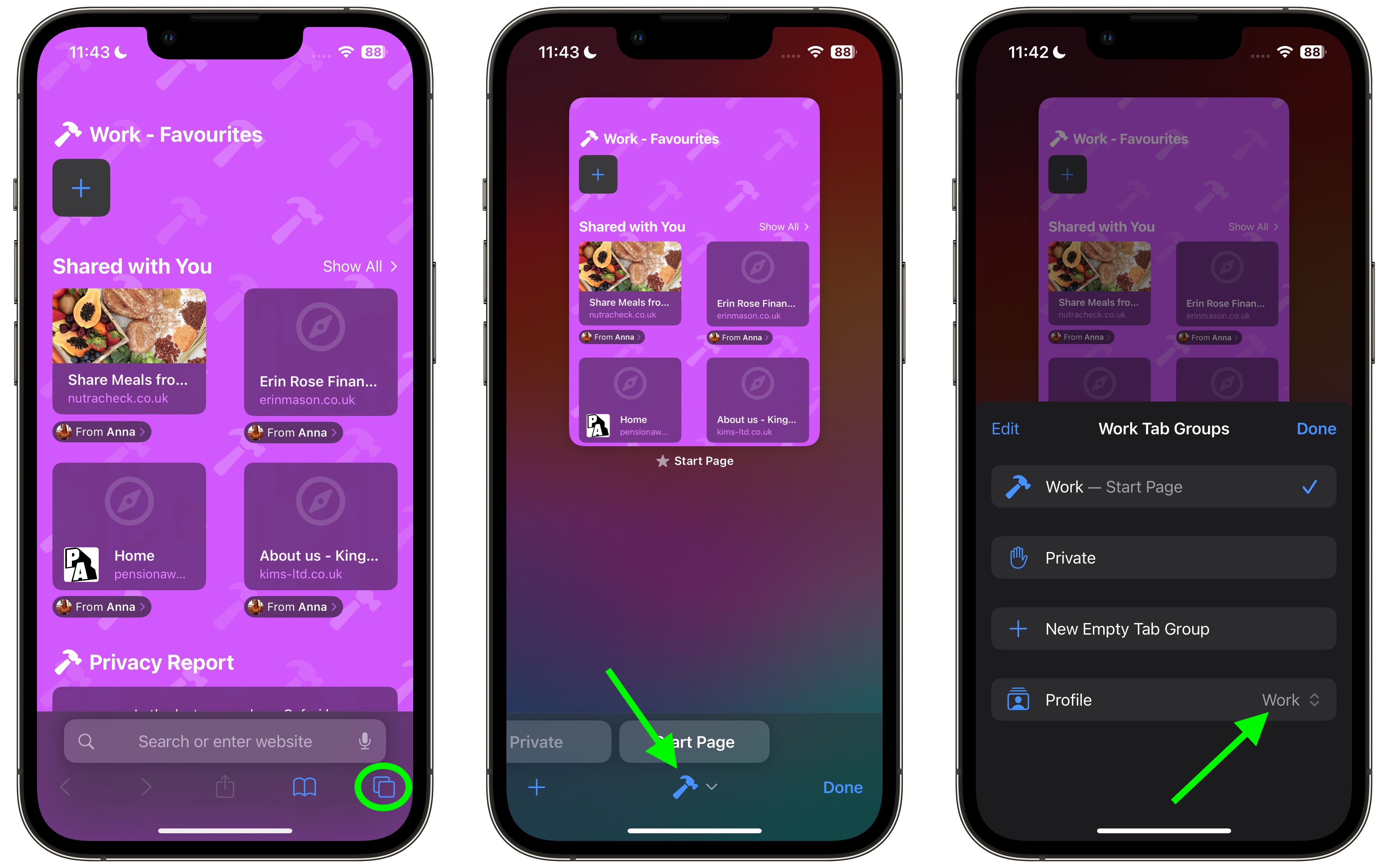
  1. In Safari, tap the Tabs icon with two overlapping squares.
  2. Tap the middle icon to bring up the active profile’s menu.
  3. Tap the Profile option to change which profile is active.
safari

The Safari Profiles feature is available in iOS 17, iPadOS 17 and macOS Sonoma, as well as being part of Safari 17 for macOS Monterey and macOS Ventura. Any profiles you create will be synced across devices logged into the same Apple ID.

The new Safari also brings additional privacy functionality, improvements to search, updated Siri integration, and more. A rundown on all of the new features in the ‌iOS 17‌ update can be found in our comprehensive iOS 17 roundup.

Related Roundups: iOS 17, iPadOS 17
Tag: Safari
Related Forums: iOS 17, iPadOS 17

This article, "iOS 17: How to Separate Your Browsing Habits With Safari Profiles" first appeared on MacRumors.com

Discuss this article in our forums


You may also be interested in this

Hidden iOS 26 features Ap…

Beyond its Liquid Glass design, iOS 26 packs several small, hidden features that will meaningfully improve your iPhone experience. (via Cult of Mac - Your source for the latest Apple

DOJ proposes Google end s…

In a significant legal battle, U.S. DOJ prosecutors have argued that Google should be forced to divest its Chrome browser and share data and search results with competitors to dismantle

Best free photo editing a…

Macworld Apple includes the free Photos app on all Macs, iPhones and iPads, but this app is primarily intended for organizing your photo collection and only has a limited selection

How to make AppleInsider …

You've long been able to turn any website into an app on your Mac, but with macOS Sonoma, Apple has made it so easy that you're going to do it.

Why Apple’s dodgy deal wi…

A deal with Google that made a mockery of Apple's privacy promises is coming to an end. It should have never been made. (via Cult of Mac - Apple news,

Macs can get viruses, but…

Macworld Do Macs get viruses? Do Macs need antivirus software? The answers to these questions aren’t as simple as they might seem. In this article, we look at the dangers

ChatGPT Can Be Used as De…

OpenAI today updated the ChatGPT app to add a new Safari Extension that allows ChatGPT to be used as the default search engine for searches made through the Safari search

UK antitrust regulators a…

The UK antitrust case against Apple's control over the mobile browser market has been dismissed for a second time after an appeal tribunal upheld its original decision on the matter.Cloud
X

A whimsical homage to the days in black and white, celebrating the magic of Mac OS. Dress up your blog with retro, chunky-grade pixellated graphics to evoke some serious computer nostalgia. Supports a custom menu, custom header image, custom background, two footer widget areas, and a full-width page template. I updated Stuart Brown's 2011 masterpiece to meet the needs of the times, made it responsive , got dark mode, custom search widget and more.You can download it from tigaman.com, where you can also find more useful code snippets and plugins to get even more out of wordpress.