
Porsche today announced that Taycan models in the United States are adopting Apple Maps EV routing in CarPlay, a feature that will direct Taycan owners to nearby electric vehicle charging
Porsche today announced that Taycan models in the United States are adopting Apple Maps EV routing in CarPlay, a feature that will direct Taycan owners to nearby electric vehicle charging facilities.
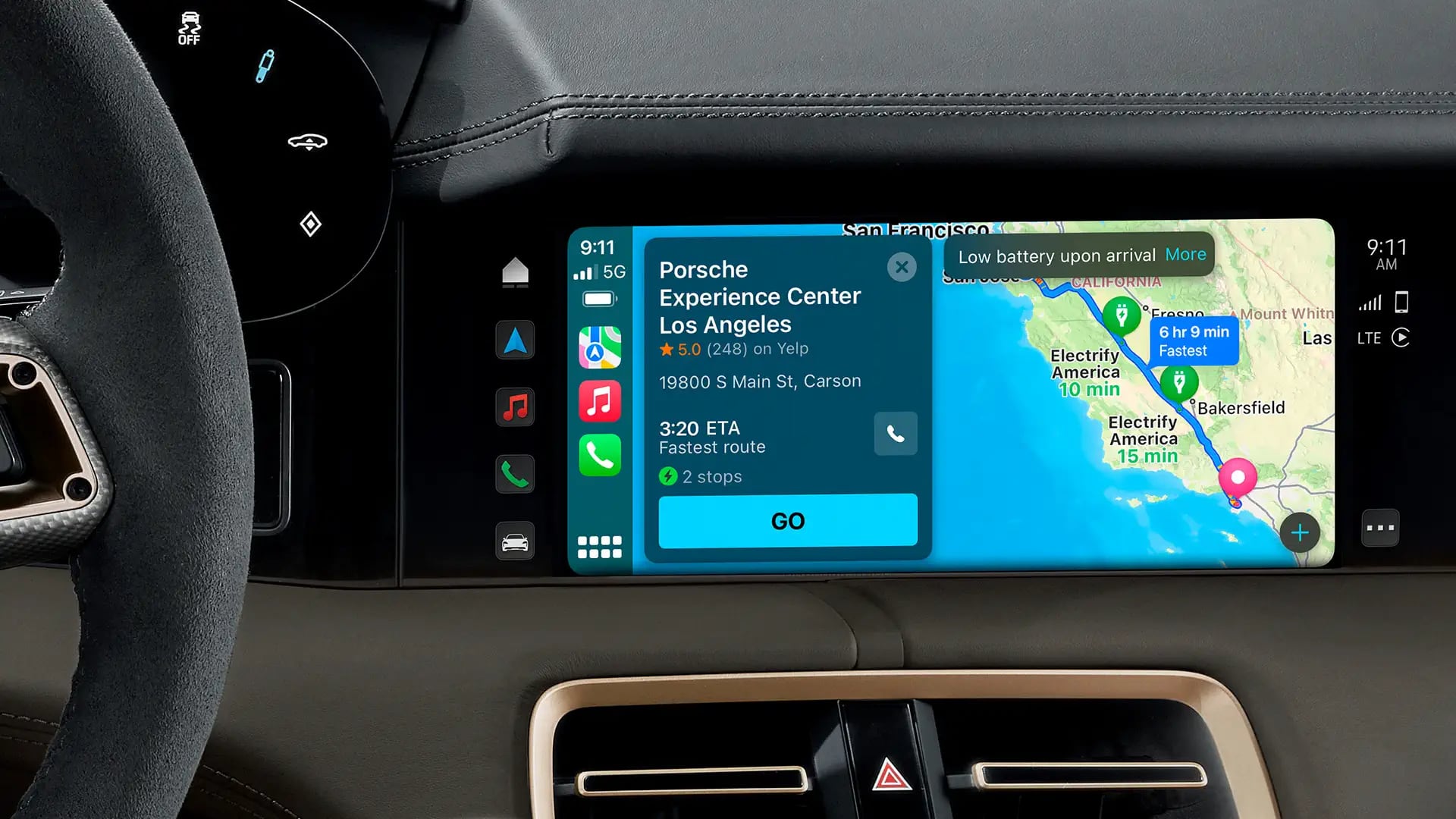

The Apple Maps EV Routing option will allow Taycan users to plan travel routes that include stops for charging. Prior to now, Taycan owners had to exit out of ‌CarPlay‌ in order to create a route that included charging stops.

Taycan vehicles include the Porsche Charging Planner, designed to optimize stops based on the anticipated state of charge upon arrival to a destination, traffic conditions, and average speed, but ‌Apple Maps‌ EV Routing is now available as an alternative for those who use ‌CarPlay‌.

‌Apple Maps‌ EV Routing uses real-time vehicle information to help customers get to their destination, with charging stops recommended when necessary. ‌Apple Maps‌ analyzes elevation changes along a route and other factors to determine when to suggest a charging stop, and if the vehicle's battery gets too low, it will provide a route to the nearest compatible charging station.

Porsche says that ‌Apple Maps‌ EV routing is available to U.S.-based Taycan owners who have installed the latest My Porsche app on their iPhones.
Related Roundup: CarPlay

This article, "Porsche Taycan Gains Support for Apple Maps EV Routing" first appeared on MacRumors.com

Discuss this article in our forums

original link


You may also be interested in this

Apple adds pronoun fields…

iOS 17 and watchOS 10 introduce a new way to easily swap contact information between iPhones, Apple Watches, or both. NameDrop, the new feature in beta now and debuting for

Secret Apple trademark al…

Macworld With less than a month to go until Apple’s WWDC keynote presentation and the expected launch of its mixed-reality headset, the company may have accidentally confirmed the name of

Apple Auto Integrations: …

For years, rumors have swirled about Apple's ambitions in the automotive space. While CarPlay has become a dominant infotainment system, questions linger: will Apple push deeper with car integrations, and

How to use Multiview on A…

Apple recently added Multiview for live sports on Apple TV 4K so you can watch multiple games at once. Here's how to use it.Apple TV 4K devices now support viewing

iPhone achieves new recor…

Following up after revealing the most popular iPhones for 2023, CIRP is out today with its latest report that shows Apple has hit a new record for the iPhone’s average

Eve announces upgraded Fl…

Eve Systems has announced the long-awaited second-generation Flare portable smart light, alongside the new EU-only smart shutter switch for Apple Home.Eve Flare now supports ThreadThe new Eve Flare doesn't change

Daily deals: 25% off Para…

Today's hottest deals include $850 off an M1 Pro 16-inch MacBook Pro, 15% off an Anker 3-in-1 MagSafe Charger, and more.Get 25% off Parallels Desktop for MacThe AppleInsider team combs

China smartphone shipment…

New figures claim that smartphone sales in China have now seen double-digit growth in the build up to the country's 6.18 shopping festival.China sales may have had a boost from
X

A whimsical homage to the days in black and white, celebrating the magic of Mac OS. Dress up your blog with retro, chunky-grade pixellated graphics to evoke some serious computer nostalgia. Supports a custom menu, custom header image, custom background, two footer widget areas, and a full-width page template. I updated Stuart Brown's 2011 masterpiece to meet the needs of the times, made it responsive , got dark mode, custom search widget and more.You can download it from tigaman.com, where you can also find more useful code snippets and plugins to get even more out of wordpress.
