
Mimestream 1.0.


As a native app written in Swift and designed with AppKit and SwiftUI for a clean, stock appearance, Mimestream's UI will be familiar to many Apple Mail users, but the app is exclusively for accessing Gmail (support for other services is being considered).

Mimestream uses the Gmail API rather than a standard IMAP connection to support features like categorized inboxes, aliases and signatures, server-side filters, templates, labels, vacation responses, mentions, undo send, archive, and more.

Support for multiple Gmail accounts is included with a unified inbox, and the app integrates fully with macOS to offer system-level notifications, system-level Dark Mode support, keyboard shortcuts, swipe gestures, and linking email profiles to Focus Filters.

Among several new features for its 1.0 release, Mimestream also supports Profiles, so separate Gmail accounts can be divided into "Work" and "Personal," for example, and different icons and colors can be assigned to them. There's also a Mimestream menu bar item for quickly checking for unread messages without opening the app.


During its lengthy free beta phase, more than 220 updates and over 100 features were added to the app, and the startup has expanded from its original solo developer to a five-person team.

Now that beta development has ended, it's becoming a paid-for client. Mimestream 1.0 is $4.99 per month or $49.99 per year, but the annual plan is being offered at a discounted launch price of $29.99 for the first year until June 9. A free 14-day trial is also available, with no credit card required.

Of the more than 167,000 people who have been using the app in beta in macOS 12 or later, access to the app will expire on May 26, 2023, but users will be able to move onto the 14-day trial in Mimestream 1.0 to try the new features. For users on macOS 11 or 10.15, the existing beta versions will continue to work on those OS versions. Interested users can check the company's roadmap to learn about what else is planned for the app.
Tag: Gmail

This article, "Former Apple Engineer's Mimestream Gmail Client for Mac Gets Official Launch, Free Beta Access to End Tomorrow" first appeared on MacRumors.com

Discuss this article in our forums
Mimestream 1.0.


As a native app written in Swift and designed with AppKit and SwiftUI for a clean, stock appearance, Mimestream's UI will be familiar to many Apple Mail users, but the app is exclusively for accessing Gmail (support for other services is being considered).

Mimestream uses the Gmail API rather than a standard IMAP connection to support features like categorized inboxes, aliases and signatures, server-side filters, templates, labels, vacation responses, mentions, undo send, archive, and more.

Support for multiple Gmail accounts is included with a unified inbox, and the app integrates fully with macOS to offer system-level notifications, system-level Dark Mode support, keyboard shortcuts, swipe gestures, and linking email profiles to Focus Filters.

Among several new features for its 1.0 release, Mimestream also supports Profiles, so separate Gmail accounts can be divided into "Work" and "Personal," for example, and different icons and colors can be assigned to them. There's also a Mimestream menu bar item for quickly checking for unread messages without opening the app.


During its lengthy free beta phase, more than 220 updates and over 100 features were added to the app, and the startup has expanded from its original solo developer to a five-person team.

Now that beta development has ended, it's becoming a paid-for client. Mimestream 1.0 is $4.99 per month or $49.99 per year, but the annual plan is being offered at a discounted launch price of $29.99 for the first year until June 9. A free 14-day trial is also available, with no credit card required.

Of the more than 167,000 people who have been using the app in beta in macOS 12 or later, access to the app will expire on May 26, 2023, but users will be able to move onto the 14-day trial in Mimestream 1.0 to try the new features. For users on macOS 11 or 10.15, the existing beta versions will continue to work on those OS versions. Interested users can check the company's roadmap to learn about what else is planned for the app.
Tag: Gmail

This article, "Former Apple Engineer's Mimestream Gmail Client for Mac Gets Official Launch, Free Beta Access to End Tomorrow" first appeared on MacRumors.com

Discuss this article in our forums
Mimestream 1.0.


As a native app written in Swift and designed with AppKit and SwiftUI for a clean, stock appearance, Mimestream's UI will be familiar to many Apple Mail users, but the app is exclusively for accessing Gmail (support for other services is being considered).

Mimestream uses the Gmail API rather than a standard IMAP connection to support features like categorized inboxes, aliases and signatures, server-side filters, templates, labels, vacation responses, mentions, undo send, archive, and more.

Support for multiple Gmail accounts is included with a unified inbox, and the app integrates fully with macOS to offer system-level notifications, system-level Dark Mode support, keyboard shortcuts, swipe gestures, and linking email profiles to Focus Filters.

Among several new features for its 1.0 release, Mimestream also supports Profiles, so separate Gmail accounts can be divided into "Work" and "Personal," for example, and different icons and colors can be assigned to them. There's also a Mimestream menu bar item for quickly checking for unread messages without opening the app.


During its lengthy free beta phase, more than 220 updates and over 100 features were added to the app, and the startup has expanded from its original solo developer to a five-person team.

Now that beta development has ended, it's becoming a paid-for client. Mimestream 1.0 is $4.99 per month or $49.99 per year, but the annual plan is being offered at a discounted launch price of $29.99 for the first year until June 9. A free 14-day trial is also available, with no credit card required.

Of the more than 167,000 people who have been using the app in beta in macOS 12 or later, access to the app will expire on May 26, 2023, but users will be able to move onto the 14-day trial in Mimestream 1.0 to try the new features. For users on macOS 11 or 10.15, the existing beta versions will continue to work on those OS versions. Interested users can check the company's roadmap to learn about what else is planned for the app.
Tag: Gmail

This article, "Former Apple Engineer's Mimestream Gmail Client for Mac Gets Official Launch, Free Beta Access to End Tomorrow" first appeared on MacRumors.com

Discuss this article in our forums
Mimestream 1.0.


As a native app written in Swift and designed with AppKit and SwiftUI for a clean, stock appearance, Mimestream's UI will be familiar to many Apple Mail users, but the app is exclusively for accessing Gmail (support for other services is being considered).

Mimestream uses the Gmail API rather than a standard IMAP connection to support features like categorized inboxes, aliases and signatures, server-side filters, templates, labels, vacation responses, mentions, undo send, archive, and more.

Support for multiple Gmail accounts is included with a unified inbox, and the app integrates fully with macOS to offer system-level notifications, system-level Dark Mode support, keyboard shortcuts, swipe gestures, and linking email profiles to Focus Filters.

Among several new features for its 1.0 release, Mimestream also supports Profiles, so separate Gmail accounts can be divided into "Work" and "Personal," for example, and different icons and colors can be assigned to them. There's also a Mimestream menu bar item for quickly checking for unread messages without opening the app.


During its lengthy free beta phase, more than 220 updates and over 100 features were added to the app, and the startup has expanded from its original solo developer to a five-person team.

Now that beta development has ended, it's becoming a paid-for client. Mimestream 1.0 is $4.99 per month or $49.99 per year, but the annual plan is being offered at a discounted launch price of $29.99 for the first year until June 9. A free 14-day trial is also available, with no credit card required.

Of the more than 167,000 people who have been using the app in beta in macOS 12 or later, access to the app will expire on May 26, 2023, but users will be able to move onto the 14-day trial in Mimestream 1.0 to try the new features. For users on macOS 11 or 10.15, the existing beta versions will continue to work on those OS versions. Interested users can check the company's roadmap to learn about what else is planned for the app.
Tag: Gmail

This article, "Former Apple Engineer's Mimestream Gmail Client for Mac Gets Official Launch, Free Beta Access to End Tomorrow" first appeared on MacRumors.com

Discuss this article in our forums
Mimestream, the Gmail client for macOS founded by former Apple Mail engineer Neil Jhaveri, this week ended more than two years of beta development with the official release of Mimestream
Mimestream, the Gmail client for macOS founded by former Apple Mail engineer Neil Jhaveri, this week ended more than two years of beta development with the official release of Mimestream 1.0.
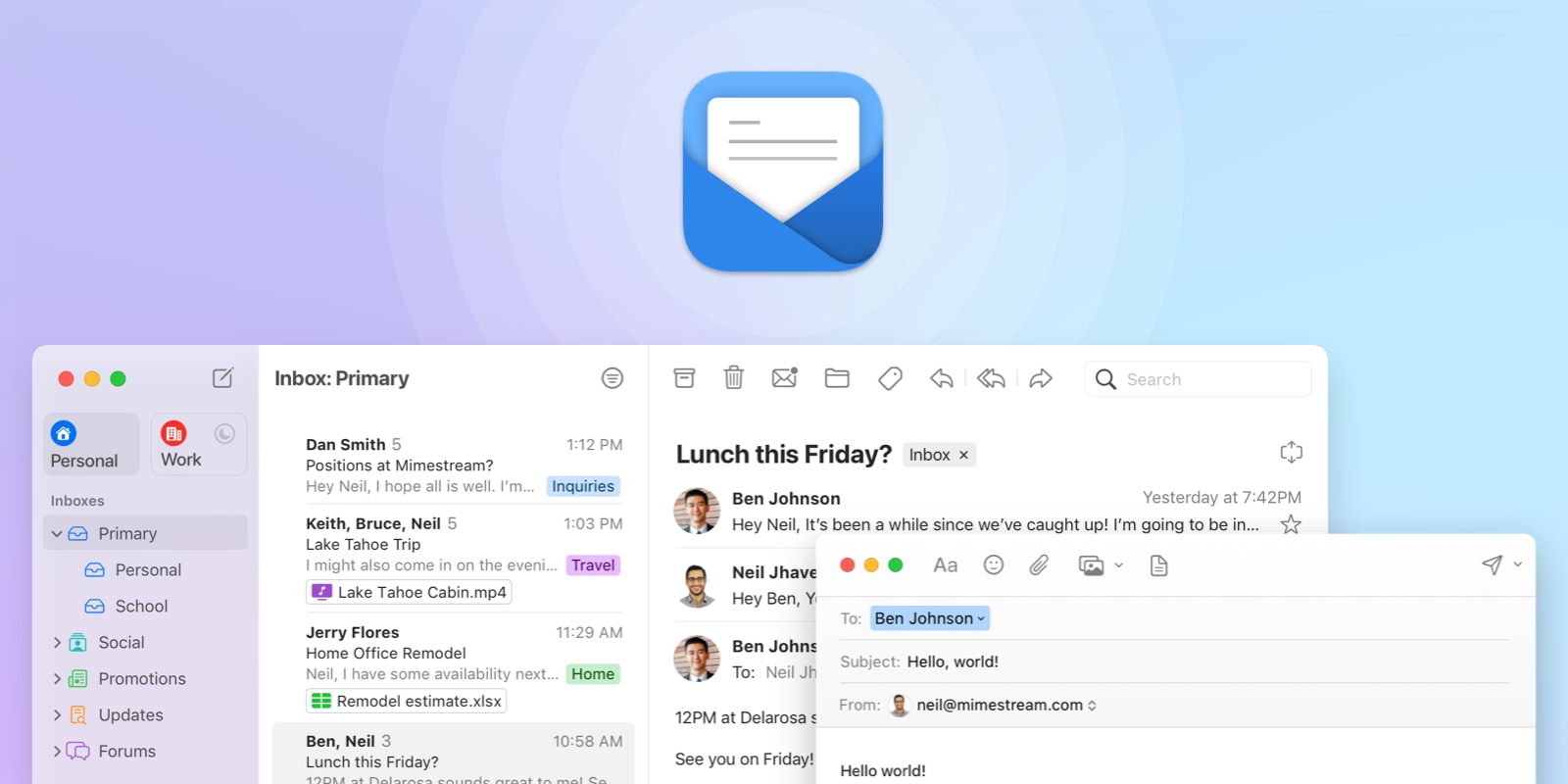

As a native app written in Swift and designed with AppKit and SwiftUI for a clean, stock appearance, Mimestream's UI will be familiar to many Apple Mail users, but the app is exclusively for accessing Gmail (support for other services is being considered).

Mimestream uses the Gmail API rather than a standard IMAP connection to support features like categorized inboxes, aliases and signatures, server-side filters, templates, labels, vacation responses, mentions, undo send, archive, and more.

Support for multiple Gmail accounts is included with a unified inbox, and the app integrates fully with macOS to offer system-level notifications, system-level Dark Mode support, keyboard shortcuts, swipe gestures, and linking email profiles to Focus Filters.

Among several new features for its 1.0 release, Mimestream also supports Profiles, so separate Gmail accounts can be divided into "Work" and "Personal," for example, and different icons and colors can be assigned to them. There's also a Mimestream menu bar item for quickly checking for unread messages without opening the app.


During its lengthy free beta phase, more than 220 updates and over 100 features were added to the app, and the startup has expanded from its original solo developer to a five-person team.

Now that beta development has ended, it's becoming a paid-for client. Mimestream 1.0 is $4.99 per month or $49.99 per year, but the annual plan is being offered at a discounted launch price of $29.99 for the first year until June 9. A free 14-day trial is also available, with no credit card required.

Of the more than 167,000 people who have been using the app in beta in macOS 12 or later, access to the app will expire on May 26, 2023, but users will be able to move onto the 14-day trial in Mimestream 1.0 to try the new features. For users on macOS 11 or 10.15, the existing beta versions will continue to work on those OS versions. Interested users can check the company's roadmap to learn about what else is planned for the app.
Tag: Gmail

This article, "Former Apple Engineer's Mimestream Gmail Client for Mac Gets Official Launch, Free Beta Access to End Tomorrow" first appeared on MacRumors.com

Discuss this article in our forums

original link


You may also be interested in this

Save up to $1,400 & g…

Experience the VIP sales event at Adorama, and unlock 5% to 7% back in rewards on your purchases. Combined with our exclusive promo code that delivers up to $300 off

Dynamic Island on iPhone …

United Airlines has become the first airline in the US to add support for Live Activities on iPhone. This allows flyers to easily track their flight’s status via a live

Apple adds Wallet app to …

The Apple Business Register has been updated to include the Wallet, which may signify some big changes will be made to the financial app in iOS 17.Apple Business RegisterThe Apple

Deals: Save on official A…

Back with all of Tuesday’s best discounts, 9to5Toys has some notable Apple offers on tap from all around the web. Leading the way, official Apple Watch Milanese Loop and Leather

Discover how to earn pass…

Macworld If you have a creative side and want to earn passive income, a YouTube channel could be just the thing. But while the potential exists to make money, success

Apple Watch Ultra falls t…

Save $98 on the Apple Watch Ultra at Amazon right now, with the robust smartwatch discounted to $701.99 while supplies last.Get the lowest price ever at Amazon.The lowest price ever

Kingston IronKey Vault Pr…

Any small external drive can back up your files, but most aren't particularly secure. Kingston's IronKey Vault Privacy 80 SSD, on the other hand, adds a passcode via its touchscreen

Apple AirTag tracks down …

Hundreds of gravesites in Texas were robbed of tens of thousands of dollars worth of bronze vases, but an Apple AirTag helped police track down the thieves. Apple AirTag 4-Pack
X

A whimsical homage to the days in black and white, celebrating the magic of Mac OS. Dress up your blog with retro, chunky-grade pixellated graphics to evoke some serious computer nostalgia. Supports a custom menu, custom header image, custom background, two footer widget areas, and a full-width page template. I updated Stuart Brown's 2011 masterpiece to meet the needs of the times, made it responsive , got dark mode, custom search widget and more.You can download it from tigaman.com, where you can also find more useful code snippets and plugins to get even more out of wordpress.
