
iOS 17 will introduce a new iPhone experience for Apple Maps that integrates detailed turn-by-turn directions to the Lock Screen without taking over the display, claims a leaker with alleged

iOS 17 will introduce a new iPhone experience for Apple Maps that integrates detailed turn-by-turn directions to the Lock Screen without taking over the display, claims a leaker with alleged insider information.
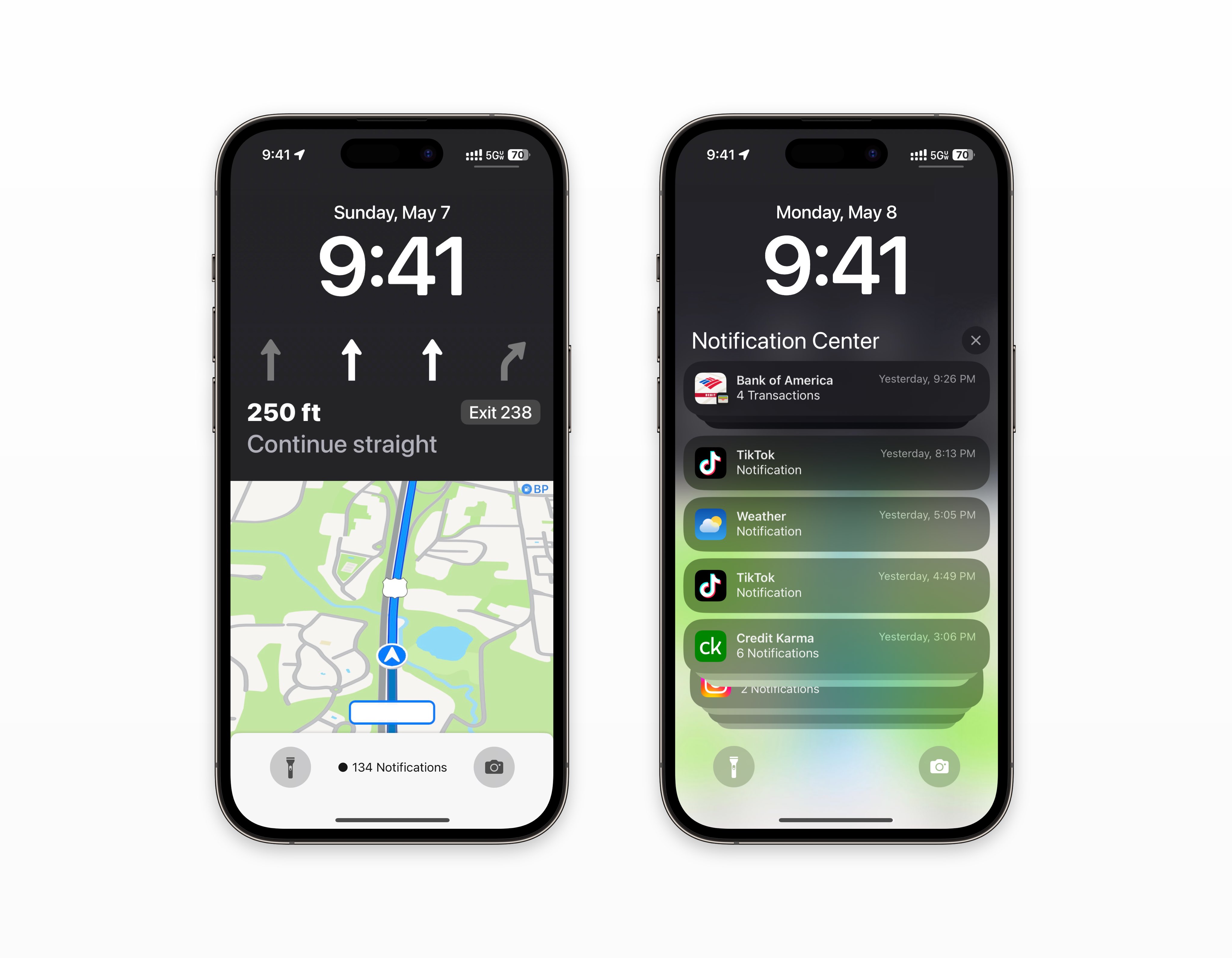
Concept render shared by Analyst941

Currently in iOS 16, when real-time Maps directions are active and the iPhone is locked, the Maps app takes over the screen and all other Lock Screen elements are hidden. According to Twitter account Analyst941, this will change in iOS 17, with Maps directions including live visual map data taking over a portion of the Lock Screen, but with app notifications and the Camera and Flashlight buttons remaining at the base of the display.

The leaker claims that app notifications will still be accessible by swiping up on the screen, while the physical act of unlocking the iPhone will remain a seamless transition. According to Analyst941, the new Maps Lock Screen interface will be coming to “all iPhones.”

This is the first time we have heard about specific changes to Maps for iOS 17, and the leaker has made several other claims about iOS 17 that have yet to be corroborated. This rumor, and others like it, should therefore be taken with a grain of salt.

Bloomberg‘s Mark Gurman has expressed doubt about Analyst941’s claims and believes that some of the information is inaccurate. We’ll know more about their accuracy in just under a month when Apple unveils ‌iOS 17‌, watchOS 10, and other updates at the June 5 WWDC keynote.

This article, "Questionable Rumor Claims iOS 17 Features Redesigned Maps Lock Screen" first appeared on MacRumors.com

Discuss this article in our forums


You may also be interested in this

iPad production in India …

iPad production in India looks likely to start soon, after Apple largely succeeded in a bid for greater financial incentives from the government. The Cupertino company rejected a previous offer,

iPhone 16: Everything you…

Macworld Now that the iPhone 15 lineup is on shelves, and now we can officially start thinking about the iPhone 16. Naturally, any rumors or leaks you see this early

FaceTime comes to Apple T…

At the WWDC keynote, Apple revealed tvOS 17, showcasing its new capabilities and enhancements including FaceTime on the Apple TV hardware for the first time.FaceTime on Apple TVDuring the event,

Your iPhone Isn’t C…

Your iPhone is a valuable tool that you rely on every day. When it doesn't charge, it can be a real inconvenience. There are a few things you can try

17% of iPhone buyers upgr…

Apple’s iPhone 14 Consumer Intelligence Research Partners (CIRP) have long tracked loyalty and platform switching among iPhone customers. CIRP assesses the percentage of iPhone owners that upgrade from another iPhone,

Here’s everything Apple i…

Macworld If you’re an Apple fan, 2023 has already been a great year. We got the new MacBook Pro with the M2 Pro and M2 Max processors, a 15-inch MacBook

Apple Wallet patent infri…

Apple and Texas firm Fintiv are preparing to hash out a potential settlement on June 8, to try and end a patent infringement lawsuit involving Apple Pay and Apple Wallet.Apple

Introducing watchOS 10, a…

Apple previewed watchOS 10, bringing Apple Watch users redesigned apps, a new Smart Stack to show relevant widgets when needed, and new watch faces.
X

A whimsical homage to the days in black and white, celebrating the magic of Mac OS. Dress up your blog with retro, chunky-grade pixellated graphics to evoke some serious computer nostalgia. Supports a custom menu, custom header image, custom background, two footer widget areas, and a full-width page template. I updated Stuart Brown's 2011 masterpiece to meet the needs of the times, made it responsive , got dark mode, custom search widget and more.You can download it from tigaman.com, where you can also find more useful code snippets and plugins to get even more out of wordpress.
