
Microsoft today announced it has completed its rollout of iPhone support for its Phone Link app on Windows 11, as spotted by The Verge. With the Phone Link app for

Microsoft today announced it has completed its rollout of iPhone support for its Phone Link app on Windows 11, as spotted by The Verge.
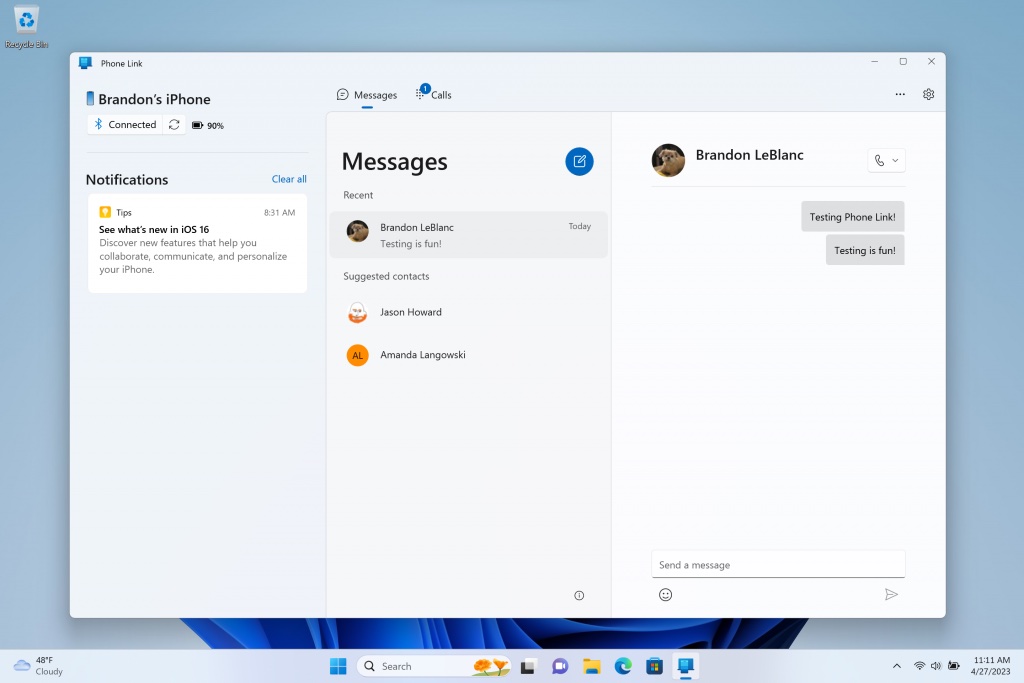


With the Phone Link app for Windows 11 and the Link to Windows app for iOS, iPhone users can make and receive phone calls, send and receive text messages, and view notifications directly on their PC. Notably, this means Windows 11 technically supports iMessage, although there are several limitations, including a lack of support for group chats, photos, videos, and conversation history beyond the current chat session.

All messages appear as gray bubbles in the Phone Link app, meaning iMessages and SMS text messages cannot be differentiated on a PC. In addition, messages are only delivered to a PC while the iPhone is connected via Bluetooth. Microsoft says the iPhone must be running iOS 14 or later, and this feature is not available for the iPad or Mac.

All in all, this is a rather clunky workaround to Apple’s lack of true iMessage support on Windows, but it’s better than nothing for iPhone users with a PC.

This article, "Microsoft Completes Rollout of Basic iMessage Support on Windows 11" first appeared on MacRumors.com

Discuss this article in our forums


You may also be interested in this

The best AI stock could v…

What’s the best AI stock? Artificial intelligence hype is off the charts, but who will win in this market in the long term? The simple answer may be Apple, as

iOS 17 beta 3: Here’s wha…

iOS 17 beta 3 is here for developers, and it includes a handful of new features and changes for iPhone users. Head below as we recap everything new in today’s

How to use Safari Profile…

Apple has added a new Profiles feature to Safari in macOS Sonoma, which is meant to be a quick way to separate work and home browsing, and to help with

Vice wag: Apple’s Vision …

“Apple’s Vision Pro Is a $3,500 Ticket to Nowhere, Janus Rose’s latest article for Vice is headlined, with the sub-headline, “A decade after Facebook bought Oculus, VR still has no

How to see iPhone battery…

Whether you’re just curious how your iPhone battery health is holding up or you’re having issues with battery life or unexpected shutdowns, it’s easy to check in iOS Settings. Below

Apple Seeds Third Beta of…

Apple today seeded the third beta of macOS Ventura 13.5 to developers for testing purposes, with the beta introduced two weeks after the release of the second beta. Registered developers

Apple’s Back to School de…

Apple’s seasonal Back to School deals promotion is expected to start later this week, according to Bloomberg’s Mark Gurman. The Apple Store Back to School deal usually includes a bundling

Check Out This Functional…

Designer Kevin Noki recently spent months creating his own homemade, functional Macintosh built from the ground up, which he dubbed the "Brewintosh." Designed to look like the Macintosh Plus, the
X

A whimsical homage to the days in black and white, celebrating the magic of Mac OS. Dress up your blog with retro, chunky-grade pixellated graphics to evoke some serious computer nostalgia. Supports a custom menu, custom header image, custom background, two footer widget areas, and a full-width page template. I updated Stuart Brown's 2011 masterpiece to meet the needs of the times, made it responsive , got dark mode, custom search widget and more.You can download it from tigaman.com, where you can also find more useful code snippets and plugins to get even more out of wordpress.
