
iOS 17 is a new ability to link notes and connect related notes together.


With just a few taps, you can create links between notes, making it easy to jump from one idea to another. Long press on a space in any note, and a new "Add Link" option can be found in the pop-up menu. Tapping it lets you link to another note by searching its title or entering a URL.

You can create an optional alternative title for the link, or just stick with the original title for clarity. Once you're done, the link appears as hyperlink-style underlined text in your note, and tapping it snaps you straight into the note you linked to.

The Notes app also offers an additional, quicker way to add links: Typing two greater-than symbols (>>) into a note invokes a list containing your six most recently modified notes, and tapping one instantly adds a link to that note.

The same feature can be found in iPadOS 17 and macOS Sonoma, and it means you can now create wiki-style collections of interlinked notes, allowing you to organize your thoughts or discover new connections and associations between ideas.

‌iOS 17‌, iPadOS 17, and macOS Sonoma are available in developer beta versions now and will be officially released in the fall.
Related Roundups: iOS 17, WWDC 2023
Tag: Apple Notes
Related Forum: Apple, Inc and Tech Industry

This article, "Apple's Notes App Now Lets You Create Links Between Notes" first appeared on MacRumors.com

Discuss this article in our forums
iOS 17 is a new ability to link notes and connect related notes together.


With just a few taps, you can create links between notes, making it easy to jump from one idea to another. Long press on a space in any note, and a new "Add Link" option can be found in the pop-up menu. Tapping it lets you link to another note by searching its title or entering a URL.

You can create an optional alternative title for the link, or just stick with the original title for clarity. Once you're done, the link appears as hyperlink-style underlined text in your note, and tapping it snaps you straight into the note you linked to.

The Notes app also offers an additional, quicker way to add links: Typing two greater-than symbols (>>) into a note invokes a list containing your six most recently modified notes, and tapping one instantly adds a link to that note.

The same feature can be found in iPadOS 17 and macOS Sonoma, and it means you can now create wiki-style collections of interlinked notes, allowing you to organize your thoughts or discover new connections and associations between ideas.

‌iOS 17‌, iPadOS 17, and macOS Sonoma are available in developer beta versions now and will be officially released in the fall.
Related Roundups: iOS 17, WWDC 2023
Tag: Apple Notes
Related Forum: Apple, Inc and Tech Industry

This article, "Apple's Notes App Now Lets You Create Links Between Notes" first appeared on MacRumors.com

Discuss this article in our forums
iOS 17 is a new ability to link notes and connect related notes together.


With just a few taps, you can create links between notes, making it easy to jump from one idea to another. Long press on a space in any note, and a new "Add Link" option can be found in the pop-up menu. Tapping it lets you link to another note by searching its title or entering a URL.

You can create an optional alternative title for the link, or just stick with the original title for clarity. Once you're done, the link appears as hyperlink-style underlined text in your note, and tapping it snaps you straight into the note you linked to.

The Notes app also offers an additional, quicker way to add links: Typing two greater-than symbols (>>) into a note invokes a list containing your six most recently modified notes, and tapping one instantly adds a link to that note.

The same feature can be found in iPadOS 17 and macOS Sonoma, and it means you can now create wiki-style collections of interlinked notes, allowing you to organize your thoughts or discover new connections and associations between ideas.

‌iOS 17‌, iPadOS 17, and macOS Sonoma are available in developer beta versions now and will be officially released in the fall.
Related Roundups: iOS 17, WWDC 2023

This article, "Apple's Notes App Now Lets You Create Links Between Notes" first appeared on MacRumors.com

Discuss this article in our forums
iOS 17 is a new ability to link notes and connect related notes together.


With just a few taps, you can create links between notes, making it easy to jump from one idea to another. Long press on a space in any note, and a new "Add Link" option can be found in the pop-up menu. Tapping it lets you link to another note by searching its title or entering a URL.

You can create an optional alternative title for the link, or just stick with the original title for clarity. Once you're done, the link appears as hyperlink-style underlined text in your note, and tapping it snaps you straight into the note you linked to.

The Notes app also offers an additional, quicker way to add links: Typing two greater-than symbols (>>) into a note invokes a list containing your six most recently modified notes, and tapping one instantly adds a link to that note.

The same feature can be found in iPadOS 17 and macOS Sonoma, and it means you can now create wiki-style collections of interlinked notes, allowing you to organize your thoughts or discover new connections and associations between ideas.

‌iOS 17‌, iPadOS 17, and macOS Sonoma are available in developer beta versions now and will be officially released in the fall.
Related Roundups: iOS 17, WWDC 2023

This article, "Apple's Notes App Now Lets You Create Links Between Notes" first appeared on MacRumors.com

Discuss this article in our forums
Apple's stock Notes app got hardly any screen time during yesterday's WWDC keynote, but one powerful addition to the app in iOS 17 is a new ability to link notes

Apple’s stock Notes app got hardly any screen time during yesterday’s WWDC keynote, but one powerful addition to the app in iOS 17 is a new ability to link notes and connect related notes together.
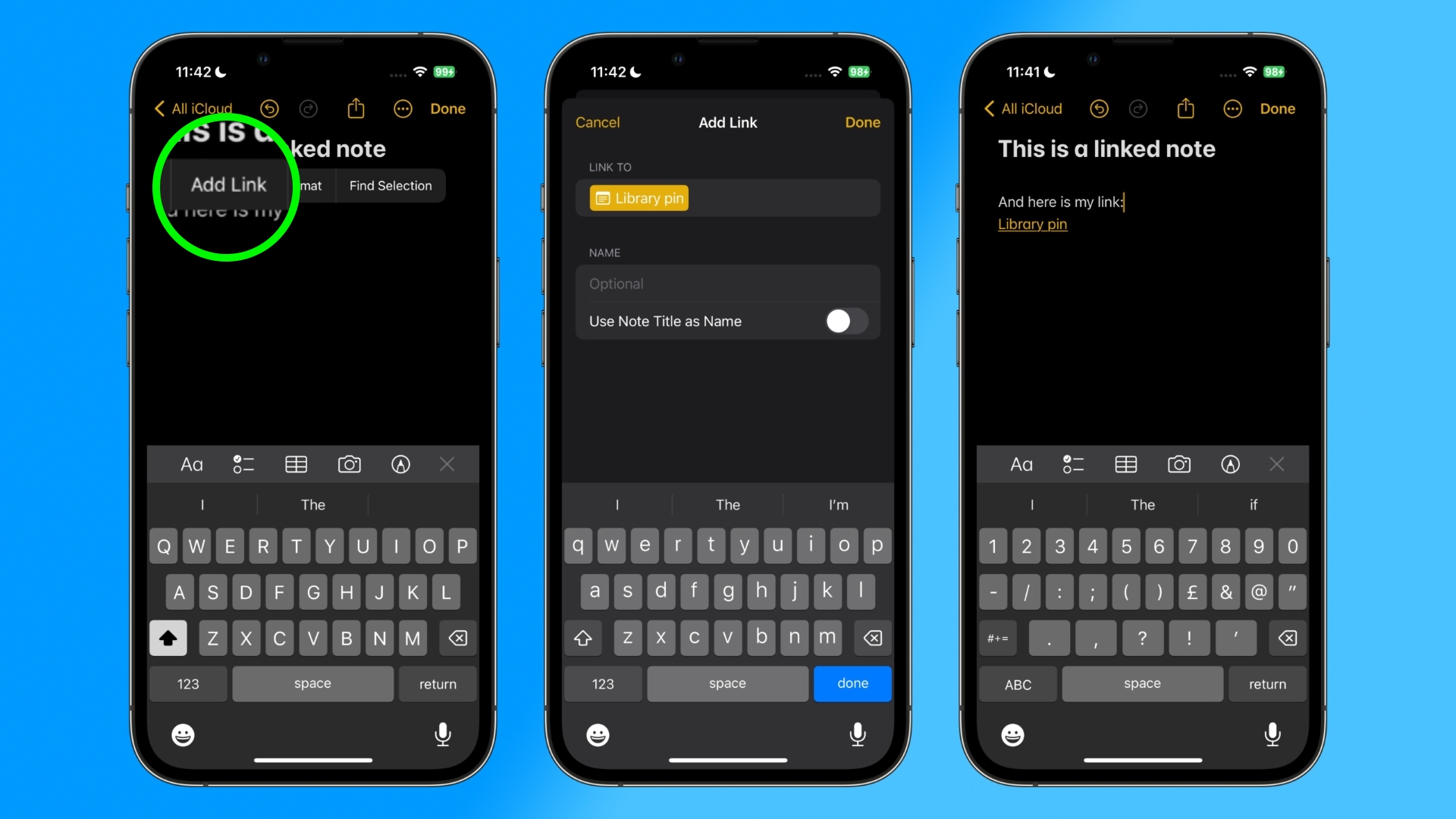


With just a few taps, you can create links between notes, making it easy to jump from one idea to another. Long press on a space in any note, and a new “Add Link” option can be found in the pop-up menu. Tapping it lets you link to another note by searching its title or entering a URL.

You can create an optional alternative title for the link, or just stick with the original title for clarity. Once you’re done, the link appears as hyperlink-style underlined text in your note, and tapping it snaps you straight into the note you linked to.

The Notes app also offers an additional, quicker way to add links: Typing two greater-than symbols (>>) into a note invokes a list containing your six most recently modified notes, and tapping one instantly adds a link to that note.

The same feature can be found in iPadOS 17 and macOS Sonoma, and it means you can now create wiki-style collections of interlinked notes, allowing you to organize your thoughts or discover new connections and associations between ideas.

‌iOS 17‌, iPadOS 17, and macOS Sonoma are available in developer beta versions now and will be officially released in the fall.

Related Roundups: iOS 17, WWDC 2023

This article, "Apple's Notes App Now Lets You Create Links Between Notes" first appeared on MacRumors.com

Discuss this article in our forums


You may also be interested in this

Never run out of storage …

Macworld We all need plenty of digital storage space, and we need it to take up as little room as possible. This 1TB portable external hard drive can store all

Apple’s high-yield saving…

Apple Card Savings Account debuted two weeks ago, and it seems to be off to a hot start. A new report from Forbes today says that Apple Card Savings Account

MacBooks, Mac Studio, Mac…

B&H Photo continues its aggressive discounting of Apple products this week with incredible deals on laptops, desktops, and even Apple TVs. Save up to $1,700 on the hottest gear available

How to use Safari Profile…

Apple has added a new Profiles feature to Safari in macOS Sonoma, which is meant to be a quick way to separate work and home browsing, and to help with

Apple releases iOS 16.5.1

Apple on Wednesday released iOS 16.5.1 which provides important security fixes and is recommended for all users. Apple’s iOS 16.5.1 is now available iOS 16.5.1 also fixes an issue that

How to protect your compa…

It’s a beautiful Fall Friday afternoon and the IT team is ready to end another week of work with a happy hour at a new brewery across the street from

Craig Federighi outlines …

Along with the software and hardware announcements at WWDC, Apple executive Craig Federighi emphasized the company's ongoing commitment to privacy, exemplified by features such as "Check In," and why he

iOS 18: Everything We Kno…

X

A whimsical homage to the days in black and white, celebrating the magic of Mac OS. Dress up your blog with retro, chunky-grade pixellated graphics to evoke some serious computer nostalgia. Supports a custom menu, custom header image, custom background, two footer widget areas, and a full-width page template. I updated Stuart Brown's 2011 masterpiece to meet the needs of the times, made it responsive , got dark mode, custom search widget and more.You can download it from tigaman.com, where you can also find more useful code snippets and plugins to get even more out of wordpress.