
iOS 17 has introduced a number of changes across its stock apps, including the Weather app. With the update, there are some minor changes to the functionality and design of the app.
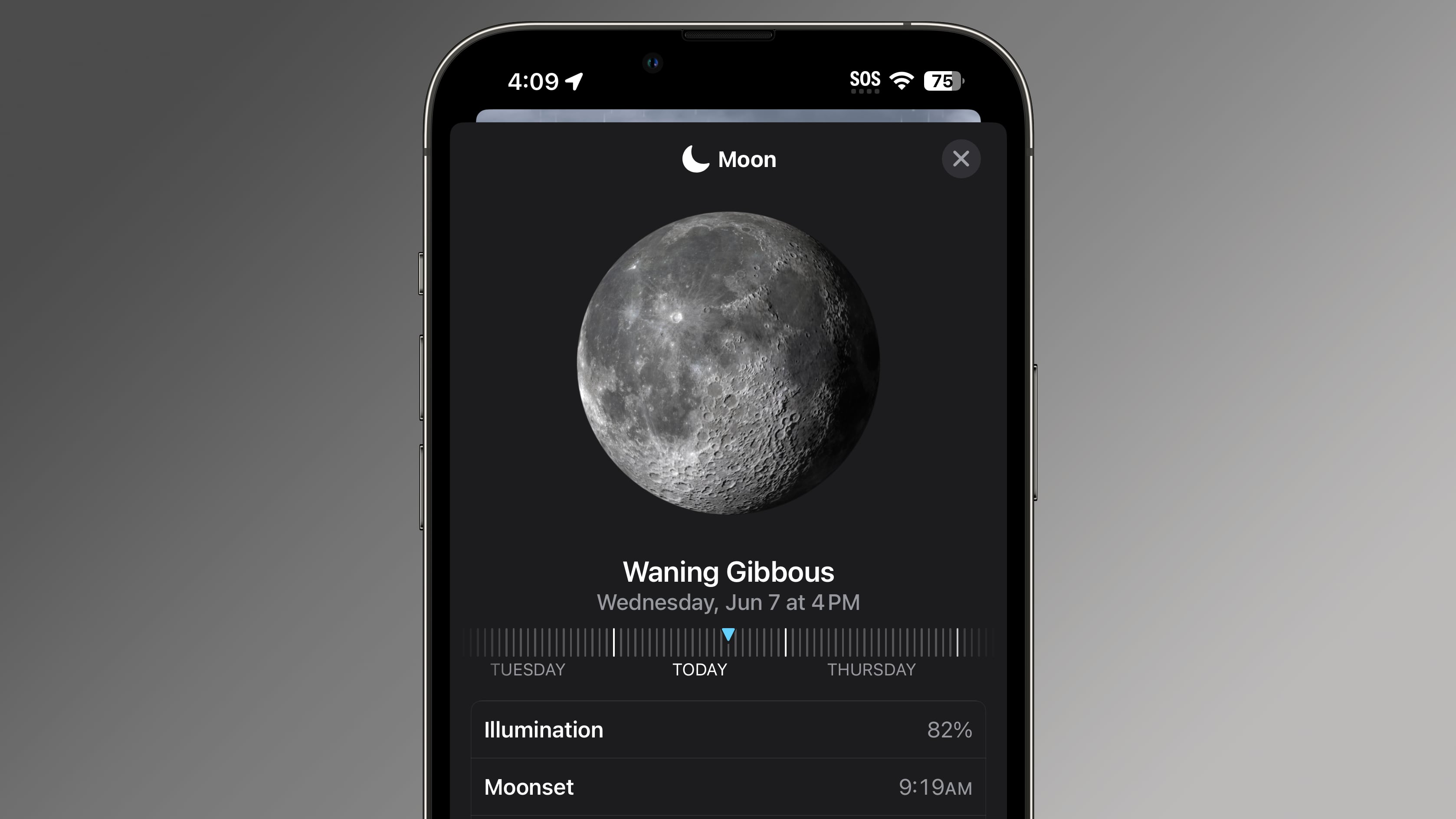

The biggest update is an option to see yesterday's weather in the 10-day forecast. In iOS 16, you can only view the current day and the next 10 days, but in ‌iOS 17‌, you can view current day, the next 10 days, and the weather from the previous day.
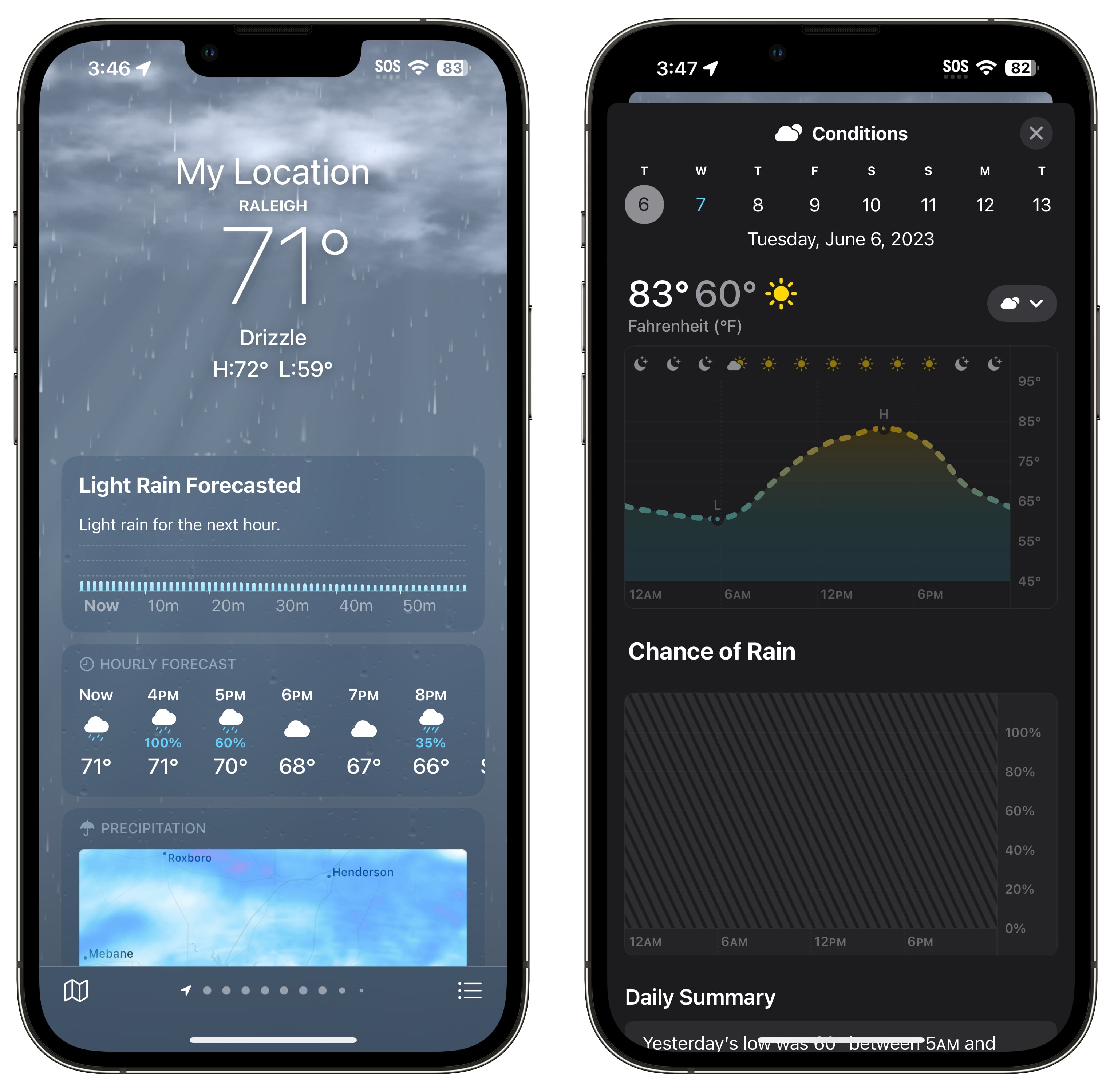

10-day forecasts show the chance of rain each day and offer a "daily summary" instead of a forecast.

The main Weather interface has been updated with large "My Location" text for the weather forecast in at your current location, with the city underneath. In ‌iOS 16‌, it simply said the city, which could be confusing when navigating through multiple saved cities.

Some of the weather modules have been relocated, with rain and hourly forecasts shown first. News and alerts are shown lower in the app, and there is a new "Averages" weather module that displays how the current temperature deviates from the historical average on that day.
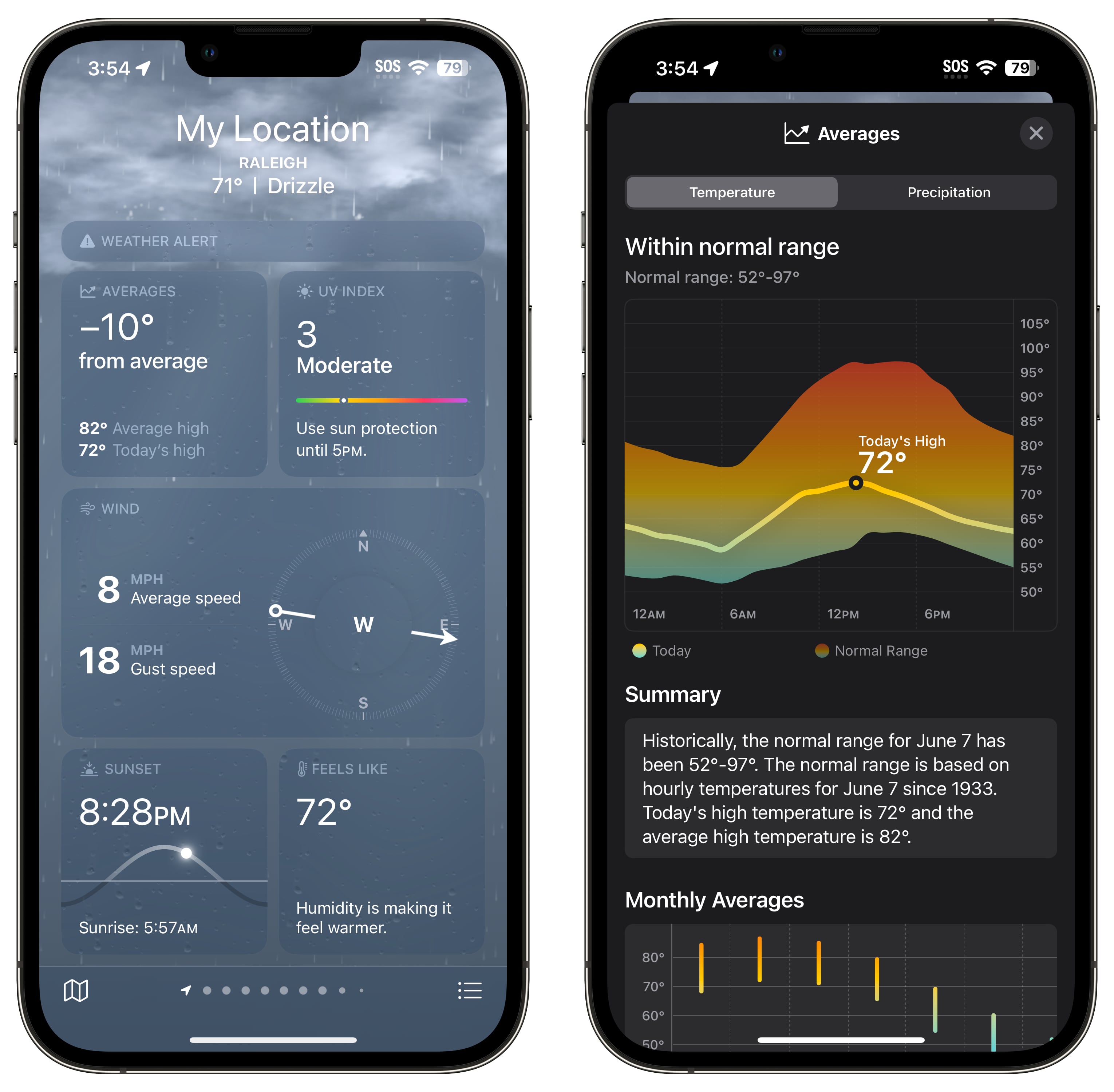

Apple has added a moon module that shows the current status of the moon, the time until the next full moon, moonset and moonrise times, and a moon calendar, plus the wind speed module is a larger size that shows information on gust speed at a glance. The wind module also displays a daily comparison and a wind scale.
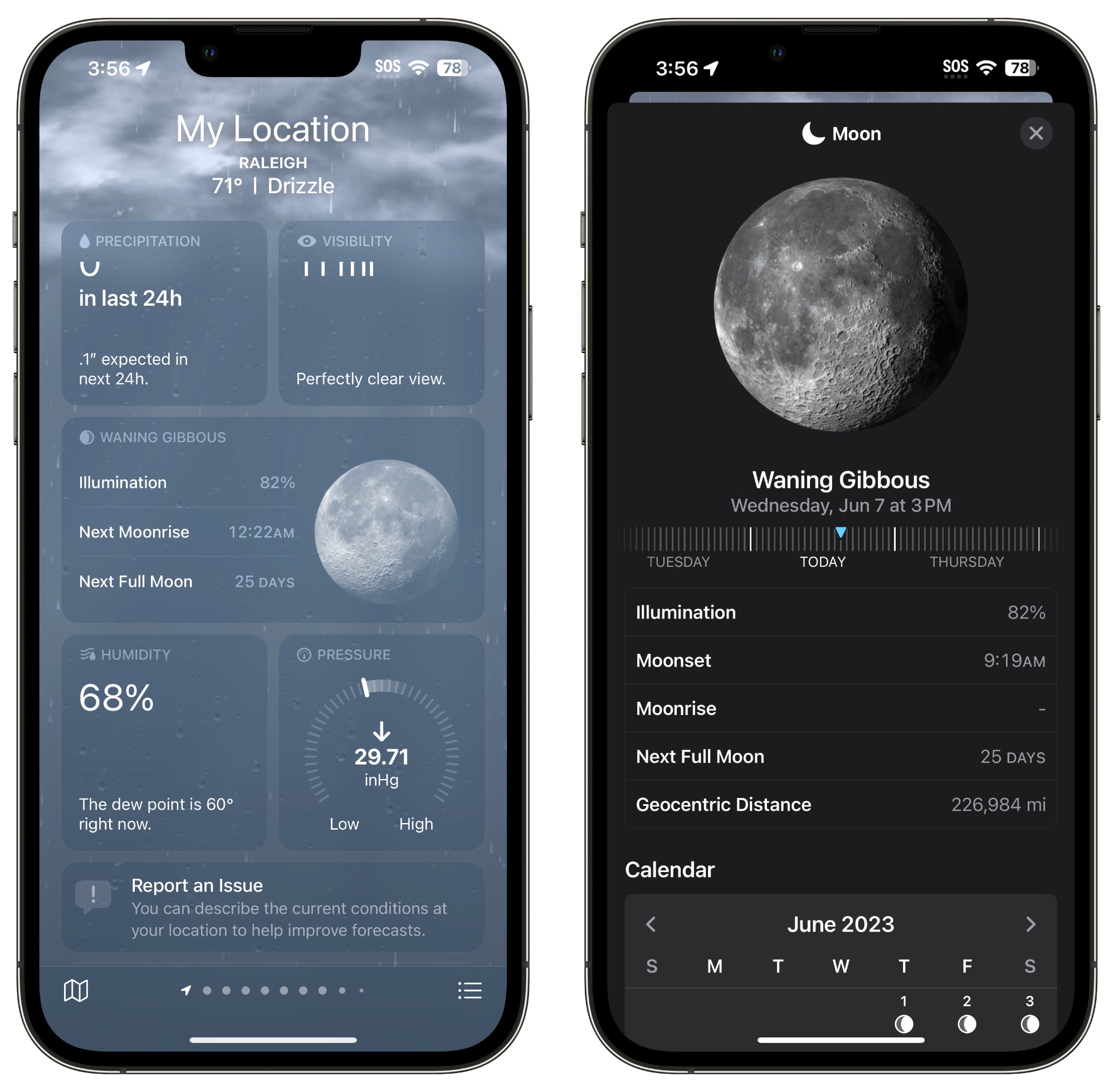

Daily comparisons are included for UV index, humidity, the "Feels Like" index, and visibility, and there are options to change units for wind speed, precipitation, pressure, and distance.

Apple does not appear to have made any changes to the data that is used for the Weather app, despite complaints of its inaccuracy following the incorporation of the Dark Sky app.
Related Roundup: iOS 17

This article, "Here's What's New in the iOS 17 Weather App" first appeared on MacRumors.com

Discuss this article in our forums

iOS 17 has introduced a number of changes across its stock apps, including the Weather app. With the update, there are some minor changes to the functionality and design of the app.


The biggest update is an option to see yesterday's weather in the 10-day forecast. In iOS 16, you can only view the current day and the next 10 days, but in ‌iOS 17‌, you can view current day, the next 10 days, and the weather from the previous day.


10-day forecasts show the chance of rain each day and offer a "daily summary" instead of a forecast.

The main Weather interface has been updated with large "My Location" text for the weather forecast in at your current location, with the city underneath. In ‌iOS 16‌, it simply said the city, which could be confusing when navigating through multiple saved cities.

Some of the weather modules have been relocated, with rain and hourly forecasts shown first. News and alerts are shown lower in the app, and there is a new "Averages" weather module that displays how the current temperature deviates from the historical average on that day.


Apple has added a moon module that shows the current status of the moon, the time until the next full moon, moonset and moonrise times, and a moon calendar, plus the wind speed module is a larger size that shows information on gust speed at a glance. The wind module also displays a daily comparison and a wind scale.


Daily comparisons are included for UV index, humidity, the "Feels Like" index, and visibility, and there are options to change units for wind speed, precipitation, pressure, and distance.

Apple does not appear to have made any changes to the data that is used for the Weather app, despite complaints of its inaccuracy following the incorporation of the Dark Sky app.
Related Roundup: iOS 17

This article, "Here's What's New in the iOS 17 Weather App" first appeared on MacRumors.com

Discuss this article in our forums

iOS 17 has introduced a number of changes across its stock apps, including the Weather app. With the update, there are some minor changes to the functionality and design of the app.


The biggest update is an option to see yesterday's weather in the 10-day forecast. In iOS 16, you can only view the current day and the next 10 days, but in ‌iOS 17‌, you can view current day, the next 10 days, and the weather from the previous day.


10-day forecasts show the chance of rain each day and offer a "daily summary" instead of a forecast.

The main Weather interface has been updated with large "My Location" text for the weather forecast in at your current location, with the city underneath. In ‌iOS 16‌, it simply said the city, which could be confusing when navigating through multiple saved cities.

Some of the weather modules have been relocated, with rain and hourly forecasts shown first. News and alerts are shown lower in the app, and there is a new "Averages" weather module that displays how the current temperature deviates from the historical average on that day.


Apple has added a moon module that shows the current status of the moon, the time until the next full moon, moonset and moonrise times, and a moon calendar, plus the wind speed module is a larger size that shows information on gust speed at a glance. The wind module also displays a daily comparison and a wind scale.


Daily comparisons are included for UV index, humidity, the "Feels Like" index, and visibility, and there are options to change units for wind speed, precipitation, pressure, and distance.

Apple does not appear to have made any changes to the data that is used for the Weather app, despite complaints of its inaccuracy following the incorporation of the Dark Sky app.
Related Roundup: iOS 17

This article, "Here's What's New in the iOS 17 Weather App" first appeared on MacRumors.com

Discuss this article in our forums
iOS 17 has introduced a number of changes across its stock apps, including the Weather app. With the update, there are some minor changes to the functionality and design of the app.


The biggest update is an option to see yesterday's weather in the 10-day forecast. In iOS 16, you can only view the current day and the next 10 days, but in ‌iOS 17‌, you can view current day, the next 10 days, and the weather from the previous day.


10-day forecasts show the chance of rain each day and offer a "daily summary" instead of a forecast.

The main Weather interface has been updated with large "My Location" text for the weather forecast in at your current location, with the city underneath. In ‌iOS 16‌, it simply said the city, which could be confusing when navigating through multiple saved cities.

Some of the weather modules have been relocated, with rain and hourly forecasts shown first. News and alerts are shown lower in the app, and there is a new "Averages" weather module that displays how the current temperature deviates from the historical average on that day.


Apple has added a moon module that shows the current status of the moon, the time until the next full moon, moonset and moonrise times, and a moon calendar, plus the wind speed module is a larger size that shows information on gust speed at a glance. The wind module also displays a daily comparison and a wind scale.


Daily comparisons are included for UV index, humidity, the "Feels Like" index, and visibility, and there are options to change units for wind speed, precipitation, pressure, and distance.

Apple does not appear to have made any changes to the data that is used for the Weather app, despite complaints of its inaccuracy following the incorporation of the Dark Sky app.
Related Roundup: iOS 17

This article, "Here's What's New in the iOS 17 Weather App" first appeared on MacRumors.com

Discuss this article in our forums
Apple in iOS 17 has introduced a number of changes across its stock apps, including the Weather app. With the update, there are some minor changes to the functionality and

Apple in iOS 17 has introduced a number of changes across its stock apps, including the Weather app. With the update, there are some minor changes to the functionality and design of the app.


The biggest update is an option to see yesterday’s weather in the 10-day forecast. In iOS 16, you can only view the current day and the next 10 days, but in ‌iOS 17‌, you can view current day, the next 10 days, and the weather from the previous day.


10-day forecasts show the chance of rain each day and offer a “daily summary” instead of a forecast.

The main Weather interface has been updated with large “My Location” text for the weather forecast in at your current location, with the city underneath. In ‌iOS 16‌, it simply said the city, which could be confusing when navigating through multiple saved cities.

Some of the weather modules have been relocated, with rain and hourly forecasts shown first. News and alerts are shown lower in the app, and there is a new “Averages” weather module that displays how the current temperature deviates from the historical average on that day.


Apple has added a moon module that shows the current status of the moon, the time until the next full moon, moonset and moonrise times, and a moon calendar, plus the wind speed module is a larger size that shows information on gust speed at a glance. The wind module also displays a daily comparison and a wind scale.


Daily comparisons are included for UV index, humidity, the “Feels Like” index, and visibility, and there are options to change units for wind speed, precipitation, pressure, and distance.

Apple does not appear to have made any changes to the data that is used for the Weather app, despite complaints of its inaccuracy following the incorporation of the Dark Sky app.

Related Roundup: iOS 17

This article, "Here's What's New in the iOS 17 Weather App" first appeared on MacRumors.com

Discuss this article in our forums


You may also be interested in this

Apple threatens to remove…

Apple has already made it known that it's not a fan of in-app cryptocurrency transfers, and now it's banging that drum again for a decentralized social messaging app backed by

Apple Likely Planning to …

Apple is likely to skip an M3 version of the Mac mini in favor of a bigger update with M4 chips toward the end of the year, according to Bloomberg's

Visual Look Up is getting…

Macworld When Apple launched iOS 15 back in 2021, the updated software included a new feature in Photos called Visual Look Up. This neat AI-powered tool can recognize animals, plants,

Here Are All the M3 Macs …

Earlier this week, Apple announced new 13-inch and 15-inch MacBook Air models, the first Mac updates of the year featuring M3 series chips. But there are other Macs in Apple's

Get an iPad Air bundled w…

Macworld If you like mobile tech but wish it wasn’t so expensive, then this is an offer you should definitely pay attention to. That’s because you can pick up an

Everything Apple Announce…

Apple today held its "Awe Dropping" fall event to debut new iPhone 17 models, the super thin iPhone Air, the Apple Watch Series 11 and Ultra 3, new AirPods 3,

Apple and 4-H are bringin…

4-H has expanded to include greater access to technology, thanks in part to support from Apple and its Community Education Initiative.

Apple Releases Second Stu…

Apple today released a second Studio Display 17 firmware beta, with the update coming two weeks after the release of the first beta. All Studio Display models are able to
X

A whimsical homage to the days in black and white, celebrating the magic of Mac OS. Dress up your blog with retro, chunky-grade pixellated graphics to evoke some serious computer nostalgia. Supports a custom menu, custom header image, custom background, two footer widget areas, and a full-width page template. I updated Stuart Brown's 2011 masterpiece to meet the needs of the times, made it responsive , got dark mode, custom search widget and more.You can download it from tigaman.com, where you can also find more useful code snippets and plugins to get even more out of wordpress.