
Apple has now released the first iOS 17 beta to developers, and in a first for the company, it is also giving non-developers the opportunity to download the beta on their iPhones for free. Keep reading to learn how it’s done.
In years past when Apple has announced a major new operating system update, the first wave of betas has officially only been available to download if you are a paying subscriber to Apple’s Developer Program, which costs $99 a year. Public betas then become available to users enrolled in Apple’s Public Beta Software Program after a delay of a few days or weeks after the developer beta has been released. However, this year you don’t have to wait for the public beta to be one of the first to try out iOS 17.
In an unexpected change for 2023, anyone who signs in to Apple’s developer account website with their Apple ID gets access to developer beta releases as well, even if they are not a paying member of Apple’s Developer Program. This means anyone with an Apple ID can download and install the iOS 17, iPadOS 17, and macOS Sonoma betas without waiting for the public betas to launch.
Should I Install iOS 17 Developer Beta?
Before downloading the update, it’s worth noting that Apple does not recommend installing the iOS 17 Beta on your main iPhone, so if you have a secondary device, use that. This is beta software, which means there are often bugs and issues that pop up that can prevent software from working properly or cause other problems.
With that caveat in mind, the following steps show you how to get iOS 17 betas on your iPhone. Note that iOS 17 is compatible with the iPhone XS and newer, meaning that support has been dropped for the iPhone 8, iPhone 8 Plus, and iPhone X. Be sure to back up your iOS device before installing the software using the method described here, otherwise you won’t be able to revert back to iOS 16 if things go wrong.
How to Download iOS 17 Developer Beta
As of writing, the option to download and install the iOS 17 Developer Beta is also available for users who have previously enrolled on Apple’s Beta Software Program, and yet the program is officially only supposed to be for Public Betas. This suggests the option is a bug and Apple will likely remove it. But until that happens, if you’re currently enrolled to receive Public Betas, you can skip to step 6.
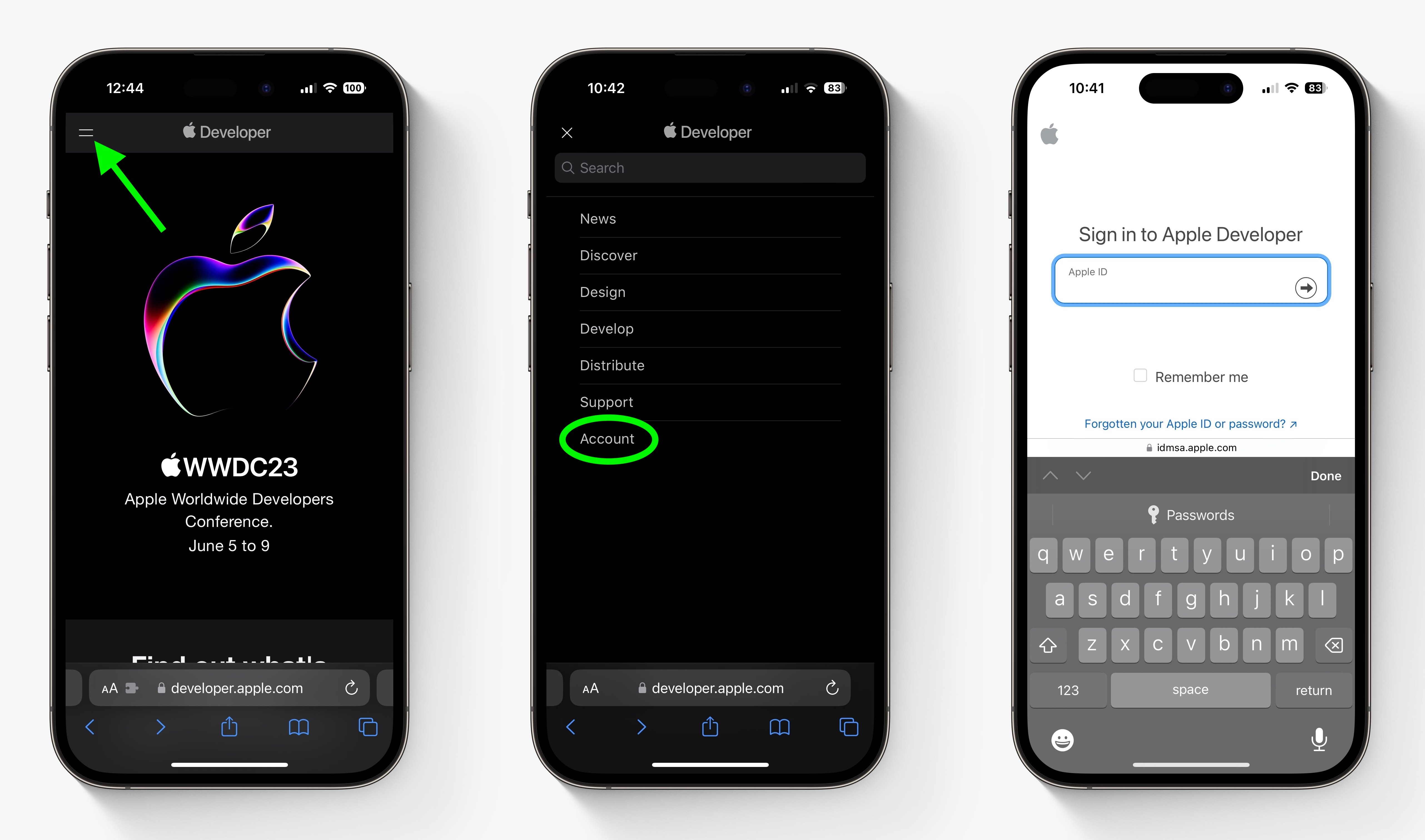
- Open Safari on your iPhone and visit developer.apple.com.
- Tap the menu icon in the top-left corner of the page, then tap Account.
- Under “Sign in to Apple Developer,” enter and submit your Apple ID and password using the arrow buttons, then enter the two-factor authentication code sent to your devices.
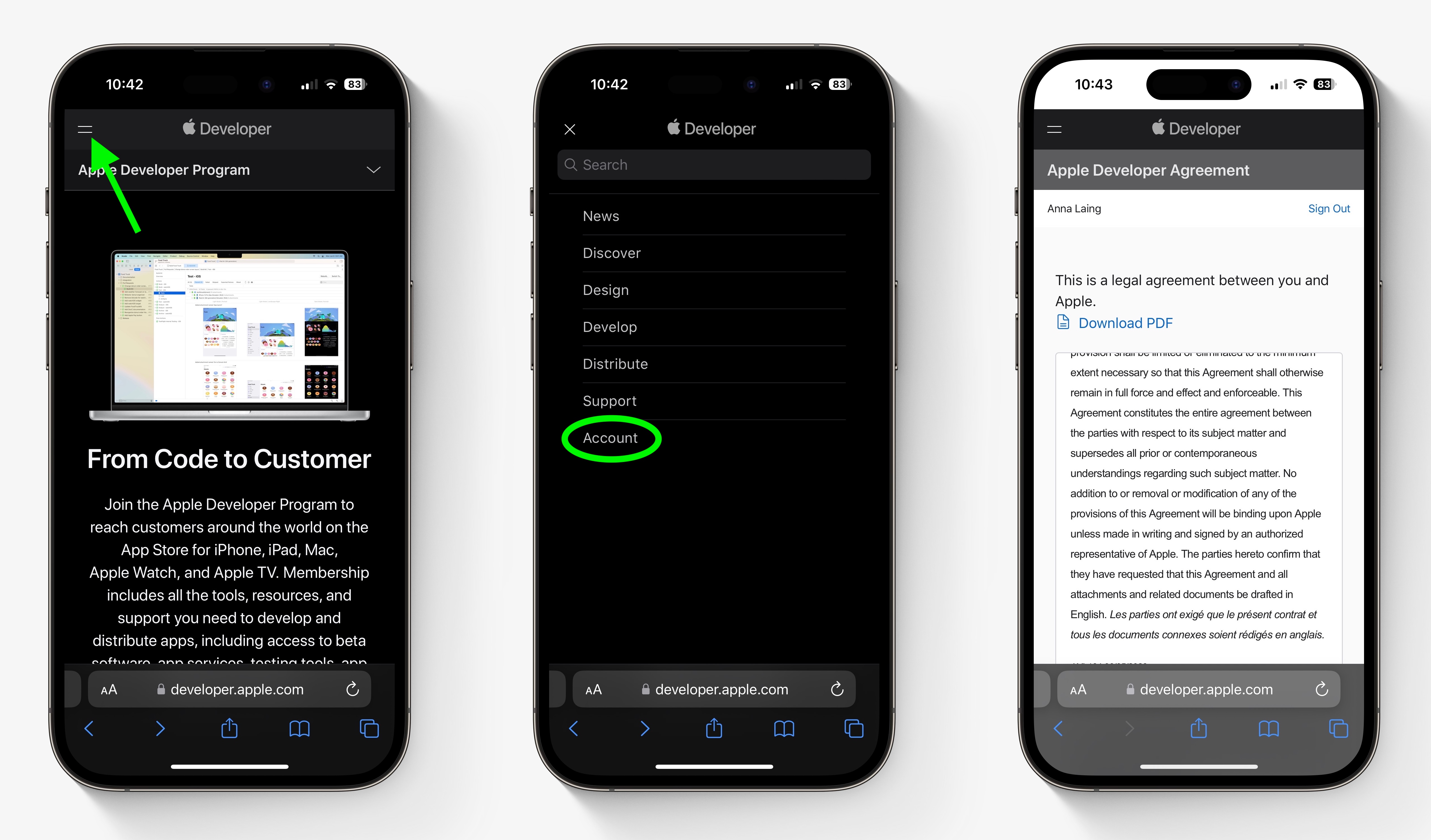
- Tap the top-left menu icon again, then tap Account.
- Accept the legal terms of the Apple Developer Agreement by scrolling down the page, checking the box, and tapping I Agree.
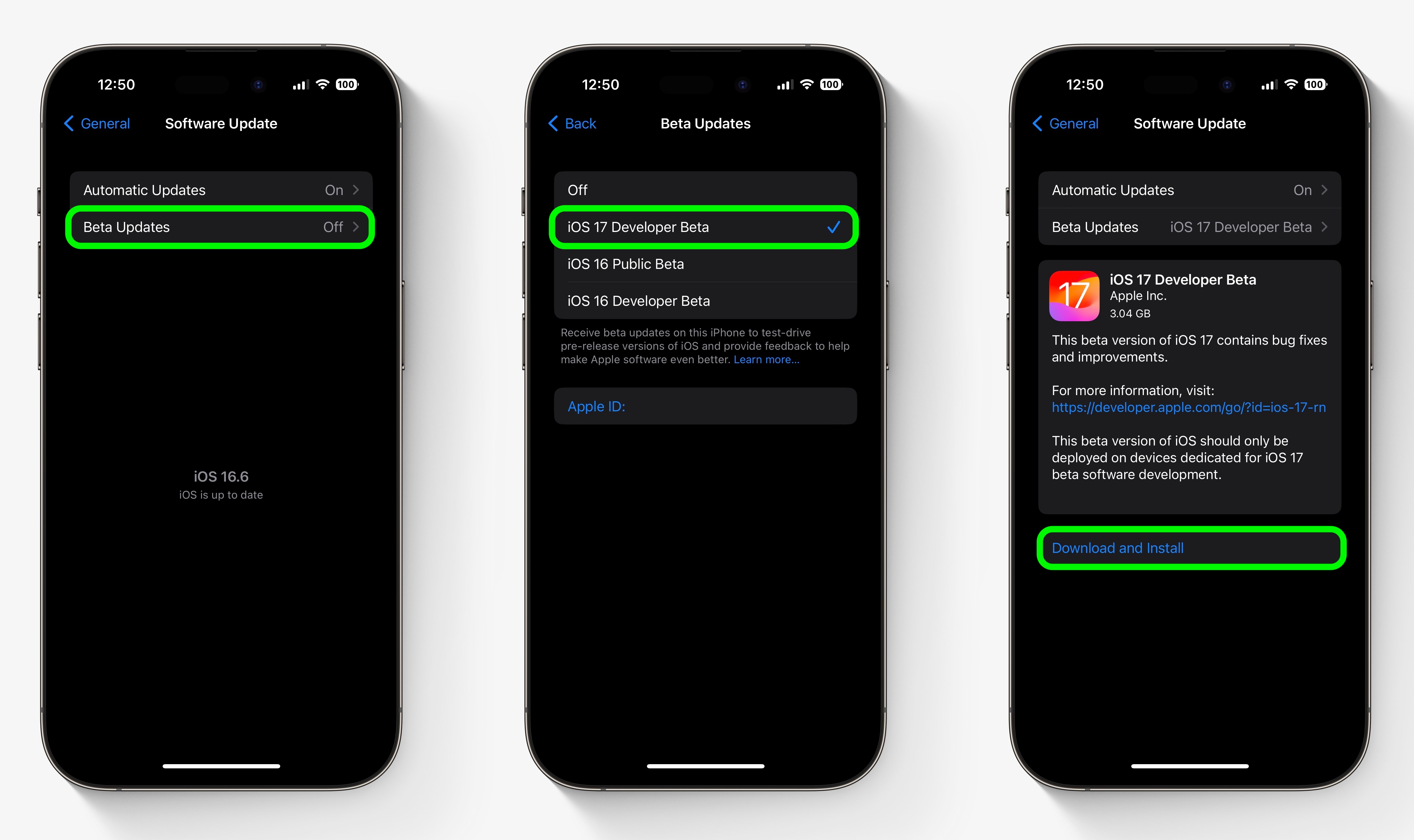
- Make sure your iPhone is running iOS 16.4 or later by going to Settings -> General -> Software Update. If it is, and you have just completed steps 1-5 to register a developer account, restart your iPhone. If it isn’t, download and install the latest update to your device, then wait for it to restart.
- Now go back to Settings -> General -> Software Update.
- Tap Beta Updates. If you don’t see the option, try switching off Download iOS Updates (Automatic Updates -> Download iOS Updates), then tap Back and it should appear.
- Select iOS 17 Developer Beta in the list, then tap Back.
- Wait for the Software Update screen to check Apple’s servers. When the iOS 17 Developer Beta appears, tap Download and Install, then follow the instructions and wait for installation to complete.
iOS 17 Features
iOS 17 is a major update that introduces a customized look for each person that calls, with the person who places the call able to customize their look. With StandBy, an iPhone placed horizontally turns into a little home hub that displays information like the calendar, time, home controls, and more, and Live Activities can be displayed in full screen too.
Widgets on the Home Screen are interactive, so you can do things like check off an item on a to-do list or turn off the lights without having to open an app. AirDrop has been improved and there’s a NameDrop function for sharing contacts quickly, plus you can hold two iPhones together to start a SharePlay session. SharePlay also now works with CarPlay so passengers can play their music in the car too.
Other new features include a journaling app coming later this year, AirPlay in select hotel rooms, improvements to AirPods Pro 2 thanks to a new Adaptive Audio feature, offline Maps, Siri that does not require the “Hey” activation, and improvements to search and spotlight.
iOS 17 is expected to get its official public release in the fall.
This article, "How to Install the iOS 17 Developer Beta on Your iPhone for Free" first appeared on MacRumors.com
Discuss this article in our forums

