
Apple has been improving password management over the last several years to encourage people to use separate, hard-to-guess passwords for each site, and the latest improvement adds password sharing. In

Apple has been improving password management over the last several years to encourage people to use separate, hard-to-guess passwords for each site, and the latest improvement adds password sharing.
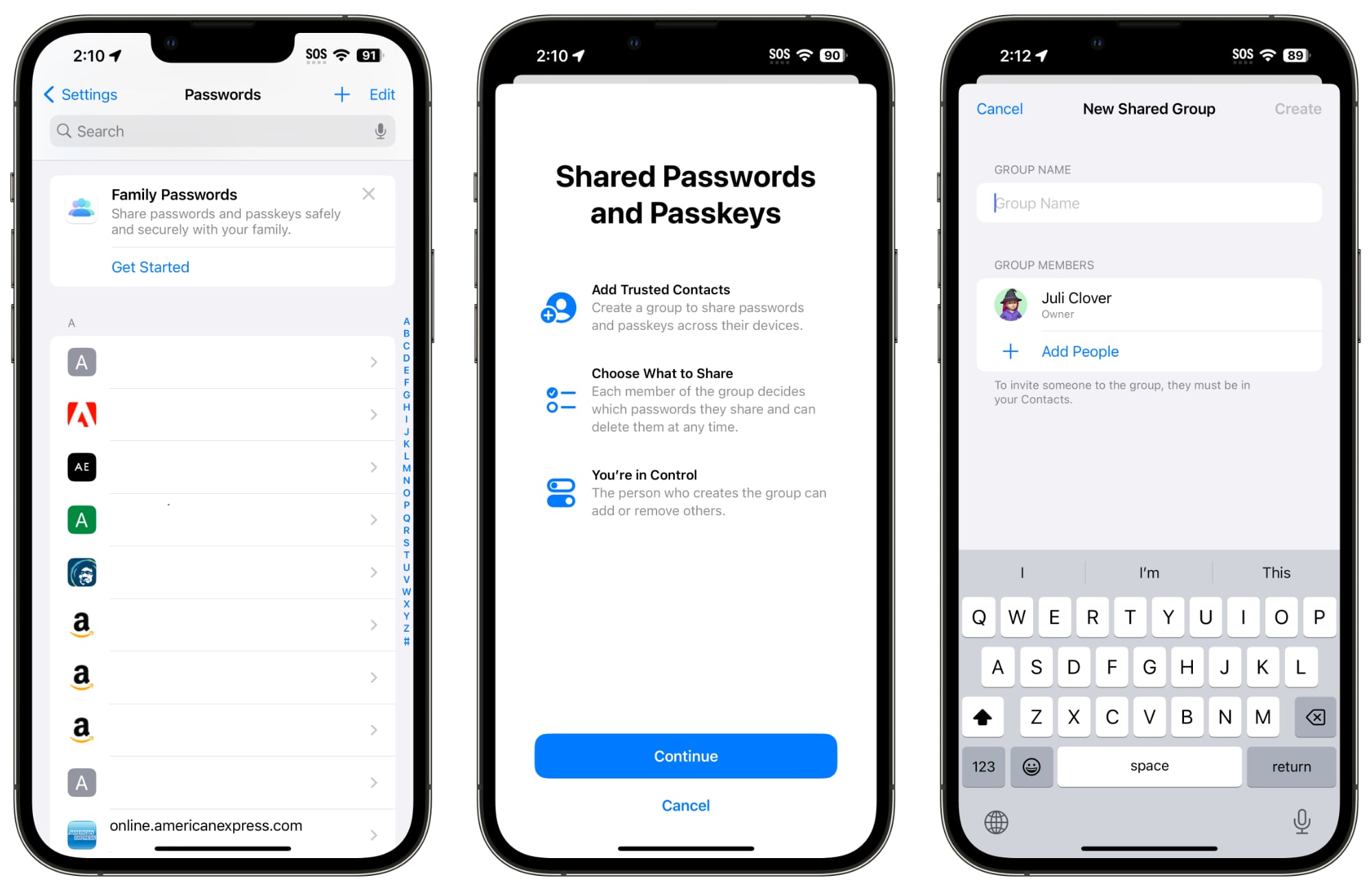


In iOS 17, Family Passwords is designed to let you share your passwords and passkeys with friends and family members. Using the Passwords section of the Settings app, you can create a group of people to share passwords with.

Using a setup process, you can select trusted contacts to share information with. Each person who is in the group can select passwords and passkeys to share with others. You can, for example, share passwords to streaming services and online bill paying sites without having to share the password for your bank.

You can select specific passwords to share after the group is created, and then people in the group can upload their own. Each participant can edit and add passwords, with changes synced across the entire group. There are options to create multiple groups, so you can have a group with a spouse and children and then a separate group with just a spouse, or a group of roommates and friends.

The person who created the group can add and delete people at will, and the entire group can be deleted as well. Adding people to a group requires the person to be in your Contact list, and everyone also must be running the ‌iOS 17‌ update.

Like regular passwords, shared passwords are stored in iCloud Keychain and are end-to-end encrypted. Passkeys, Apple’s device-verified alternative to passwords, can also be shared.

The addition of multi-user password sharing brings Apple’s free built-in Password functionality closer to third-party apps like 1Password and LastPass, as there was previously no simple, free, and secure way to share passwords between Apple device users.

Related Roundup: iOS 17

This article, "iOS 17 Lets You Share iCloud Keychain Passwords With Friends and Family" first appeared on MacRumors.com

Discuss this article in our forums


You may also be interested in this

Hands on with Apple’…

Apple unveiled the long-rumored 15-inch MacBook Air at WWDC and I was on hand at Apple Park to take the new portable laptop for a spin.Editing on the 15-inch MacBook

Base iPhone 14 now sells …

New research into iPhone usage on US carriers suggests that there's recently been a preference for the iPhone 14, and even the iPhone 11 is proving to be important to

Best MIDI keyboards for M…

Welcome to our 2023 edition of the best MIDI keyboards for iPad and Mac. With the reveal of Logic Pro for iPad earlier this month (it’s about time, Apple) and

macOS 13: New Features an…

Apple's latest operating system for Macs, macOS 13 Ventura, introduces a raft of exciting new features and enhancements that are designed to make your computing experience more productive, creative, and

New Apple Podcast Feature…

Apple Podcasts has long been one of the leading platforms for listening to and discovering podcasts, offering users a seamless, intuitive experience. However, with the increasing competition in the podcasting

Apple announces winners o…

Today, Apple proudly unveiled the winners of its annual Apple Design Awards, celebrating 12 best-in-class apps and games.

Several new Macs will lau…

Backing up recent rumors, Bloomberg's Mark Gurman says that WWDC will include multiple Macs alongside the expected Apple AR headset.The rumored 15-inch MacBook Air could arrive at WWDCFollowing the discovery

Tested: Satechi’s Pro Sli…

At the beginning of the year, Satechi launched its new Pro Hub Slim, a more compact version of its USB-C expansions for Mac. A slimmed-down version of the original models,
X

A whimsical homage to the days in black and white, celebrating the magic of Mac OS. Dress up your blog with retro, chunky-grade pixellated graphics to evoke some serious computer nostalgia. Supports a custom menu, custom header image, custom background, two footer widget areas, and a full-width page template. I updated Stuart Brown's 2011 masterpiece to meet the needs of the times, made it responsive , got dark mode, custom search widget and more.You can download it from tigaman.com, where you can also find more useful code snippets and plugins to get even more out of wordpress.
