
Apple Vision Pro, Apple’s new “spatial computing” device, does not have a hardware-based control mechanism. It relies on eye tracking and hand gestures to allow users to manipulate objects in the virtual space in front of them. In a recent developer session, Apple designers outlined the specific gestures that can be used with Vision Pro, and how some of the interactions will work.
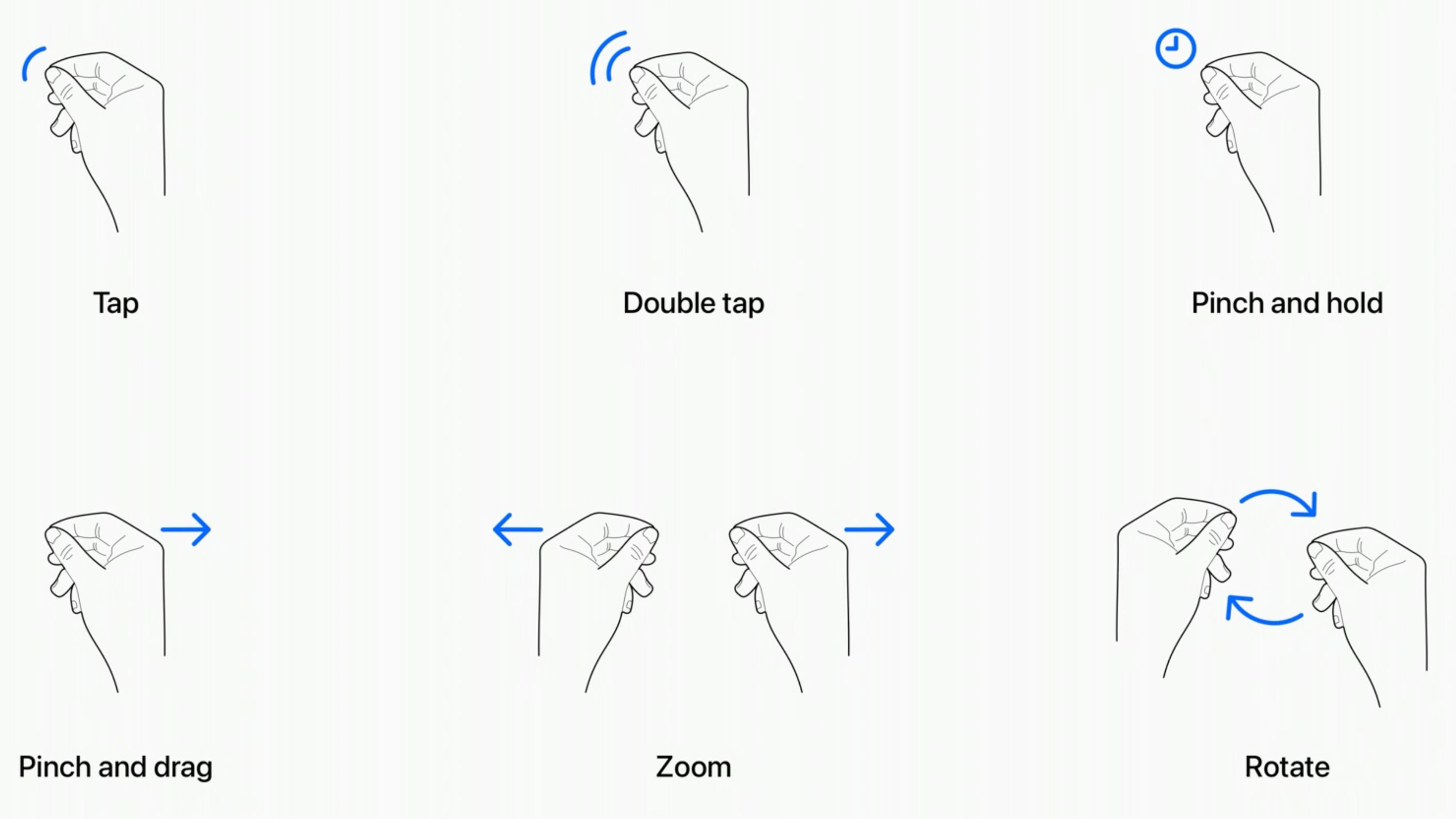
- Tap – Tapping the thumb and the index finger together signals to the headset that you want to tap on a virtual element on the display that you’re looking at. Users have also described this as a pinch, and it is the equivalent to tapping on the screen of an iPhone.
- Double Tap – Tapping twice initiates a double tap gesture.
- Pinch and Hold – A pinch and a hold is similar to a tap and hold gesture, and it does things like highlighting text.
- Pinch and Drag – Pinching and dragging can be used to scroll and to move windows around. You can scroll horizontally or vertically, and if you move your hand faster, you’ll be able to scroll faster.
- Zoom – Zoom is one of two main two-handed gestures. You can pinch your fingers together and pull your hands apart to zoom in, and presumably zooming out will have a pushing sort of motion. Window sizes can also be adjusted by dragging at the corners.
- Rotate – Rotate is the other two-handed gesture and based on Apple’s chart, it will involve pinching the fingers together and rotating the hands to manipulate virtual objects.
Gestures will work in tandem with eye movements, and the many cameras in the Vision Pro will track where you are looking with great accuracy. Eye position will be a key factor in targeting what you want to interact with using hand gestures. As an example, looking at an app icon or on-screen element targets it and highlights it, and then you can follow up with a gesture.
Hand gestures do not need to be grand, and you can keep your hands in your lap. Apple is encouraging that, in fact, because it will keep your hands and arms from getting tired from being held in the air. You only need a tiny pinch gesture for the equivalent of a tap, because the cameras can track precise movements.
@macrumors Eye tracking and pinching is the interface on the new #AppleVisionPro and we could to try jt out! #Apple #VR #AR ♬ original sound – MacRumors
What you’re looking at will let you select and manipulate objects that are both close to you and far from you, and Apple does anticipate scenarios where you might want to use larger gestures to control objects that are right in front of you. You can reach out and use your fingertips to interact with an object. For example, if you have a Safari window right in front of you, you can reach your hand out and scroll from there rather than using your fingers in your lap.
In addition to gestures, the headset will support hand movements such as air typing, though it doesn’t seem like those who have received a demo have been able to try this feature as of yet. Gestures will work together, of course, and to do something like create a drawing, you’ll look at a spot on the canvas, select a brush with your hand, and use a gesture in the air to draw. If you look elsewhere, you’ll be able to move the cursor immediately to where you’re looking.
While these are the six main system gestures that Apple has described, developers can create custom gestures for their apps that will perform other actions. Developers will need to make sure custom gestures are distinct from the system gestures or common hand movements that people might use, and that the gestures can be repeated frequently without hand strain.
To supplement hand and eye gestures, Bluetooth keyboards, trackpads, mice, and game controllers can be connected to the headset, and there are also voice-based search and dictation tools.
Multiple people who have been able to try the Vision Pro have had the same word to describe the control system – intuitive. Apple’s designers seem to have created it to work similarly to multitouch gestures on the iPhone and the iPad, and so far, reactions have been positive.
MacRumors videographer Dan Barbera was able to try out the headset and he was impressed with the controls. You can see his full overview of his experience on our YouTube channel.
This article, "These Gestures Are How You Control Apple Vision Pro" first appeared on MacRumors.com
Discuss this article in our forums

