
If you enter an incorrect passcode, tapping on "Forgot Passcode?" at the bottom of the screen will lead to another screen with a "Try Passcode Reset" option. Tapping this option allows you to enter the iPhone's previous passcode and create a new passcode.

As a safeguard, an option in the Settings app lets you expire the previous passcode immediately so that it cannot be used to reset the new passcode.


As of the first beta of iOS 17, it is still possible to change an Apple ID account's password with an iPhone's passcode, despite a Wall Street Journal report in February highlighting instances of thieves spying on an iPhone user's passcode in public and then stealing the device in order to gain widespread access to the device. In an interview with Daring Fireball's John Gruber last week, Apple's software engineering chief Craig Federighi said Apple has continued to "look at other ways to address this," but no changes have been made as of yet.

iOS 17 will be released later this year for the iPhone XS and newer, and it is currently available in beta with a free Apple developer account.
Related Roundups: iOS 17, iPadOS 17
Related Forums: iOS 17, iPadOS 17

This article, "Changed Your iPhone's Passcode and Forgot It? iOS 17 Gives You 72 Hours to Reset It" first appeared on MacRumors.com

Discuss this article in our forums

If you enter an incorrect passcode, tapping on "Forgot Passcode?" at the bottom of the screen will lead to another screen with a "Try Passcode Reset" option. Tapping this option allows you to enter the iPhone's previous passcode and create a new passcode.

As a safeguard, an option in the Settings app lets you expire the previous passcode immediately so that it cannot be used to reset the new passcode.


As of the first beta of iOS 17, it is still possible to change an Apple ID account's password with an iPhone's passcode, despite a Wall Street Journal report in February highlighting instances of thieves spying on an iPhone user's passcode in public and then stealing the device in order to gain widespread access to the device. In an interview with Daring Fireball's John Gruber last week, Apple's software engineering chief Craig Federighi said Apple has continued to "look at other ways to address this," but no changes have been made as of yet.

iOS 17 will be released later this year for the iPhone XS and newer, and it is currently available in beta with a free Apple developer account.
Related Roundups: iOS 17, iPadOS 17
Related Forums: iOS 17, iPadOS 17

This article, "Changed Your iPhone's Passcode and Forgot It? iOS 17 Gives You 72 Hours to Reset It" first appeared on MacRumors.com

Discuss this article in our forums

If you enter an incorrect passcode, tapping on "Forgot Passcode?" at the bottom of the screen will lead to another screen with a "Try Passcode Reset" option. Tapping this option allows you to enter the iPhone's previous passcode and create a new passcode.

As a safeguard, an option in the Settings app lets you expire the previous passcode immediately so that it cannot be used to reset the new passcode.


As of the first beta of iOS 17, it is still possible to change an Apple ID account's password with an iPhone's passcode, despite a Wall Street Journal report in February highlighting instances of thieves spying on an iPhone user's passcode in public and then stealing the device in order to gain widespread access to the device. In an interview with Daring Fireball's John Gruber last week, Apple's software engineering chief Craig Federighi said Apple has continued to "look at other ways to address this," but no changes have been made as of yet.

iOS 17 will be released later this year for the iPhone XS and newer, and it is currently available in beta with a free Apple developer account.
Related Roundups: iOS 17, iPadOS 17
Related Forums: iOS 17, iPadOS 17

This article, "Changed Your iPhone's Passcode and Forgot It? iOS 17 Gives You 72 Hours to Reset It" first appeared on MacRumors.com

Discuss this article in our forums

If you enter an incorrect passcode, tapping on "Forgot Passcode?" at the bottom of the screen will lead to another screen with a "Try Passcode Reset" option. Tapping this option allows you to enter the iPhone's previous passcode and create a new passcode.

As a safeguard, an option in the Settings app lets you expire the previous passcode immediately so that it cannot be used to reset the new passcode.


As of the first beta of iOS 17, it is still possible to change an Apple ID account's password with an iPhone's passcode, despite a Wall Street Journal report in February highlighting instances of thieves spying on an iPhone user's passcode in public and then stealing the device in order to gain widespread access to the device. In an interview with Daring Fireball's John Gruber last week, Apple's software engineering chief Craig Federighi said Apple has continued to "look at other ways to address this," but no changes have been made as of yet.

iOS 17 will be released later this year for the iPhone XS and newer, and it is currently available in beta with a free Apple developer account.
Related Roundups: iOS 17, iPadOS 17
Related Forums: iOS 17, iPadOS 17

This article, "Changed Your iPhone's Passcode and Forgot It? iOS 17 Gives You 72 Hours to Reset It" first appeared on MacRumors.com

Discuss this article in our forums
If you change your iPhone's passcode and forget it soon after, iOS 17 has a new option available to help out. Specifically, it is now possible to reset an iPhone's

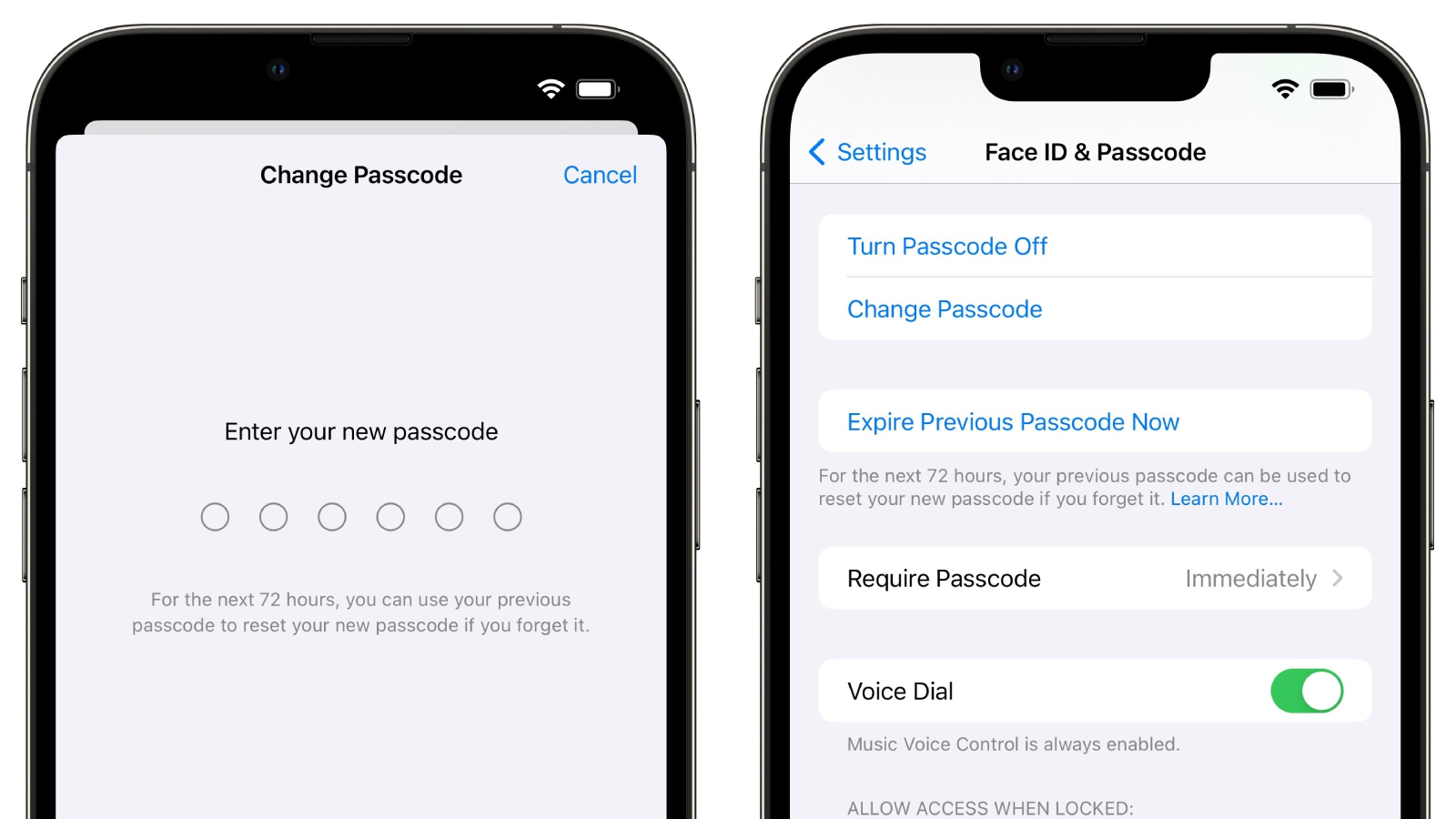
If you change your iPhone’s passcode and forget it soon after, iOS 17 has a new option available to help out. Specifically, it is now possible to reset an iPhone’s new passcode with the previous passcode for up to 72 hours after the change is made.


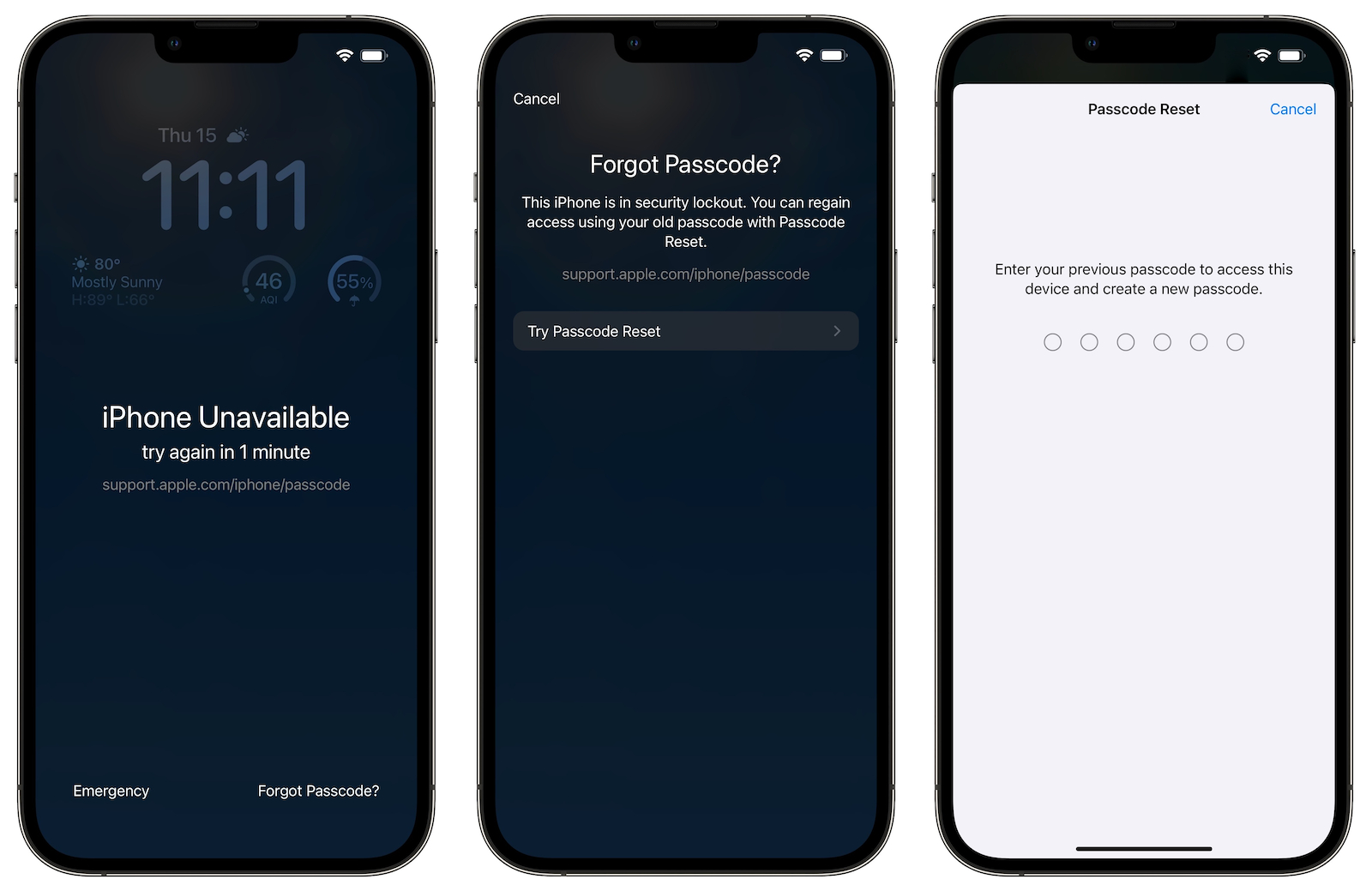
If you enter an incorrect passcode, tapping on “Forgot Passcode?” at the bottom of the screen will lead to another screen with a “Try Passcode Reset” option. Tapping this option allows you to enter the iPhone’s previous passcode and create a new passcode.

As a safeguard, an option in the Settings app lets you expire the previous passcode immediately so that it cannot be used to reset the new passcode.


As of the first beta of iOS 17, it is still possible to change an Apple ID account’s password with an iPhone’s passcode, despite a Wall Street Journal report in February highlighting instances of thieves spying on an iPhone user’s passcode in public and then stealing the device in order to gain widespread access to the device. In an interview with Daring Fireball‘s John Gruber last week, Apple’s software engineering chief Craig Federighi said Apple has continued to “look at other ways to address this,” but no changes have been made as of yet.

iOS 17 will be released later this year for the iPhone XS and newer, and it is currently available in beta with a free Apple developer account.

Related Roundups: iOS 17, iPadOS 17
Related Forums: iOS 17, iPadOS 17

This article, "Changed Your iPhone's Passcode and Forgot It? iOS 17 Gives You 72 Hours to Reset It" first appeared on MacRumors.com

Discuss this article in our forums


You may also be interested in this

Apple Approves First Retr…

Apple this weekend approved free PC emulator "UTM SE" for the App Store on iPhone, iPad, and Vision Pro. The app allows users to emulate old versions of Windows OS,

iPhone 15 latest: What th…

Macworld Every year, Apple introduces a new iPhone line, and its introduction is the most important event in the Apple calendar. As much as Mac sales are growing and Apple’s

Jony Ive’s latest g…

An "Astra Carta" seal has been designed by Jony Ive's LoveFrom firm for the UK's King Charles, and aimed at being a call to action for private firms in space-related

Apple fights EU’s Digital…

Apple challenged the European Union’s Digital Markets Act (DMA) in the most significant legal test yet of the bloc’s antitrust rules for Big Tech. The company’s lawyer, Daniel Beard, argued

Beats Studio Pro over-ear…

As 9to5Mac reported last month, Apple is working on a major update to Beats Studio over-ear headphones. Beats Studio Pro headphones now appear closer to launch after showing up in

Apple is opening its firs…

After over 30 years of Specialists and third parties supporting Apple in Vietnam, the company will be opening its first official online sales and support effort very soon.Vietnam Apple Store

How to deal with Wi-Fi Ca…

Macworld Cellular carriers limit the number of devices you own logged into the same iCloud account that can place voice calls to the regular phone network via Wi-Fi. You might

Leaker claims Apple used …

Over the last several months, a new “leaker” emerged on Twitter claiming to know a broad range of details about upcoming Apple software releases. The account shared what they claimed
X

A whimsical homage to the days in black and white, celebrating the magic of Mac OS. Dress up your blog with retro, chunky-grade pixellated graphics to evoke some serious computer nostalgia. Supports a custom menu, custom header image, custom background, two footer widget areas, and a full-width page template. I updated Stuart Brown's 2011 masterpiece to meet the needs of the times, made it responsive , got dark mode, custom search widget and more.You can download it from tigaman.com, where you can also find more useful code snippets and plugins to get even more out of wordpress.
