
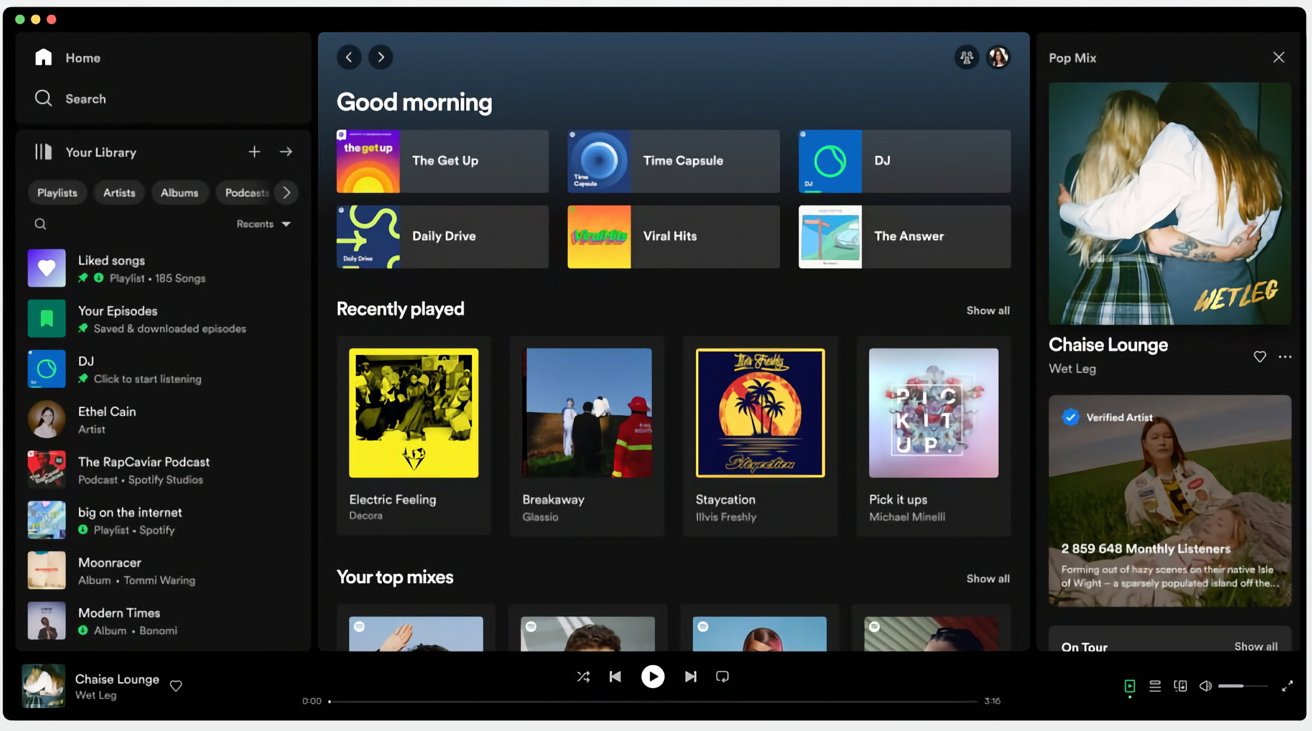
"Your Library" is now located in the sidebar to let you access saved music and podcasts. Spotify says its research has shown that the new library helps users save time by providing a better overview, while making it easier to switch between playlists. Users can also now move and pin the playlists in the Library, as well as drop songs into the editable listed playlists.

Elsewhere, the "Now Playing" view takes up the right-hand side of the app, showing the currently playing song or podcast. According to Spotify, "You can even find more information about the song and artist here, as well as information on tour dates and merch — making it easier to connect with your favorite artists and discover more about them. For select podcasts, you can even follow transcripts as you listen."

By default, Friend Activity is now hidden, but easily accessible via a new Friends icon beside the user profile icon in the top-right corner of the window. You can also now hide the library by clicking "Your Library" for a more compact layout.

Previously, the only way to find playlists was through the search bar, where users had to trawl through not only their own content, but results from the entire Spotify catalog. Now, when it’s expanded, the new Library design allows users to toggle through their dedicated music, podcast, and audiobook feeds and search Your Library exclusively.

Spotify says the desktop app revamp began rolling out on Tuesday and will eventually make its way to all users over the next week.
Tag: Spotify

This article, "Spotify Desktop App Updated With Redesigned 'Your Library' and 'Now Playing' Views" first appeared on MacRumors.com

Discuss this article in our forums


"Your Library" is now located in the sidebar to let you access saved music and podcasts. Spotify says its research has shown that the new library helps users save time by providing a better overview, while making it easier to switch between playlists. Users can also now move and pin the playlists in the Library, as well as drop songs into the editable listed playlists.

Elsewhere, the "Now Playing" view takes up the right-hand side of the app, showing the currently playing song or podcast. According to Spotify, "You can even find more information about the song and artist here, as well as information on tour dates and merch — making it easier to connect with your favorite artists and discover more about them. For select podcasts, you can even follow transcripts as you listen."

By default, Friend Activity is now hidden, but easily accessible via a new Friends icon beside the user profile icon in the top-right corner of the window. You can also now hide the library by clicking "Your Library" for a more compact layout.

Previously, the only way to find playlists was through the search bar, where users had to trawl through not only their own content, but results from the entire Spotify catalog. Now, when it’s expanded, the new Library design allows users to toggle through their dedicated music, podcast, and audiobook feeds and search Your Library exclusively.

Spotify says the desktop app revamp began rolling out on Tuesday and will eventually make its way to all users over the next week.
Tag: Spotify

This article, "Spotify Desktop App Updated With Redesigned 'Your Library' and 'Now Playing' Views" first appeared on MacRumors.com

Discuss this article in our forums


"Your Library" is now located in the sidebar to let you access saved music and podcasts. Spotify says its research has shown that the new library helps users save time by providing a better overview, while making it easier to switch between playlists. Users can also now move and pin the playlists in the Library, as well as drop songs into the editable listed playlists.

Elsewhere, the "Now Playing" view takes up the right-hand side of the app, showing the currently playing song or podcast. According to Spotify, "You can even find more information about the song and artist here, as well as information on tour dates and merch — making it easier to connect with your favorite artists and discover more about them. For select podcasts, you can even follow transcripts as you listen."

By default, Friend Activity is now hidden, but easily accessible via a new Friends icon beside the user profile icon in the top-right corner of the window. You can also now hide the library by clicking "Your Library" for a more compact layout.

Previously, the only way to find playlists was through the search bar, where users had to trawl through not only their own content, but results from the entire Spotify catalog. Now, when it’s expanded, the new Library design allows users to toggle through their dedicated music, podcast, and audiobook feeds and search Your Library exclusively.

Spotify says the desktop app revamp began rolling out on Tuesday and will eventually make its way to all users over the next week.
Tag: Spotify

This article, "Spotify Desktop App Updated With Redesigned 'Your Library' and 'Now Playing' Views" first appeared on MacRumors.com

Discuss this article in our forums


"Your Library" is now located in the sidebar to let you access saved music and podcasts. Spotify says its research has shown that the new library helps users save time by providing a better overview, while making it easier to switch between playlists. Users can also now move and pin the playlists in the Library, as well as drop songs into the editable listed playlists.

Elsewhere, the "Now Playing" view takes up the right-hand side of the app, showing the currently playing song or podcast. According to Spotify, "You can even find more information about the song and artist here, as well as information on tour dates and merch — making it easier to connect with your favorite artists and discover more about them. For select podcasts, you can even follow transcripts as you listen."

By default, Friend Activity is now hidden, but easily accessible via a new Friends icon beside the user profile icon in the top-right corner of the window. You can also now hide the library by clicking "Your Library" for a more compact layout.

Previously, the only way to find playlists was through the search bar, where users had to trawl through not only their own content, but results from the entire Spotify catalog. Now, when it’s expanded, the new Library design allows users to toggle through their dedicated music, podcast, and audiobook feeds and search Your Library exclusively.

Spotify says the desktop app revamp began rolling out on Tuesday and will eventually make its way to all users over the next week.
Tag: Spotify

This article, "Spotify Desktop App Updated With Redesigned 'Your Library' and 'Now Playing' Views" first appeared on MacRumors.com

Discuss this article in our forums
If you open up Spotify's desktop app on a Mac or PC today, things should look a lot more "mobile." That's because the company has redesigned the "Your Library" and

If you open up Spotify’s desktop app on a Mac or PC today, things should look a lot more “mobile.” That’s because the company has redesigned the “Your Library” and “Now Playing” interfaces to make them more aligned with Spotify’s smartphone app.


“Your Library” is now located in the sidebar to let you access saved music and podcasts. Spotify says its research has shown that the new library helps users save time by providing a better overview, while making it easier to switch between playlists. Users can also now move and pin the playlists in the Library, as well as drop songs into the editable listed playlists.

Elsewhere, the “Now Playing” view takes up the right-hand side of the app, showing the currently playing song or podcast. According to Spotify, “You can even find more information about the song and artist here, as well as information on tour dates and merch — making it easier to connect with your favorite artists and discover more about them. For select podcasts, you can even follow transcripts as you listen.”

By default, Friend Activity is now hidden, but easily accessible via a new Friends icon beside the user profile icon in the top-right corner of the window. You can also now hide the library by clicking “Your Library” for a more compact layout.

Previously, the only way to find playlists was through the search bar, where users had to trawl through not only their own content, but results from the entire Spotify catalog. Now, when it’s expanded, the new Library design allows users to toggle through their dedicated music, podcast, and audiobook feeds and search Your Library exclusively.

Spotify says the desktop app revamp began rolling out on Tuesday and will eventually make its way to all users over the next week.

Tag: Spotify

This article, "Spotify Desktop App Updated With Redesigned 'Your Library' and 'Now Playing' Views" first appeared on MacRumors.com

Discuss this article in our forums


You may also be interested in this

No Man’s Sky teases Apple…

Hello Games’ founder Sean Murray yesterday tweeted two cryptic apple emojis, suggesting an announcement aimed at Apple users is imminent. The tease comes almost a year after WWDC 2022, in

Rumored next-generation A…

Apple's first Macs running M3 chips could arrive by the end of 2023 at the earliest, a report from a reliable leaker claims, with an "M3 Pro" variant of Apple

AirTag foils $1.1 million…

Two Chicago men were arrested for a $1.1 million armored truck armed robbery after being tracked down via an AirTag hidden amongst the money.AirTag tracker helps find robbersThe AirTag is

Daily deals: $800 off Mac…

Today's best deals include 64% off Skullcandy Riff wireless headphones, Apple Watch Series 4 from $114, 71% off a 14" ThinkPad T14s Gen 2 Intel, and up to 53% off

New immersive AR experien…

Inspired by a curiosity for the natural world, “Deep Field” is a new immersive art experience and app created by celebrated Australian artists and creative technologists Tin Nguyen and Edward

Apple is better at conver…

While there is a small number of iPhone users who switch to Android, iPhone owners have a greater level of brand loyalty compared to Android users.Not many people actually switch

The downfall of Brydge: i…

Brydge, a once thriving startup making popular keyboard accessories for iPad, Mac, and Microsoft Surface products, is ceasing operations. According to nearly a dozen former Brydge employees who spoke to

Apple-Sponsored Study Hig…

Small developers have seen growing success over the course of the last two years, according to an Apple-commissioned study conducted by economists at Analysis Group. Data shared today highlights the
X

A whimsical homage to the days in black and white, celebrating the magic of Mac OS. Dress up your blog with retro, chunky-grade pixellated graphics to evoke some serious computer nostalgia. Supports a custom menu, custom header image, custom background, two footer widget areas, and a full-width page template. I updated Stuart Brown's 2011 masterpiece to meet the needs of the times, made it responsive , got dark mode, custom search widget and more.You can download it from tigaman.com, where you can also find more useful code snippets and plugins to get even more out of wordpress.
