The government of New South Wales in Australia today announced that the Opal ticketing system now supports Express Mode for Apple Pay payments, allowing the fare card to be added

The government of New South Wales in Australia today announced that the Opal ticketing system now supports Express Mode for Apple Pay payments, allowing the fare card to be added to the Wallet app on a compatible iPhone or Apple Watch for tap-and-go payments across the public transport network.



Express Transit mode allows users to pay for rides without having to wake or unlock their ‌iPhone‌ or Apple Watch, or open the Opal app. The mode also bypasses the need to authenticate with Face ID, Touch ID, or a passcode. Users simply need to hold their ‌iPhone‌ or Apple Watch near the contactless payment reader until a checkmark appears on the display.

Transport for NSW undertook a staggered rollout of Express Mode across the 25,000 card readers on the Opal network, starting with ferries and light rail, then train stations, and then the thousands of Opal readers on buses, which finished this week.

“Commuters in the Hunter, Illawarra, Blue Mountains and everywhere in between will benefit from being the first public transport users in Australia to benefit from the mass roll out of this initiative,” said NSW transport minister Jo Haylen. “It will make life so much easier for the almost two million transport passengers who use contactless payments with a digital wallet in NSW.”

How to Set Up Express Transit on iPhone

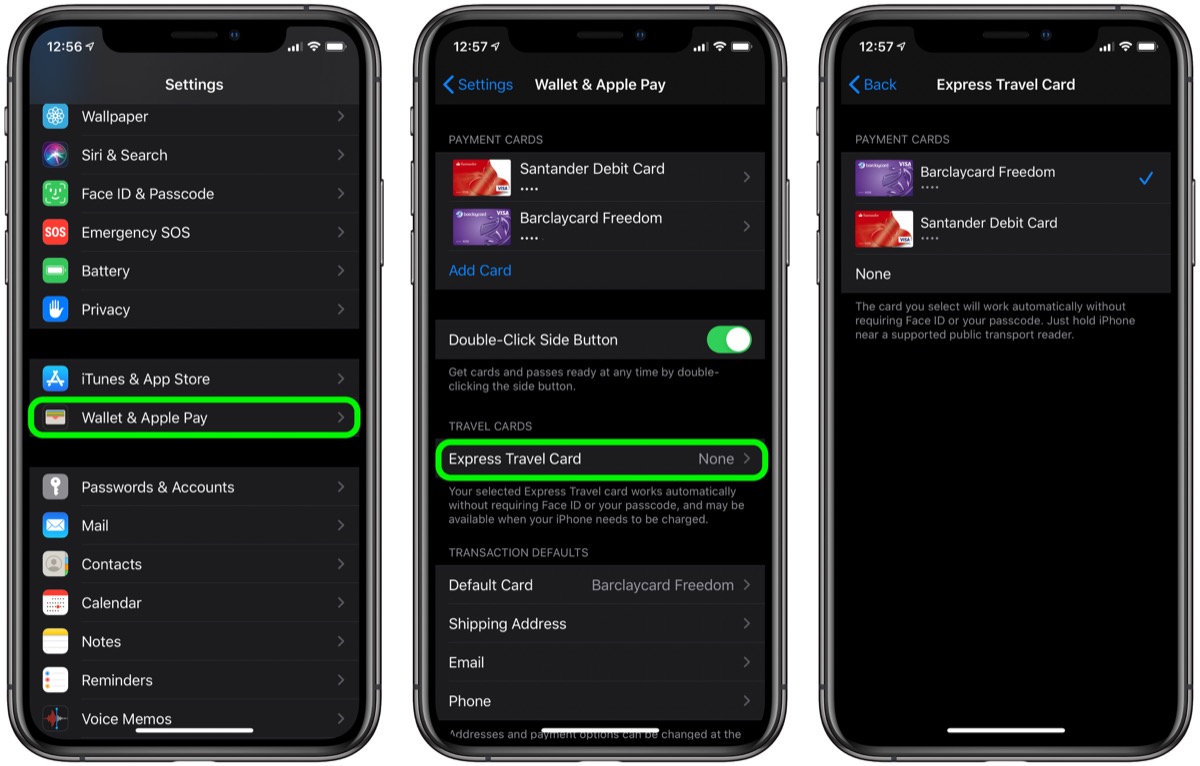
  1. Launch the Settings app on your ‌iPhone‌.
  2. Tap Wallet & Apple Pay.
  3. Tap Express Transit Card.
  4. Tap one of your cards in the list to use it with Express Transit. A tick will appear next to the card you select. The default option is None.
  5. Authenticate your device using ‌Touch ID‌ or ‌Face ID‌.

settings

If your bank card doesn’t support Express Transit, you’ll get an error message telling you that the card is incompatible. If no error message appears, you’re good to tap-and-go.

How to Set Up Express Transit on Apple Watch

  1. Launch the Watch app on your ‌iPhone‌.
  2. Tap Wallet & Apple Pay.
  3. Tap Express Transit Card.
  4. Tap one of your cards in the list to use it with Express Transit. A tick will appear next to the card you select. The default option is None.
  5. Authenticate by entering your passcode on your Apple Watch.
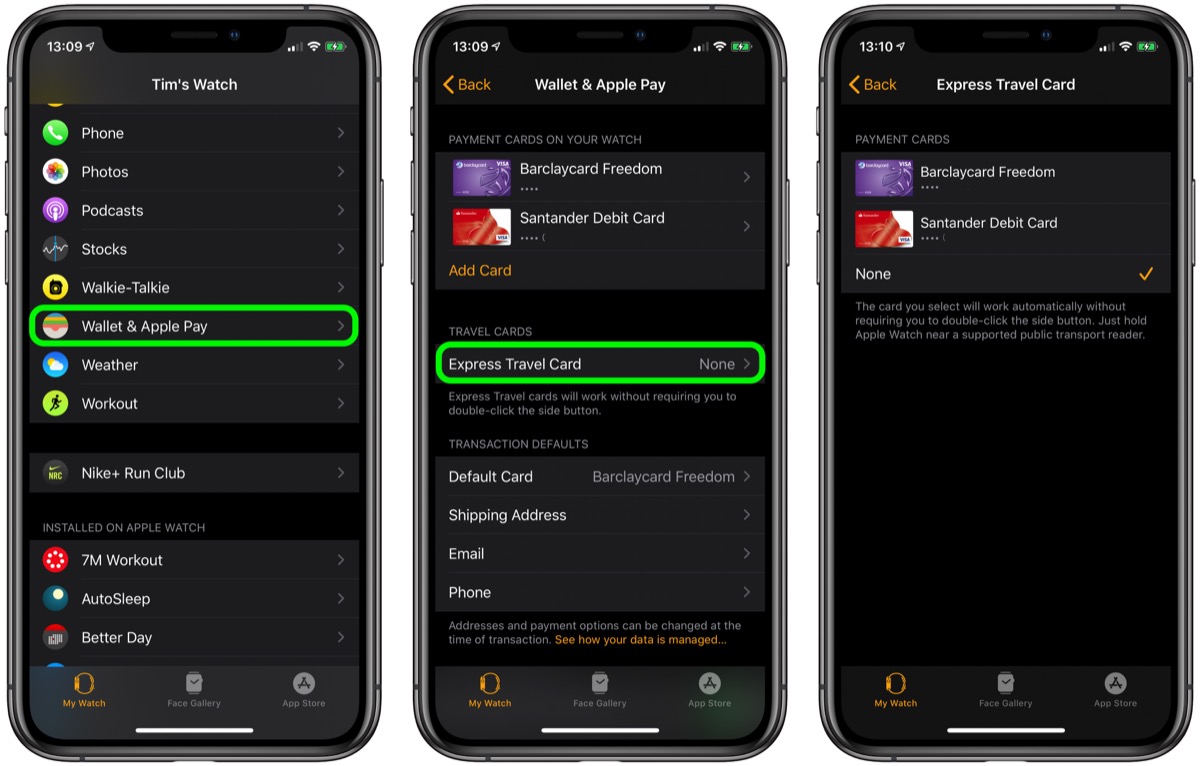
watch settings

If your bank card doesn’t support Express Transit, you’ll get an error message telling you that the card is incompatible. If no message appears, you’re all set.

This article, "Apple Pay Express Mode Now Available in New South Wales" first appeared on MacRumors.com

Discuss this article in our forums


You may also be interested in this

Best iPad for students 20…

Macworld Preparing for student life can be exciting and stressful. To make things easier, it’s good to know that you’ve got the right tech to help you write your essays,

WWDC 2023: Everything we …

Macworld Of the big Apple events of the year, WWDC is the most reliable: In each of the past 16 Junes, like clockwork, Apple has held a big get-together for

Backbone now has an Andro…

An image of a Google Pixel phone slotted into a Backbone One PlayStation edition. | Image: Backbone If you were an Android user jealous of last year’s iOS exclusive PlayStation-branded

Apple Likely Filed for &#…

Just a few weeks ahead of WWDC, it appears that Apple continues to secretly apply for trademarks related to its rumored AR/VR headset. Apple headset concept by designer Marcus Kane

Australia Approves Apple …

Australia has granted approval for Apple to enable its Apple Watch hypertension notification feature in the country, Information Age reports. The Therapeutic Goods Administration (TGA), Australia's medical device regulator, has

iCloud storage plans: How…

Macworld iCloud backs up our iOS devices, keeps all our photos and videos safe and in sync, and even syncs our macOS desktop between Macs–and lets us access it via

Apple has invested over $…

Apple has announced a further $25 million for its initiative to support minority businesses, and says this brings its total investment to twice the originally planned $100 million.Source: AppleApple's Racial

Apple Vision Pro arrives …

The Apple Vision Pro spatial computer Apple today announced Apple Vision Pro will expand to new countries and regions, with pre-orders for China mainland, Hong Kong, Japan, and Singapore beginning
X

A whimsical homage to the days in black and white, celebrating the magic of Mac OS. Dress up your blog with retro, chunky-grade pixellated graphics to evoke some serious computer nostalgia. Supports a custom menu, custom header image, custom background, two footer widget areas, and a full-width page template. I updated Stuart Brown's 2011 masterpiece to meet the needs of the times, made it responsive , got dark mode, custom search widget and more.You can download it from tigaman.com, where you can also find more useful code snippets and plugins to get even more out of wordpress.