
WhatsApp has added new text formatting options to the chat platform, enabling users to message each other everything from grocery lists to step-by-step instructions in mid-conversation. Following Wednesday's update, WhatsApp

WhatsApp has added new text formatting options to the chat platform, enabling users to message each other everything from grocery lists to step-by-step instructions in mid-conversation.



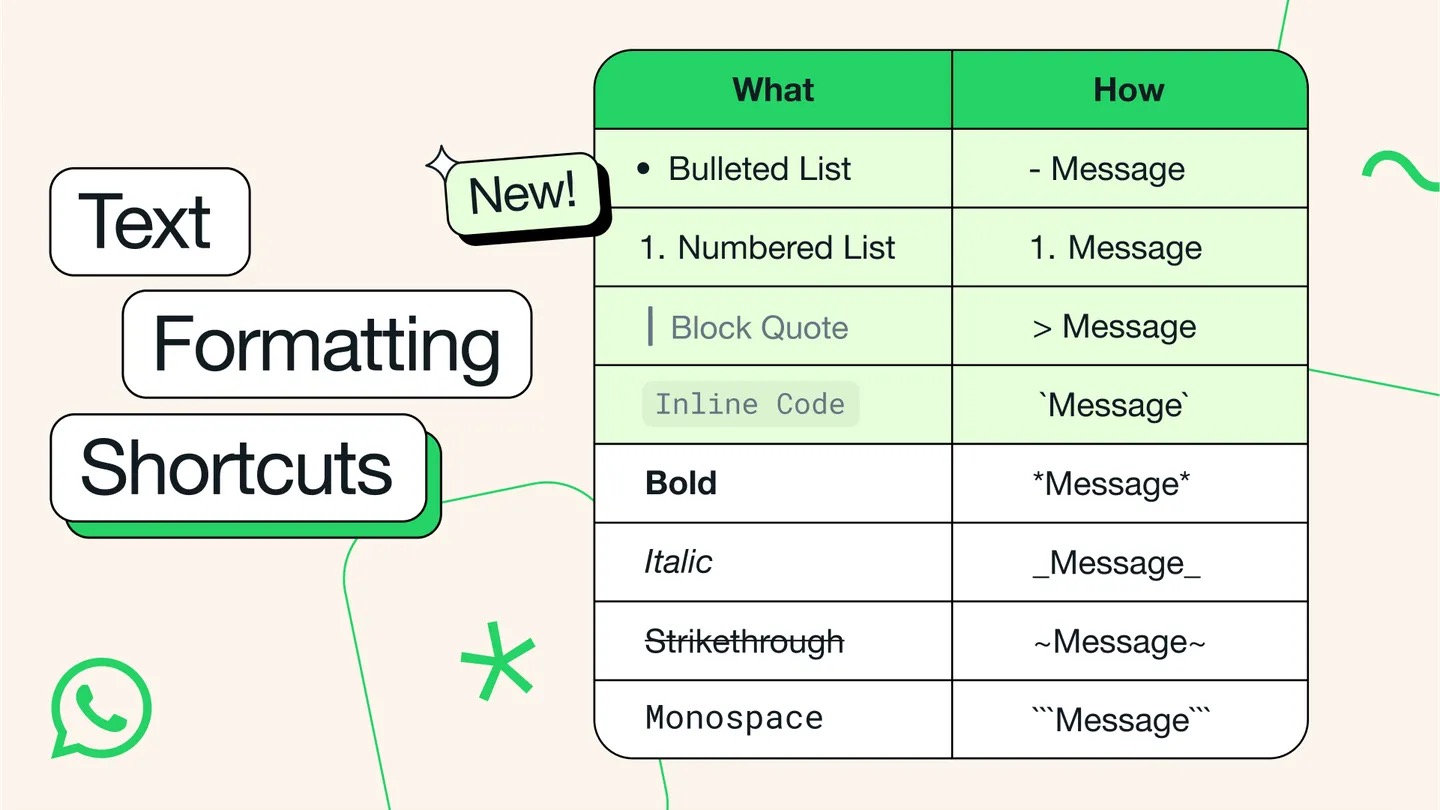
Following Wednesday’s update, WhatsApp users can now use bulleted and numbered lists, block quotes, and inline code to communicate more effectively.

The new formatting options join the existing bold, italic, strikethrough, and monospaced formats that have been available to WhatsApp users for a while now.

How to Use New WhatsApp Text Formatting Options

  • Bulleted list: Start a new line with a – (dash) symbol, followed by a space.
  • Numbered list: Start a new line with 1 or 2 digits, followed by a period and a space.
  • Block quote: Start a new line with the > symbol, followed by a space.
  • Inline code: Wrap any code or text you want to highlight using the ` (backtick) symbol.
whatsapp

All of WhatsApp’s text formatting options (Image: WhatsApp)

Last month, WhatsApp introduced a custom sticker creation tool for iPhone users running iOS 17 or later. In a future update, WhatsApp also plans to add passkey support, allowing iPhone users to sign in to the app with Face ID, Touch ID, or their device’s passcode.

This article, "WhatsApp Gains New Text Formatting Options in Latest Update" first appeared on MacRumors.com

Discuss this article in our forums


You may also be interested in this

WhatsApp native iPad app …

WhatsApp is finally testing its native iPad app, with a beta being available on its TestFlight program for enrolled members. (via Cult of Mac - Tech and culture through an

WhatsApp Now Lets You Sen…

WhatsApp is rolling out a new option that lets users on iPhone share photos and video over the messaging platform in their original quality. As spotted by WABetaInfo, the official

WhatsApp to Drop Support …

WhatsApp is set to end support for iOS versions older than iOS 15.1 from May next year, removing the chat platform's compatibility with several iPhone models in the process. From

WhatsApp to Let iPhone Us…

WhatsApp is working on a new feature that will allow iOS users to log into the encrypted messaging platform through different accounts within the same app, reports WABetaInfo. Previously, the

WhatsApp Users Can Now Se…

OpenAI has announced a couple of new ChatGPT features for WhatsApp users, adding support for voice messages and image-based interactions when communicated with the chat bot via the Meta-owned chat

WhatsApp for iPhone’s des…

WhatsApp is getting a fresh look on Android and iPhone, with new colors, updated iconography, and other design tweaks. (via Cult of Mac - Apple news, rumors, reviews and how-tos)

WhatsApp to Add Support f…

WhatsApp this week announced that it is adding passkey-encrypted chat backups, allowing users protect their stored messages using Touch ID or Face ID instead of a 64-digit key. The feature

WhatsApp: How to Set a Me…

WhatsApp has rolled out a new feature on iPhone that lets you set reminder alerts for specific messages that you want to come back to later. Available in version 25.25.74
X

A whimsical homage to the days in black and white, celebrating the magic of Mac OS. Dress up your blog with retro, chunky-grade pixellated graphics to evoke some serious computer nostalgia. Supports a custom menu, custom header image, custom background, two footer widget areas, and a full-width page template. I updated Stuart Brown's 2011 masterpiece to meet the needs of the times, made it responsive , got dark mode, custom search widget and more.You can download it from tigaman.com, where you can also find more useful code snippets and plugins to get even more out of wordpress.
