
new iOS 18 accessibility features that Apple previewed today is a Reader Mode in the Magnifier app, which will convert words in images to uniform lines of text. Apple did not provide any specific details about the feature, but it shared a screenshot showing that users will be able to change the font and have the text read aloud.
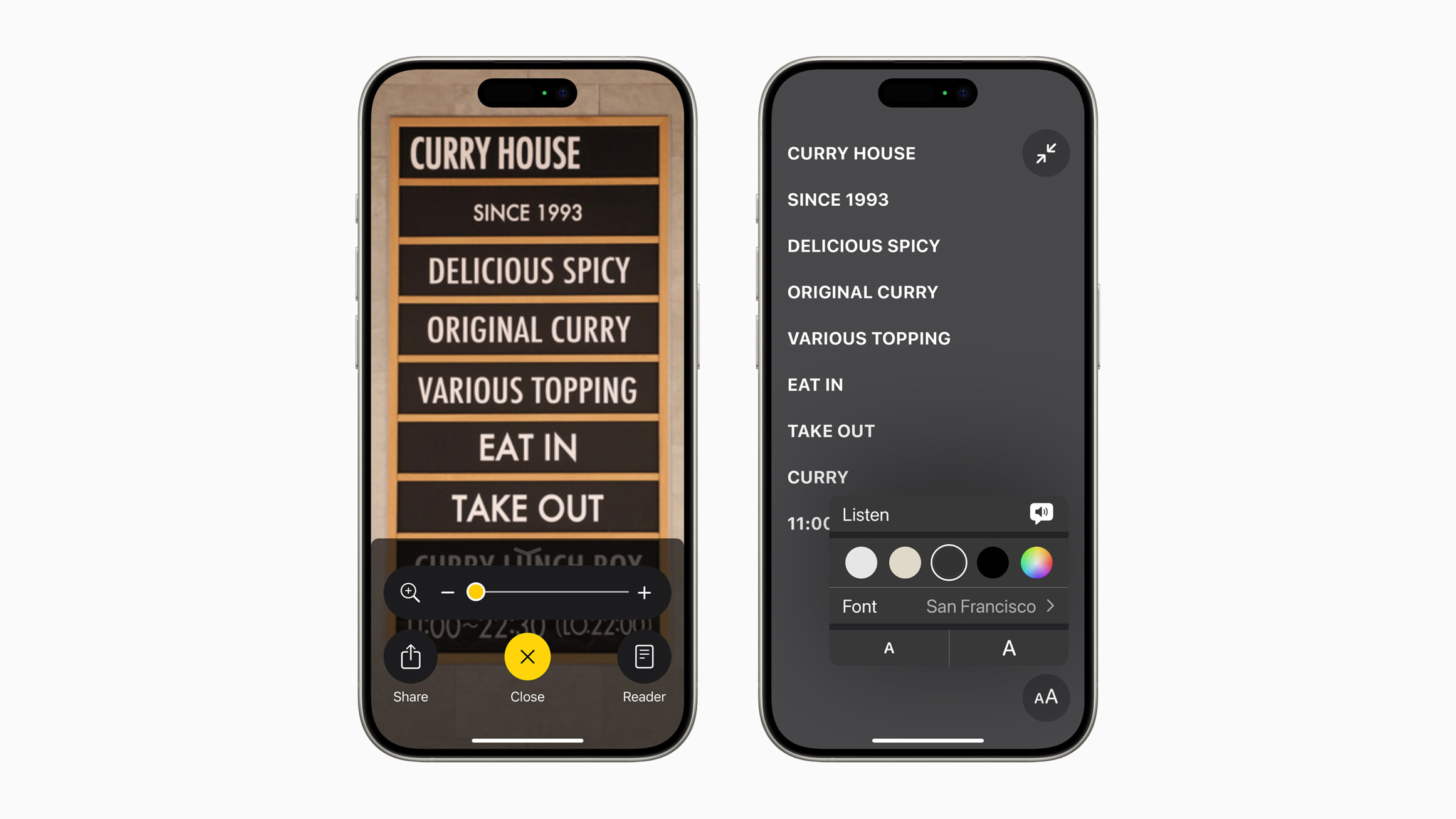

Apple also revealed that iOS 18 will allow iPhone users to easily launch the Magnifier app's Detection Mode with the Action button, which debuted on the iPhone 15 Pro models and is rumored to expand to the entire iPhone 16 lineup later this year. Detection Mode can identify and read aloud all text within an iPhone camera's field of view.

It is already possible to set the Action button to open the Magnifier app in general, so this will be an expansion of the app's integration with the button.

iOS 18 is expected to be unveiled at Apple's developers conference WWDC on June 10, and the update should be widely released in September.
Related Roundup: iOS 18
Tag: Accessibility

This article, "Apple Previews iOS 18's Upgraded Magnifier App With New Reader Mode" first appeared on MacRumors.com

Discuss this article in our forums

new iOS 18 accessibility features that Apple previewed today is a Reader Mode in the Magnifier app, which will convert words in images to uniform lines of text. Apple did not provide any specific details about the feature, but it shared a screenshot showing that users will be able to change the font and have the text read aloud.


Apple also revealed that iOS 18 will allow iPhone users to easily launch the Magnifier app's Detection Mode with the Action button, which debuted on the iPhone 15 Pro models and is rumored to expand to the entire iPhone 16 lineup later this year. Detection Mode can identify and read aloud all text within an iPhone camera's field of view.

It is already possible to set the Action button to open the Magnifier app in general, so this will be an expansion of the app's integration with the button.

iOS 18 is expected to be unveiled at Apple's developers conference WWDC on June 10, and the update should be widely released in September.
Related Roundup: iOS 18
Tag: Accessibility

This article, "Apple Previews iOS 18's Upgraded Magnifier App With New Reader Mode" first appeared on MacRumors.com

Discuss this article in our forums

new iOS 18 accessibility features that Apple previewed today is a Reader Mode in the Magnifier app, which will convert words in images to uniform lines of text. Apple did not provide any specific details about the feature, but it shared a screenshot showing that users will be able to change the font and have the text read aloud.


Apple also revealed that iOS 18 will allow iPhone users to easily launch the Magnifier app's Detection Mode with the Action button, which debuted on the iPhone 15 Pro models and is rumored to expand to the entire iPhone 16 lineup later this year. Detection Mode can identify and read aloud all text within an iPhone camera's field of view.

It is already possible to set the Action button to open the Magnifier app in general, so this will be an expansion of the app's integration with the button.

iOS 18 is expected to be unveiled at Apple's developers conference WWDC on June 10, and the update should be widely released in September.
Related Roundup: iOS 18

This article, "Apple Previews iOS 18's Upgraded Magnifier App With New Reader Mode" first appeared on MacRumors.com

Discuss this article in our forums
new iOS 18 accessibility features that Apple previewed today is a Reader Mode in the Magnifier app, which will convert words in images to uniform lines of text. Apple did not provide any specific details about the feature, but it shared a screenshot showing that users will be able to change the font and have the text read aloud.


Apple also revealed that iOS 18 will allow iPhone users to easily launch the Magnifier app's Detection Mode with the Action button, which debuted on the iPhone 15 Pro models and is rumored to expand to the entire iPhone 16 lineup later this year. Detection Mode can identify and read aloud all text within an iPhone camera's field of view.

It is already possible to set the Action button to open the Magnifier app in general, so this will be an expansion of the app's integration with the button.

iOS 18 is expected to be unveiled at Apple's developers conference WWDC on June 10, and the update should be widely released in September.
Related Roundup: iOS 18

This article, "Apple Previews iOS 18's Upgraded Magnifier App With New Reader Mode" first appeared on MacRumors.com

Discuss this article in our forums
One of the new iOS 18 accessibility features that Apple previewed today is a Reader Mode in the Magnifier app, which will convert words in images to uniform lines of

One of the new iOS 18 accessibility features that Apple previewed today is a Reader Mode in the Magnifier app, which will convert words in images to uniform lines of text. Apple did not provide any specific details about the feature, but it shared a screenshot showing that users will be able to change the font and have the text read aloud.


Apple also revealed that iOS 18 will allow iPhone users to easily launch the Magnifier app’s Detection Mode with the Action button, which debuted on the iPhone 15 Pro models and is rumored to expand to the entire iPhone 16 lineup later this year. Detection Mode can identify and read aloud all text within an iPhone camera’s field of view.

It is already possible to set the Action button to open the Magnifier app in general, so this will be an expansion of the app’s integration with the button.

iOS 18 is expected to be unveiled at Apple’s developers conference WWDC on June 10, and the update should be widely released in September.

Related Roundup: iOS 18

This article, "Apple Previews iOS 18's Upgraded Magnifier App With New Reader Mode" first appeared on MacRumors.com

Discuss this article in our forums


You may also be interested in this

Apple reveals iOS 17

iOS 17 upgrades the communications experience with Contact Posters, a new stickers experience, Live Voicemail, and much more. Apple today announced iOS 17, a major release that upgrades the communications

Top 10 Apple ads of 2025 …

Capping a decade of achievement, the Best Apple ads of 2025 run the gamut from emotional tributes to playful satire. (via Cult of Mac - Your source for the latest

iOS 17 accessibility feat…

Hear about iOS 17's new accessibility features, the WWDC "special activity," and the iCloud Drive woes that led your host to wipe his MacBook Pro on the AppleInsider Podcast.iOS 17

Apple’s new ‘Personal Voi…

As part of its preview of iOS 17 accessibility updates coming this year, Apple has announced a pair of new features called Live Speech and Personal Voice. Live Speech allows

A Siri bug in the iOS 16.…

In iOS 16.4.1 and iPadOS 16.4.1, Siri cannot create or read back calendar events set on the 31st of a given month, causing problems for accessibility.Try it yourself. Tell Siri

iOS 17 accessibility feat…

Hear about iOS 17's new accessibility features, the WWDC "special activity," and the iCloud Drive woes that led your host to wipe his MacBook Pro on the AppleInsider Podcast.iOS 17

Soon, your iPhone will be…

Apple on Tuesday previewed software features for cognitive, vision, hearing, and mobility accessibility, along with innovative tools for individuals who are nonspeaking or at risk of losing their ability to

A Siri bug in the iOS 16.…

In iOS 16.4.1 and iPadOS 16.4.1, Siri cannot create or read back calendar events set on the 31st of a given month, causing problems for accessibility.Try it yourself. Tell Siri
X

A whimsical homage to the days in black and white, celebrating the magic of Mac OS. Dress up your blog with retro, chunky-grade pixellated graphics to evoke some serious computer nostalgia. Supports a custom menu, custom header image, custom background, two footer widget areas, and a full-width page template. I updated Stuart Brown's 2011 masterpiece to meet the needs of the times, made it responsive , got dark mode, custom search widget and more.You can download it from tigaman.com, where you can also find more useful code snippets and plugins to get even more out of wordpress.