
With iOS 18.4, Apple made a small tweak to Safari that could be polarizing because it puts your search history front and center. When you open up a new Safari

With iOS 18.4, Apple made a small tweak to Safari that could be polarizing because it puts your search history front and center. When you open up a new Safari tab and then tap into the search field, Safari shows your recent search history.
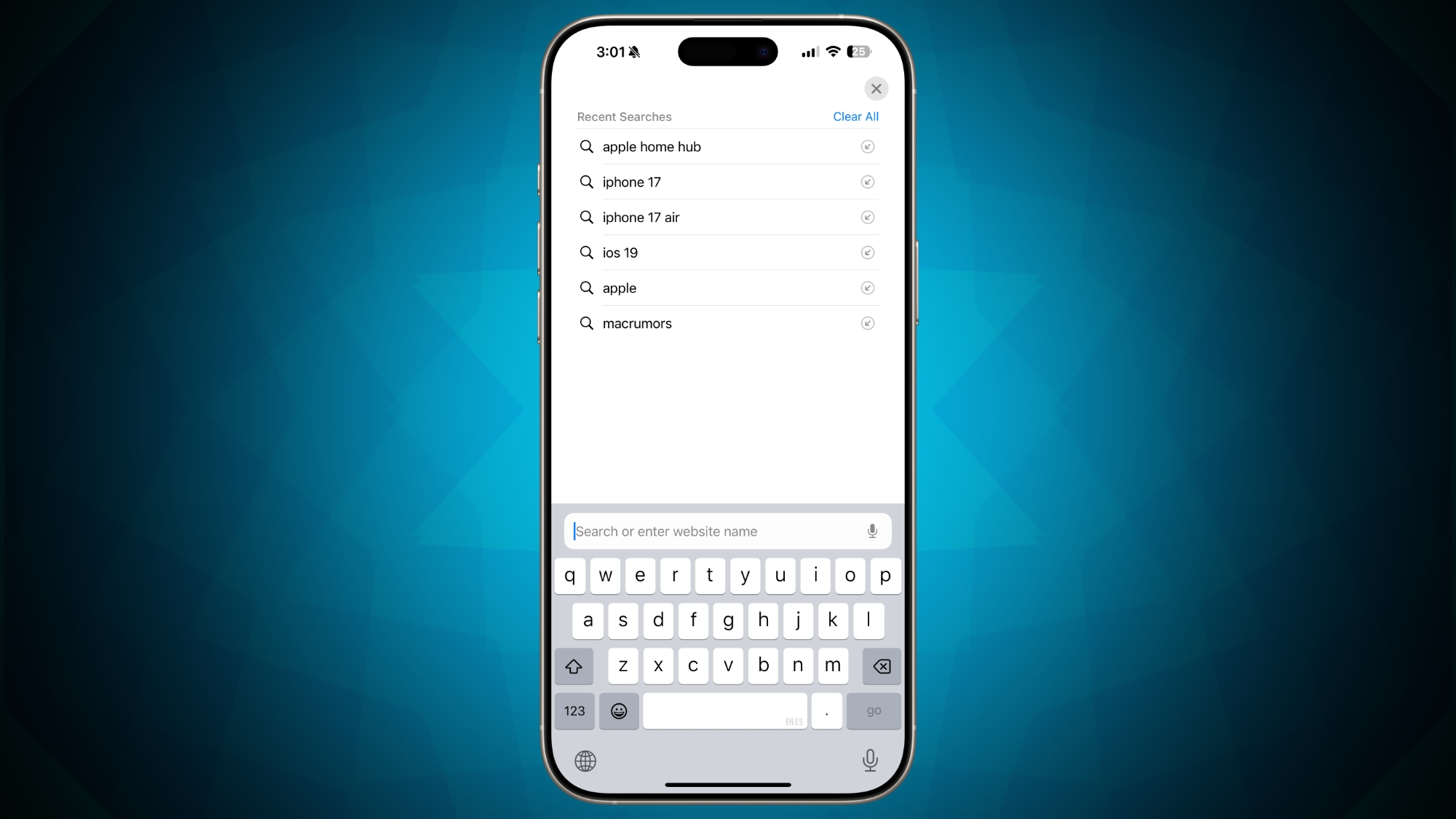


In iOS 18.3.1, opening up a new tab and then tapping into search does not show your history, and the view remains on the personalized Safari home page. iOS 18.3.1 has no clear view of prior searches at all, except that a recent search will show up in your suggested results if you search for the same thing again.

As noted by 9to5Mac, having Safari search so visible may not always be desirable if you’re ever in a situation where you hand your iPhone or iPad over to someone else to let them use Safari or another app.

Of course, if you don’t ever let anyone use your devices, having recent search available at a tap has the potential to be useful if you’re often using the same search terms multiple times. Apple also offers a Private browsing mode where searches are not saved.

There is no setting in iOS 18.4 to disable the recent search view, but Apple may opt to tweak the feature before the beta sees a public launch. Users can also opt to clear their search history at any time with the “Clear All” option.

Tag: Safari

This article, "iOS 18.4 Shows Your Search History in New Safari Tabs" first appeared on MacRumors.com

Discuss this article in our forums


You may also be interested in this

Latest iOS 18.4 Beta Lets…

iOS 18.4 includes a new Safari feature that puts your searches front and center, showing your recent search history whenever you open up a new Safari tab and tap into

All about Apple’s ‘Rapid …

Apple’s ‘Rapid Security Responses’ for iOS, iPadOS, and macOS deliver important security improvements between software updates. Rapid Security Responses are a new type of software release for iPhone, iPad, and

Apple Releases Safari Tec…

Apple today released a new update for Safari Technology Preview, the experimental browser Apple first introduced in March 2016. Apple designed the ‌Safari Technology Preview‌ to test features that may

iOS 17: Everything you ne…

Macworld Each year Apple releases a major update for iOS, the operating system on your iPhone. The current version, released last year, is iOS 16, and it doesn’t take a

macOS Sonoma Tidbits: New…

The first macOS Sonoma beta was released to developers and early adopters this week, and changes in the newest version of Apple's macOS operating system are still being unearthed. Below

WWDC 2023 Recap: Everythi…

Apple today held the WWDC 2023 keynote event that saw the introduction of the Apple Vision Pro headset, the 15-inch MacBook Air, new versions of the Mac Pro and Mac

Apple Reality Pro headset…

Macworld It’s looking more and more like Apple’s next big thing won’t be something that fits in your pocket or a bag. Rather it could be another wearable device–specifically an

Apple Offers Safari Desig…

Apple introduced a new, compact design for Safari in iOS 26 that serves as the default layout, but there are two other design options available if you don't like it.
X

A whimsical homage to the days in black and white, celebrating the magic of Mac OS. Dress up your blog with retro, chunky-grade pixellated graphics to evoke some serious computer nostalgia. Supports a custom menu, custom header image, custom background, two footer widget areas, and a full-width page template. I updated Stuart Brown's 2011 masterpiece to meet the needs of the times, made it responsive , got dark mode, custom search widget and more.You can download it from tigaman.com, where you can also find more useful code snippets and plugins to get even more out of wordpress.
