
In Safari on iPhone, it's not unusual for the number of tabs you have open to quickly get out of hand. Here's how to temporarily clean things up without losing

In Safari on iPhone, it’s not unusual for the number of tabs you have open to quickly get out of hand. Here’s how to temporarily clean things up without losing your tabs.



If you have no use for all your open tabs, you can simply select one, then press and hold on the tabs button in the bottom-right corner of the screen. This will bring up an option to “Close All [x] Tabs,” X being the number open.

Using the close all tabs option is one solution for restoring order to your browser session, but that’s no good if you’re not finished looking at the open tabs, especially if you’re busy researching a project or a vacation, let’s say.

You could always bookmark the open web pages for later reference. But you don’t have to bookmark each tab one by one – that could take a while depending on how many are open.

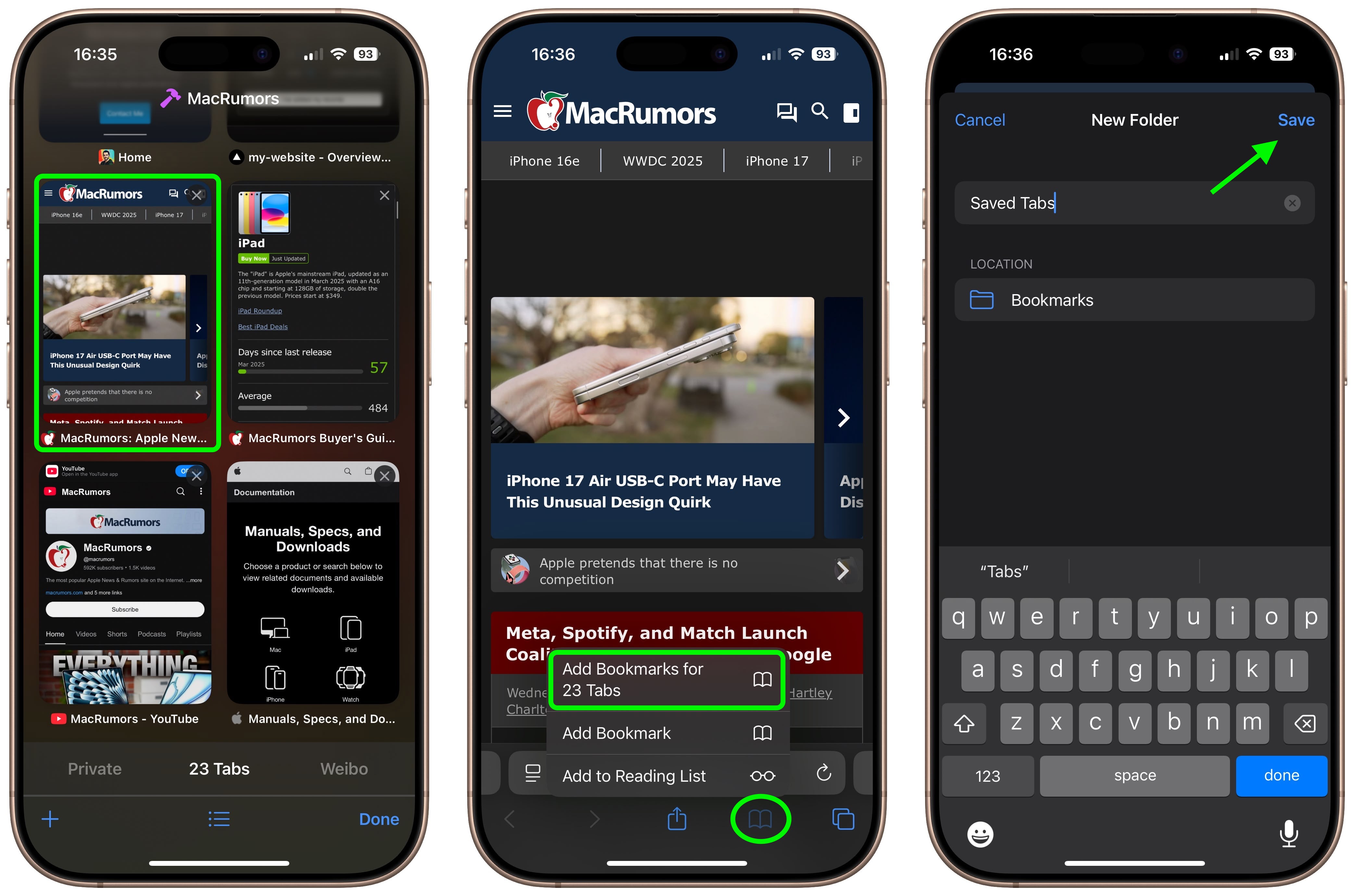
Fortunately, Safari lets you bookmark multiple tabs in a just couple of taps and save them all in a new or existing bookmark folder. Here’s how it works.

Select one of your open tabs, and in the main browsing window, long press the Bookmark icon (it looks like an open book).
safari

Once you’ve tapped this option, you’ll be asked to save the tabs in a new bookmarks folder. You can also choose the location where you want the new folder to live.

To access your bookmarks in Safari at any time, simply tap the Bookmarks icon in the main browsing interface to reveal all of your saved favorites and folders.

Tag: Safari

This article, "Bookmark Multiple Tabs in Safari on iPhone" first appeared on MacRumors.com

Discuss this article in our forums


You may also be interested in this

Keep your Private Browsin…

Don't suffer from an embarrassing browser faux pas. iOS on Safari offers a foolproof way to avoid reopening a Private Browsing mode session. (via Cult of Mac - Apple news,

Apple patches three explo…

Macworld On Thursday, Apple released a slew of updates that bring a few new features to the iPhone and Mac. But much more importantly, the updates include three critical zero-day

App Store Review Guidelin…

Apple has refined its App Store Review Guidelines and other developer-related documents, with changes taking aim against inappropriate advertising, apps that impersonate others, and Safari extensions.In an email to developers

Google paid Apple $18 bil…

The New York Times on Thursday reports that Alphabet-subsidiary Google paid Apple “around $18 billion” to be Safari’s default search engine in 2021. Nico Grant for The New York Times:

Adobe Creative Cloud pric…

Macworld Photoshop, Illustrator, InDesign, Premiere Pro, and Acrobat are well known apps used by creative professionals. There was once a time when all these apps, known collectively as Adobe Creative

Apple explores acquiring …

Apple executives have internally considered acquiring Perplexity AI to offer an AI-powered search engine in Safari on its devices. (via Cult of Mac - Your source for the latest Apple

Safari 18 Features: Highl…

In macOS Sequoia, Apple has some additional features in Safari 18 that are likely to be welcomed by Mac users. Here's a quick rundown of what's new. Safari's headline feature

Apple Vision Pro will com…

Apple’s upcoming Vision Pro headset will feature a new augmented reality (AR) version of the Visual Lookup feature found in iPhones and iPads. This feature, dubbed “Visual Search,” will allow
X

A whimsical homage to the days in black and white, celebrating the magic of Mac OS. Dress up your blog with retro, chunky-grade pixellated graphics to evoke some serious computer nostalgia. Supports a custom menu, custom header image, custom background, two footer widget areas, and a full-width page template. I updated Stuart Brown's 2011 masterpiece to meet the needs of the times, made it responsive , got dark mode, custom search widget and more.You can download it from tigaman.com, where you can also find more useful code snippets and plugins to get even more out of wordpress.
