
In macOS, Apple allows you to share Tab Groups in Safari with colleagues, friends, and family. Keep reading to learn how it's done. Introduced back in macOS Monterey, Tab Groups

In macOS, Apple allows you to share Tab Groups in Safari with colleagues, friends, and family. Keep reading to learn how it’s done.


Introduced back in macOS Monterey, Tab Groups are designed to make organizing and preserving open tabs more manageable in Safari without having to have those tabs active.

In a Tab Group, you can easily collect and save related tabs, which can be especially advantageous in scenarios where collaboration and coordination are key. For instance, teams working on research projects can compile relevant sources into a shared group, allowing everyone to stay aligned and contribute in real time.

Families planning a vacation can gather booking sites, maps, and activity pages in one place, making it easy to explore options together. Even casual browsing, like curating gift ideas or event plans with friends, can benefit from this feature, turning scattered links into a centralized, living workspace. Here’s how it’s done.

  1. To share a currently open Tab Group in Safari, reveal Safari’s sidebar by clicking the Show sidebar button.
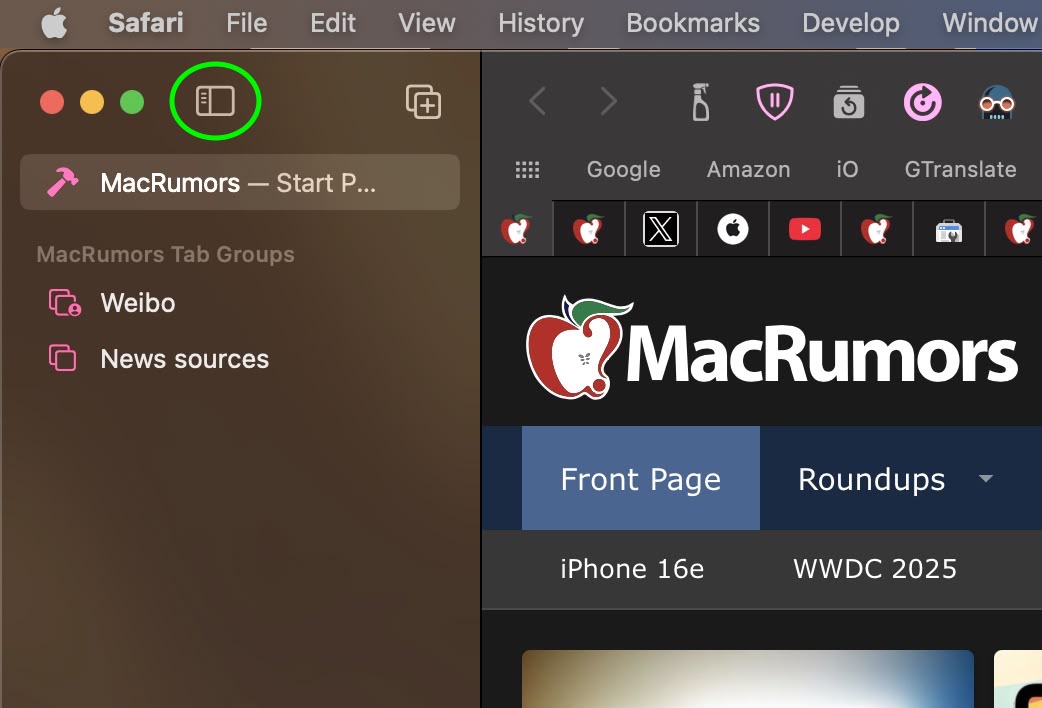
    safari

  2. Right-click the Tab Group or click the ellipsis button (three encircled dots) next to the Tab Group in the list and select Share Tab Group from the contextual menu.
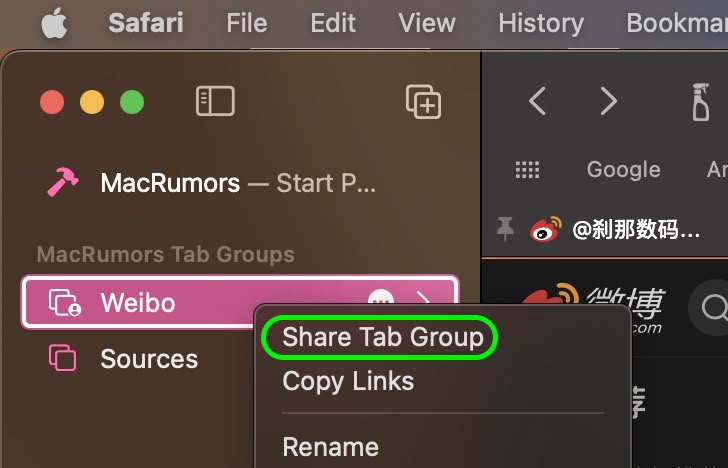
    safari

  3. Choose the desired sharing method from the Share Sheet menu that appears. Selecting Mail or Messages, for example, will open the associated app with a link to the Tab Group, ready to be sent.

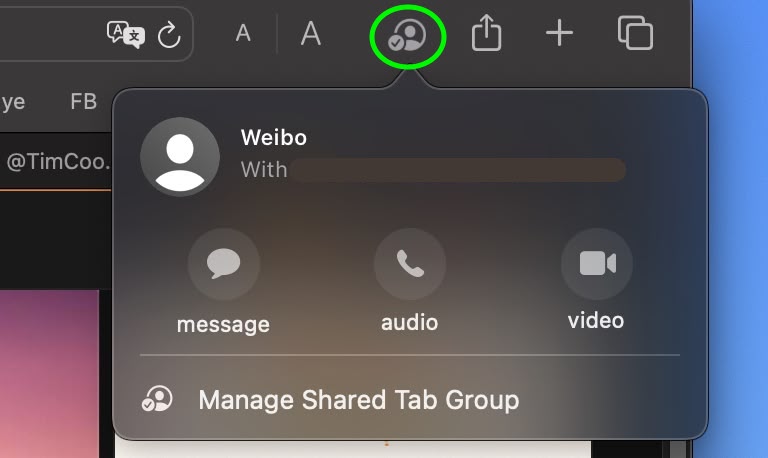
Once you’ve sent an invite, you can see who has access to the Tab Group by clicking the user profile icon that appears on the right-hand side of Safari’s address bar.
safari

From there, you can manage access to the Tab Group: you can revoke access, add new people, or call and message them to chat about the project. Note that everyone you collaborate with must be signed in to their Apple Account, have Safari turned on in iCloud settings, and have two-factor authentication turned on.

If you’re on iPhone and iPad, here’s how to share Tab Groups: Tap the open tabs button in the bottom-right corner of the screen (the two squares overlapping), then tap the Share icon (the square with the arrow pointing out). Tap Messages, then choose the person that you want to share the group with.

Tag: Safari

This article, "How to Share Safari Tab Groups in macOS" first appeared on MacRumors.com

Discuss this article in our forums


You may also be interested in this

Apple announces new Safar…

You can now share passwords and passkeys using iCloud Keychain through Safari. | Image: Apple Apple’s latest version of Safari was announced at WWDC as part of the newly announced

WWDC 2023: Everything you…

Macworld It seems like we’ve been waiting forever, but the first Apple keynote of 2023 is finally here—and it’s a big one. We’re expecting a ton of announcements at WWDC

iOS 18.4: Stop Your Recen…

Apple in iOS 18.4 has introduced a potentially privacy-compromising change to Safari that puts your search history on full display when opening new tabs. Previously in iOS, opening a new

How to fix Wi-Fi on Mac

Macworld Welcome to our Mac Wi-Fi troubleshooting guide, which offers fixes for situations where Wi-Fi isn’t working, your Mac refuses to connect to the internet, you MacBook won’t connect to

Apple previews macOS Sono…

macOS Sonoma makes the Mac experience better than ever — from more ways to personalize with widgets, to big updates to Safari and video conferencing, along with exciting new game

Apple’s upcoming Personal…

Macworld With WWDC just weeks away, Apple on Tuesday offered a preview of a wide range of new accessibility software features for the iPhone, iPad, and Mac. The features, intended

Japan looks to force Appl…

The Japanese government is looking to force Apple to allow third-party app stores for iPhone and, presumably, iPad, Apple Watch, Apple TV, and even Apple Vision when it hits the

Apple Argued Safari Is Th…

Apple recently claimed that Safari is three different browsers in effort to avoid regulation in the European Union (via The Register). The claim came as part of a response to
X

A whimsical homage to the days in black and white, celebrating the magic of Mac OS. Dress up your blog with retro, chunky-grade pixellated graphics to evoke some serious computer nostalgia. Supports a custom menu, custom header image, custom background, two footer widget areas, and a full-width page template. I updated Stuart Brown's 2011 masterpiece to meet the needs of the times, made it responsive , got dark mode, custom search widget and more.You can download it from tigaman.com, where you can also find more useful code snippets and plugins to get even more out of wordpress.
