
WhatsApp has rolled out a new feature on iPhone that lets you set reminder alerts for specific messages that you want to come back to later. Available in version 25.25.74

WhatsApp has rolled out a new feature on iPhone that lets you set reminder alerts for specific messages that you want to come back to later.



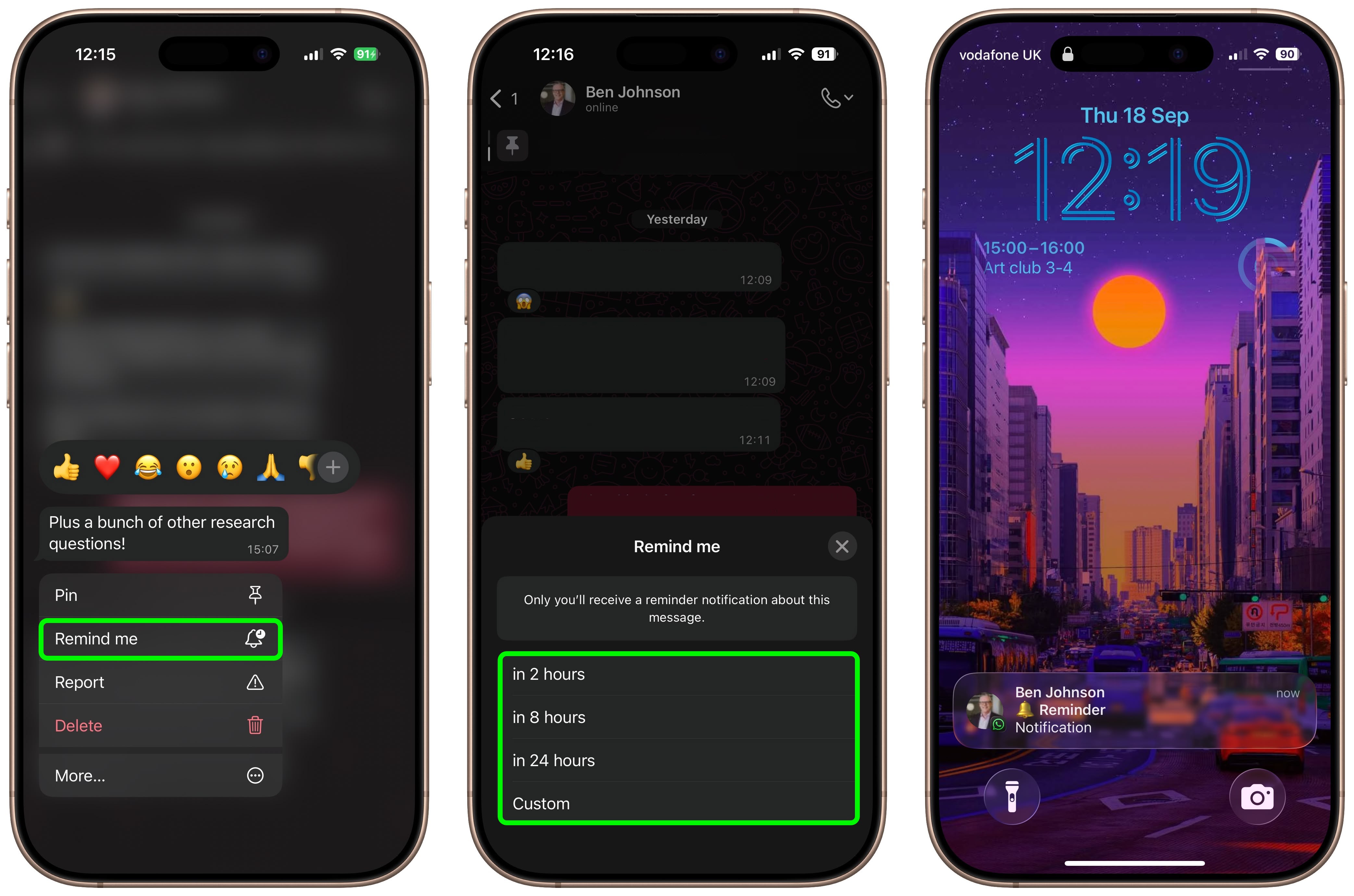
Available in version 25.25.74 of WhatsApp, the feature allows you to long press on any message in a conversation thread and select a new “Remind me” option in the popup menu. You can then choose between 2 hours, 8 hours, and 24 hours, or set a custom duration after which you will be alerted about it.

The new feature is useful for keeping track of important details that might otherwise get lost in busy chats. It’s also a simple way to make sure you don’t forget to reply to a message at a later time. Here’s how to set your first message reminder in WhatsApp:

How to Set a Message Reminder in WhatsApp

  1. Open a WhatsApp conversation thread and long press on a message bubble that you want to be reminded about later.
  2. Tap More… in the popup menu.
  3. Select Remind Me.
  4. Select in 2 hours, in 8 hours, in 24 hours, or choose Custom to set a more specific reminder time and date.
whatsapp

A bell symbol appears in the corner of the message bubble to indicate a reminder has been set. When the reminder alert comes through as a notification, depending on your message preview settings you may see the message content, the conversation in which it’s located, and a preview of any accompanying media.

The ability to schedule a reminder about a message should be a lot more convenient and foolproof than, say, starring a message or taking a screenshot of it and hoping you’ll remember to come back to it.

How to Cancel a WhatsApp Message Reminder

If you want to cancel a reminder that you’ve set, simply long press a message showing the bell symbol, tap More… then choose Cancel Reminder.

This article, "WhatsApp: How to Set a Message Reminder" first appeared on MacRumors.com

Discuss this article in our forums


You may also be interested in this

WhatsApp Rolls Out Custom…

WhatsApp has announced the introduction of chat themes, giving users the freedom to personalize their conversations using custom colors for both chat bubbles and backgrounds. The encrypted messaging platform is

WhatsApp may let you tran…

WhatsApp could soon allow you to transfer your chat history from one iPhone to another without using iCloud. (via Cult of Mac - Tech and culture through an Apple lens)

Seven big tech companies …

Illustration: Alex Castro / The Verge An important deadline just passed for the biggest tech platform companies in the world to notify the European Union (EU) that they are gatekeepers

WhatsApp Ads Debut in Upd…

WhatsApp this week introduced advertising to its messaging platform, but your encrypted conversation threads in the Meta-owned app are off limits for marketers – at least for now. WhatsApp announced

WhatsApp to Add Support f…

WhatsApp this week announced that it is adding passkey-encrypted chat backups, allowing users protect their stored messages using Touch ID or Face ID instead of a 64-digit key. The feature

WhatsApp finally lets you…

WhatsApp has rolled out iMessage-like ability to edit sent messages up to 15 minutes after they are sent. (via Cult of Mac - Tech and culture through an Apple lens)

Latest WhatsApp Beta Feat…

WhatsApp for iPad finally appears to be nearing a release. In the latest version of WhatsApp Beta for TestFlight, Meta has introduced an option to use WhatsApp on an iPad

WhatsApp Will Soon Let Us…

WhatsApp is testing a new feature that will allow users to link their social media accounts to their WhatsApp profile, according to findings in the latest iOS beta version of
X

A whimsical homage to the days in black and white, celebrating the magic of Mac OS. Dress up your blog with retro, chunky-grade pixellated graphics to evoke some serious computer nostalgia. Supports a custom menu, custom header image, custom background, two footer widget areas, and a full-width page template. I updated Stuart Brown's 2011 masterpiece to meet the needs of the times, made it responsive , got dark mode, custom search widget and more.You can download it from tigaman.com, where you can also find more useful code snippets and plugins to get even more out of wordpress.
