Prior to the launch of the latest Apple TV 4K, there were rumors that Apple planned to build Find My functionality into the Siri Remote to make it easier to

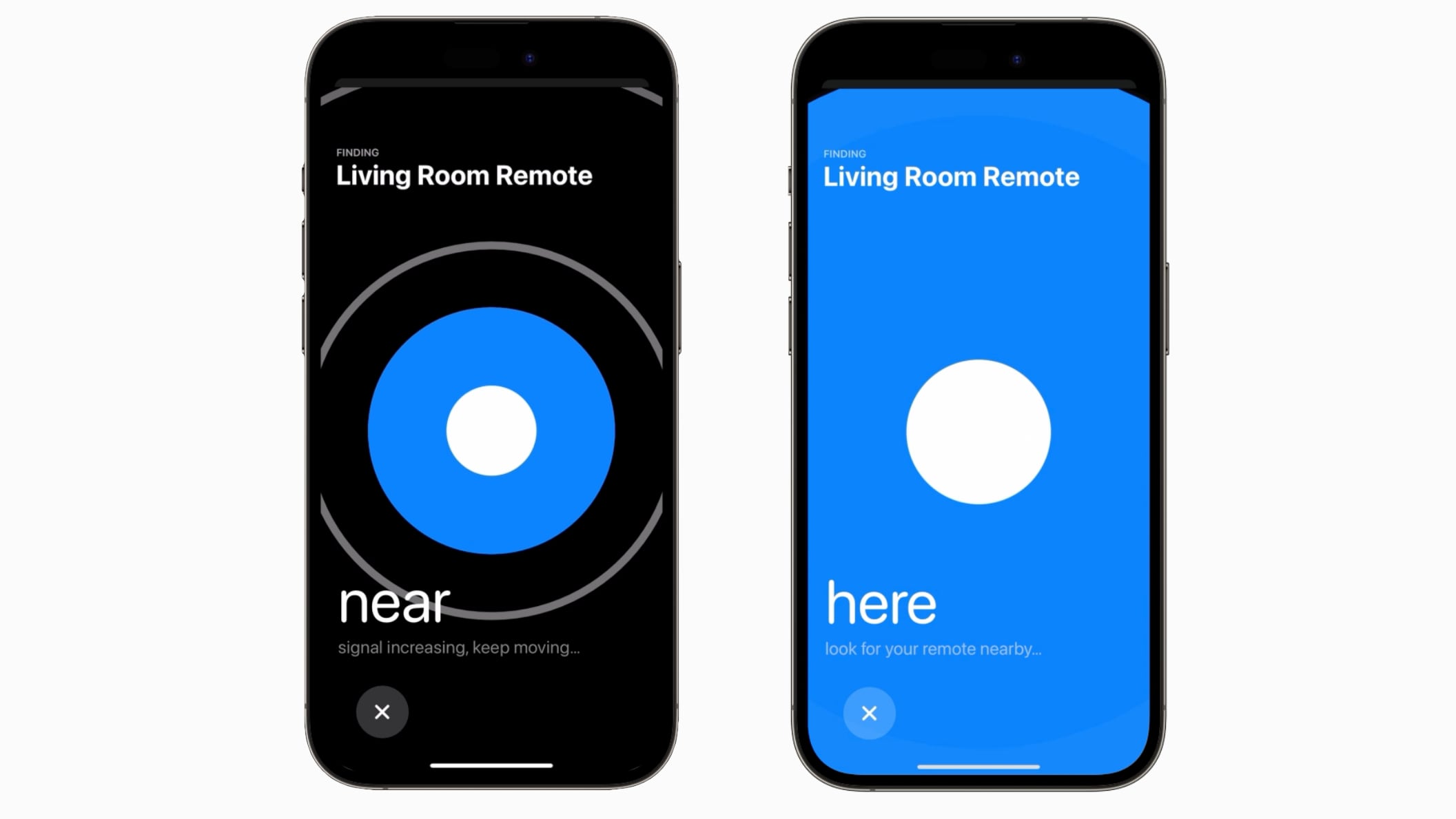
Prior to the launch of the latest Apple TV 4K, there were rumors that Apple planned to build Find My functionality into the Siri Remote to make it easier to find. That never happened, but Apple is introducing a similar location function for the ‌Siri‌ Remote in tvOS 17.


If the ‌Siri‌ Remote becomes lost, tvOS 17 users can open up the ‌Apple TV‌ remote on the Control Center on a linked iPhone to locate their ‌Siri‌ Remote. There is a Find My-like interface that will guide them toward the remote, with the size of the onscreen circle growing to guide movement.

The feature for locating a ‌Siri‌ Remote works with the second-generation or later version of the device, and tvOS 17 is required as well.

The Remote location feature is likely possible due to deeper integration between the ‌iPhone‌ and iPad and the ‌Apple TV‌. Apple has also introduced a FaceTime app for the ‌Apple TV‌ that uses a connected ‌iPhone‌ or ‌iPad‌ as the camera source.

Other new tvOS 17 features include updated screen savers that use your photos, an option to immediately switch to your profile when you use the ‌Apple TV‌ with your ‌iPhone‌ remote, and a revamped Control Center that makes it easier for you to access key settings and information.

Related Roundup: Apple TV
Buyer’s Guide: Apple TV (Buy Now)

This article, "tvOS 17 Lets You Use Your iPhone to Find a Lost Siri Remote" first appeared on MacRumors.com

Discuss this article in our forums


You may also be interested in this

Flash Sale: Get a lifetim…

Macworld Websites provide an easy means of connecting with people. Unfortunately, starting one up these days is kind of pricey given the cost of hosting services. Wish you could find

Apple Watch could detect …

Researchers have shown how smartwatches like Apple Watch can provide data that allows AI to detect Parkinson’s disease as much as seven years before symptoms show. Apple Watch Ultra EuroNews:

Use Your iPhone as a Micr…

If you have macOS 13 or later installed on your Mac, you can use a nearby iPhone as your computer's microphone input. Keep reading to learn how it works. When

Apple releases third Deve…

Apple has started rolling out the third developer beta of macOS 14 Sonoma with important bug fixes, according… The post Apple releases third Developer Beta of macOS Sonoma appeared first

OpenAI launches free Chat…

OpenAI on Thursday launched the official ChatGPT app for iOS 16.1 and later. The free app promises “OpenAI’s latest advancements at your fingertips.” ChatGPT is an artificial intelligence (AI) chatbot

How to reset your iPhone …

How do you reset an iPhone if you’re trading it in, selling it or passing it down to another family member? There’s a right way and a wrong way. If

Emergency SOS via Satelli…

A dramatic Emergency SOS via Satellite rescue saved four hikers trapped on a glacier near raging wildfires in Canada. (via Cult of Mac - Apple news, rumors, reviews and how-tos)

Commuter app ETA arrives …

ETA is an iPhone and Apple Watch app dedicated to prominently displaying travel times and traffic conditions. The latest version of ETA puts that information on the screen in your
X

A whimsical homage to the days in black and white, celebrating the magic of Mac OS. Dress up your blog with retro, chunky-grade pixellated graphics to evoke some serious computer nostalgia. Supports a custom menu, custom header image, custom background, two footer widget areas, and a full-width page template. I updated Stuart Brown's 2011 masterpiece to meet the needs of the times, made it responsive , got dark mode, custom search widget and more.You can download it from tigaman.com, where you can also find more useful code snippets and plugins to get even more out of wordpress.